


- Home
- Acrobat
- Discussions
- Re: 'no colour' option not available when in prope...
- Re: 'no colour' option not available when in prope...

Copy link to clipboard
Copied
I have been preparing forms and creating text boxes, check boxes etc for some time now.
Recently, I am unsure if was a recent update or because I have updated to highSierra on my mac, there is no longer a 'no colour' option available when trying to make these boxes transparent.
I have had to move my file to a PC and do it on a previous version of Acrobat Pro.
I have deleted my plist files to see if that worked (thanks Adobe support) but still no love.
Yes I have also turned my computer on and off again.
I am also running, InDesign, Illustrator and Muse on my mac.
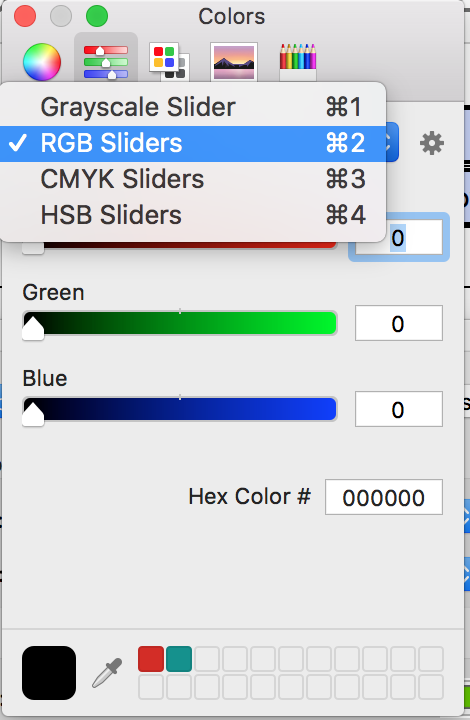
Anyone else come across this?





Copy link to clipboard
Copied
For everyone still struggling with this issue, I've developed a simple utility that allows you to set a field's fill/border color as transparent, even when this option is not available in the color selection dialog in Acrobat. It can be downloaded for FREE here: Custom-made Adobe Scripts: Acrobat -- Set Field As Transparent (FREE)
A more advanced version of this tool, which allows multiple fields selection as well as editing many other properties, can be found here: Custom-made Adobe Scripts: Acrobat -- Mass Edit Fields Properties
 25
Replies
25
25
Replies
25


Copy link to clipboard
Copied
They are hundreds of people on forums, Twitter, Facebook, etc. that warns users against hasty upgrades.
They are dozens of people on forums, Twitter, Facebook, etc. that warns InDesign users against High Sierra upgrade.
It looks like we should warns Acrobat users too…

Acrobate du PDF, InDesigner et Photoshopographe
Copy link to clipboard
Copied
Checked compatibility before upgrading....
Anyone else experiencing this issue?

Copy link to clipboard
Copied
Under Properties > Appearance I use none (red slash) for Border and Fill Color. I'm on a Mac. Would this work for you?
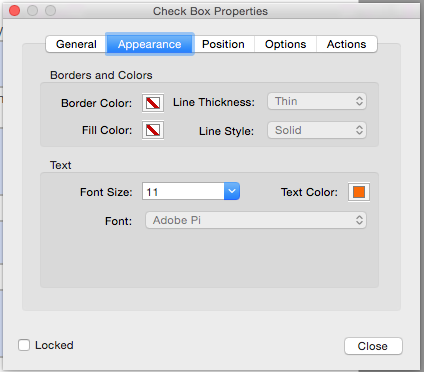
Copy link to clipboard
Copied
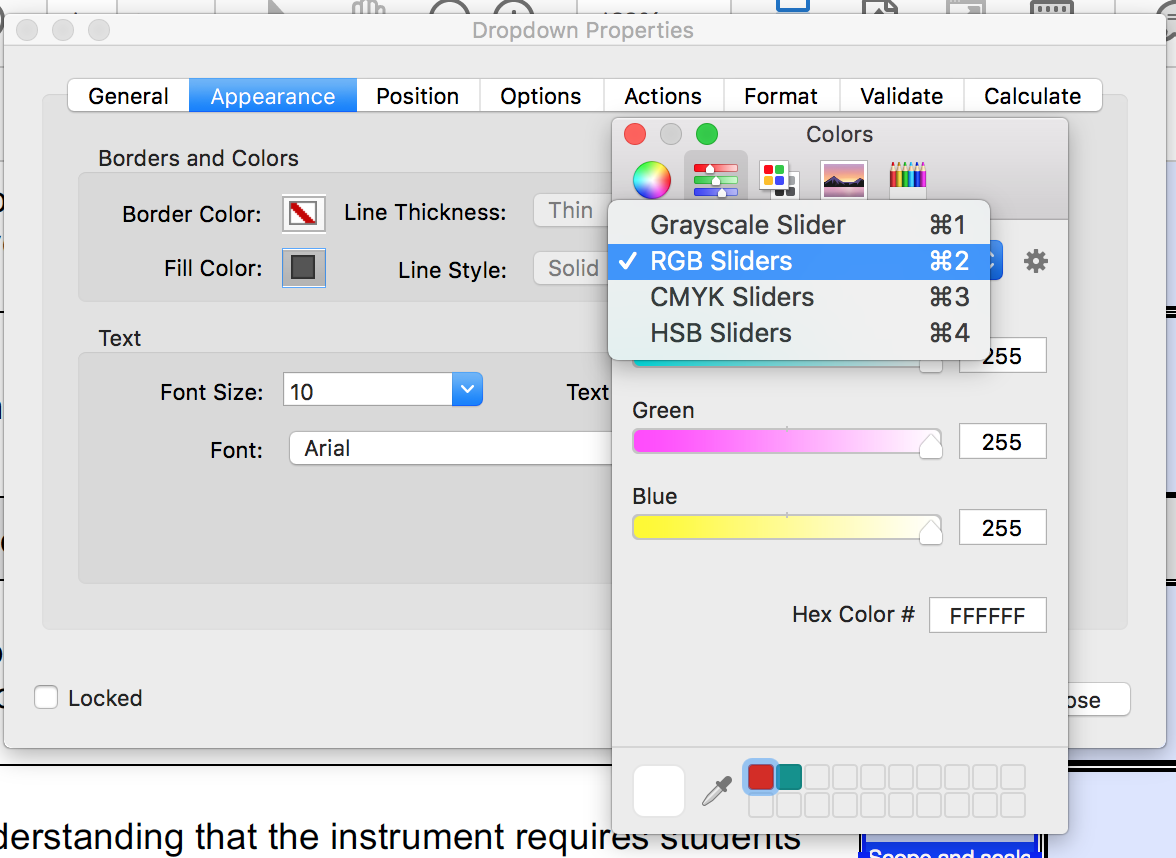
As you can see after going into properties and appearance, there is no option for no colour available anymore.
Help!
Copy link to clipboard
Copied
It can always be done using a script...

Copy link to clipboard
Copied
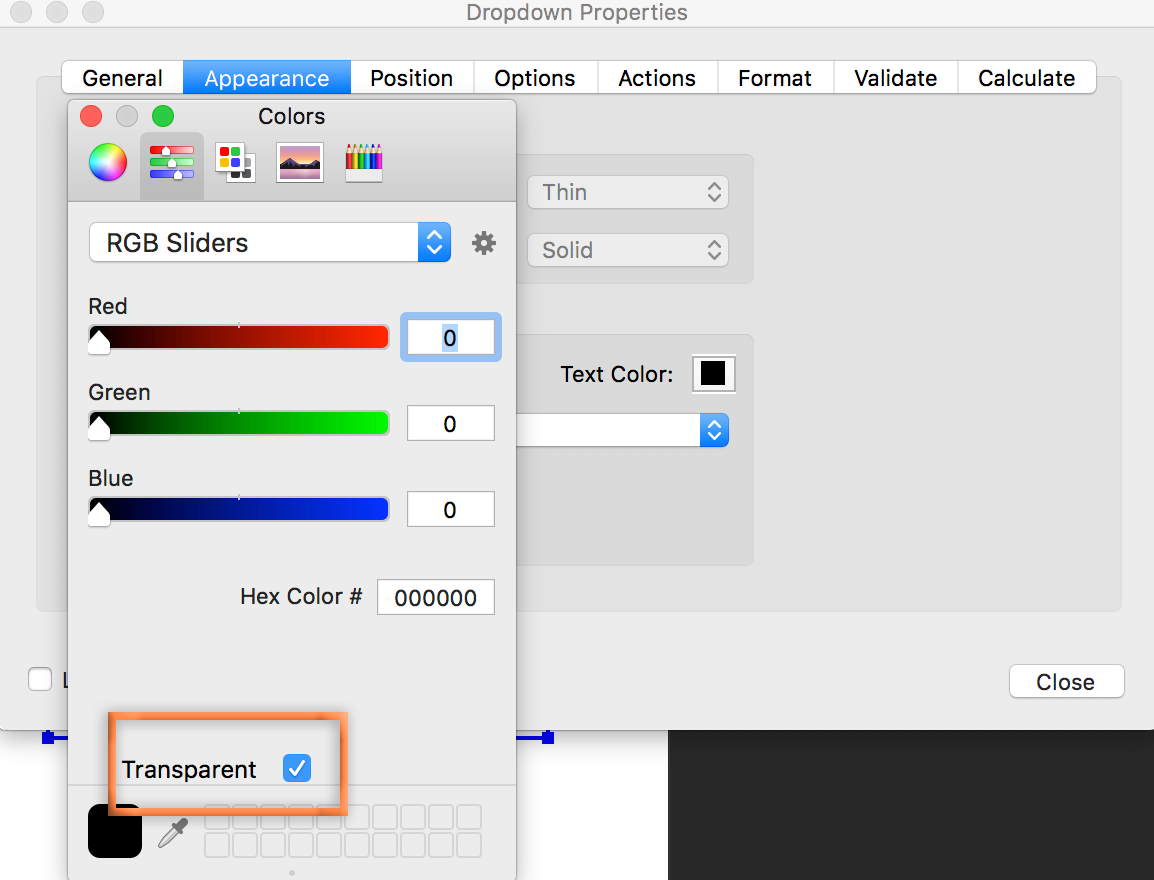
Well, you aren't losing your mind...
Mac OS 10.12.6 (Sierra)

 '
'
So I'd say your options are to roll back to Sierra or report it as a bug and wait.
Acrobat for Windows and Mac (727 ideas) – Share your feedback on Acrobat DC
Copy link to clipboard
Copied
Thank you for confirming that I am not going mad!
Now I just have to find out how to report a bug.
Yay! I'm not crazy.
Copy link to clipboard
Copied
Its definitely A high Sierra thing as I am running exactly the same version as you are.
Copy link to clipboard
Copied
I gave you the bug link above but here it is again:
Acrobat for Windows and Mac (727 ideas) – Share your feedback on Acrobat DC
And so glad you have a sense of humor. I was worried that my comment would upset you, as you are already concerned about the missing command. 
Copy link to clipboard
Copied
Hi Barb,
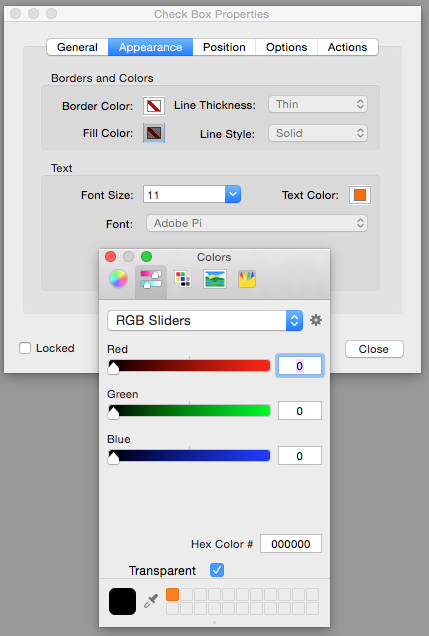
I have the same as you, same Acrobat version but have NOT upgraded to Sierra.

Copy link to clipboard
Copied
And the checkbox for Transparency is there at the bottom of your screen shot, as expected.
Now if you are wondering why you aren't getting a color, it's because it is checked. You have to uncheck it to assign a color.
Copy link to clipboard
Copied
Yes, I want it transparent. I was only showing this so one could see the Transparent option is still there with the most recent Acrobat version but without the upgrade to Sierra. I'm still on Yosemite and still have the Transparent check box.
Copy link to clipboard
Copied
Ah, sorry. according to the original poster Wood Darrin, It appears to be gone after the High Sierra upgrade. I can't confirm that because I'm waiting for the various issues to be resolved before I make the leap.
There are two similarly-named OS upgrades: Sierra and High Sierra. If you go back and re-read the thread, it appears as though the check box is gone with High Sierra. It's still there on Sierra. We are all three using the same version of Acrobat Pro DC.
~Barb
Copy link to clipboard
Copied
All good!
I just was wondering what had happened,
Bug reported. Now we wait
Copy link to clipboard
Copied
Remember, we had exactly the same bug when Acrobat X for MacOS came out.
But today it seems that it is an Apple bug and not an Adobe bug.

Acrobate du PDF, InDesigner et Photoshopographe
Copy link to clipboard
Copied
I still have transparency options on other non Adobe programs, just not Acrobat.
Copy link to clipboard
Copied
BTW, High Sierra got its first upgrade today. You can get it from the App Store. Let us know if it makes a difference.
~Barb
Copy link to clipboard
Copied
Ran the update.
Still no love.
Copy link to clipboard
Copied
Copy link to clipboard
Copied
Just letting you know, still no love after the latest High Sierra (10.13.1) update as well.....
They don't want me to be transparent!
Copy link to clipboard
Copied
For everyone still struggling with this issue, I've developed a simple utility that allows you to set a field's fill/border color as transparent, even when this option is not available in the color selection dialog in Acrobat. It can be downloaded for FREE here: Custom-made Adobe Scripts: Acrobat -- Set Field As Transparent (FREE)
A more advanced version of this tool, which allows multiple fields selection as well as editing many other properties, can be found here: Custom-made Adobe Scripts: Acrobat -- Mass Edit Fields Properties


Copy link to clipboard
Copied
Adobe is aware of the issue and working on it.
You may refer to Acrobat and macOS 10.13 High Sierra compatibility

Copy link to clipboard
Copied
As many have discovered, this bug manifests in many parts of Acrobat. Someone has, very helpfully, posted a fix for all of them at the topic How to draw shape in 'Comments' with no fill
Seems the Properties Toolbar (buried in true Acrobat form) still has the abilities that have been lost in the more direct tools.

Copy link to clipboard
Copied
Hi all
Came across this problem recently but managed to copy a transparent button from an older PDF which keeps the transparency in the DC. This PDF https://drive.google.com/open?id=185__xi4BiZmtJX_zmNmgNeZtoT27kRez has a transparent button, just copy and paste into your PDFs.
Hope this helps!

-
- 1
- 2

Get ready! An upgraded Adobe Community experience is coming in January.
Learn more
 AdChoices