


Participating Frequently
September 28, 2017
Answered

'no colour' option not available when in properties with check, text boxes etc. Mac

  • September 28, 2017
  • 9 replies
  • 13965 views

I have been preparing forms and creating text boxes, check boxes etc for some time now.

Recently, I am unsure if was a recent update or because I have updated to highSierra on my mac, there is no longer a 'no colour' option available when trying to make these boxes transparent.

I have had to move my file to a PC and do it on a previous version of Acrobat Pro.

I have deleted my plist files to see if that worked (thanks Adobe support) but still no love.

Yes I have also turned my computer on and off again.

I am also running, InDesign, Illustrator and Muse on my mac.
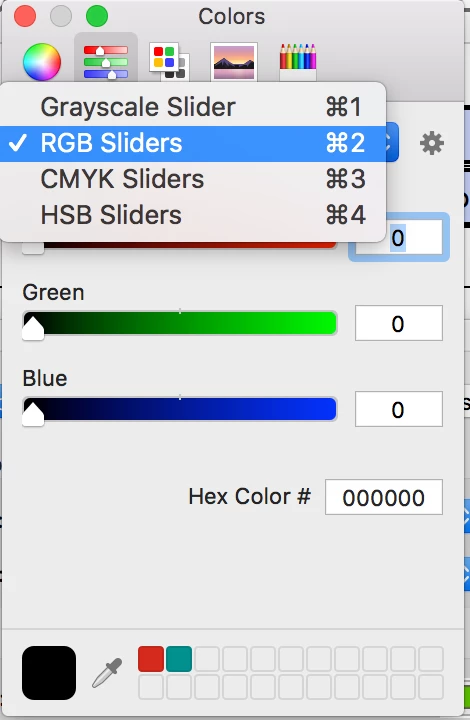
Anyone else come across this?

This topic has been closed for replies.
Correct answer try67

For everyone still struggling with this issue, I've developed a simple utility that allows you to set a field's fill/border color as transparent, even when this option is not available in the color selection dialog in Acrobat. It can be downloaded for FREE here: Custom-made Adobe Scripts: Acrobat -- Set Field As Transparent (FREE)

A more advanced version of this tool, which allows multiple fields selection as well as editing many other properties, can be found here: Custom-made Adobe Scripts: Acrobat -- Mass Edit Fields Properties

9 replies

Adobe Employee
October 30, 2018

The fix for this issue has been officially rolled out with latest Acrobat update

Please update.

More details here: 19.008.20071 Planned update, October 02, 2018 — Release Notes for Acrobat DC Products

Participating Frequently
April 1, 2018

As many have discovered, this bug manifests in many parts of Acrobat. Someone has, very helpfully, posted a fix for all of them at the topic How to draw shape in 'Comments' with no fill

Seems the Properties Toolbar (buried in true Acrobat form) still has the abilities that have been lost in the more direct tools.

Participant
May 31, 2018

Hi all

Came across this problem recently but managed to copy a transparent button from an older PDF which keeps the transparency in the DC. This PDF https://drive.google.com/open?id=185__xi4BiZmtJX_zmNmgNeZtoT27kRez has a transparent button, just copy and paste into your PDFs.

Hope this helps!

Adobe Employee
March 14, 2018

Adobe is aware of the issue and working on it.

You may refer to Acrobat and macOS 10.13 High Sierra compatibility

Participating Frequently
November 1, 2017

Just letting you know, still no love after the latest High Sierra (10.13.1) update as well.....

They don't want me to be transparent!

try67
Community Expert
try67Community ExpertCorrect answer
Community Expert
November 1, 2017

For everyone still struggling with this issue, I've developed a simple utility that allows you to set a field's fill/border color as transparent, even when this option is not available in the color selection dialog in Acrobat. It can be downloaded for FREE here: Custom-made Adobe Scripts: Acrobat -- Set Field As Transparent (FREE)

A more advanced version of this tool, which allows multiple fields selection as well as editing many other properties, can be found here: Custom-made Adobe Scripts: Acrobat -- Mass Edit Fields Properties

JR Boulay
Community Expert
Community Expert
October 5, 2017

Remember, we had exactly the same bug when Acrobat X for MacOS came out.
But today it seems that it is an Apple bug and not an Adobe bug.

Acrobate du PDF, InDesigner et Photoshopographe
Participating Frequently
October 6, 2017

I still have transparency options on other non Adobe programs, just not Acrobat.

Barb Binder
Community Expert
Community Expert
October 6, 2017

BTW, High Sierra got its first upgrade today. You can get it from the App Store. Let us know if it makes a difference.

~Barb

~Barb at Rocky Mountain Training
Participating Frequently
October 5, 2017

All good!

I just was wondering what had happened,

Bug reported. Now we wait

Participating Frequently
October 4, 2017

As you can see after going into properties and appearance, there is no option for no colour available anymore.

Help!

try67
Community Expert
Community Expert
October 4, 2017

It can always be done using a script...

Participating Frequently
October 4, 2017

Under Properties > Appearance I use none (red slash) for Border and Fill Color. I'm on a Mac. Would this work for you?

JR Boulay
Community Expert
Community Expert
September 28, 2017

They are hundreds of people on forums, Twitter, Facebook, etc. that warns users against hasty upgrades.

They are dozens of people on forums, Twitter, Facebook, etc. that warns InDesign users against High Sierra upgrade.

It looks like we should warns Acrobat users too…

Acrobate du PDF, InDesigner et Photoshopographe
Participating Frequently
September 28, 2017

Checked compatibility before upgrading....

Anyone else experiencing this issue?