


Participant
June 1, 2023
Question

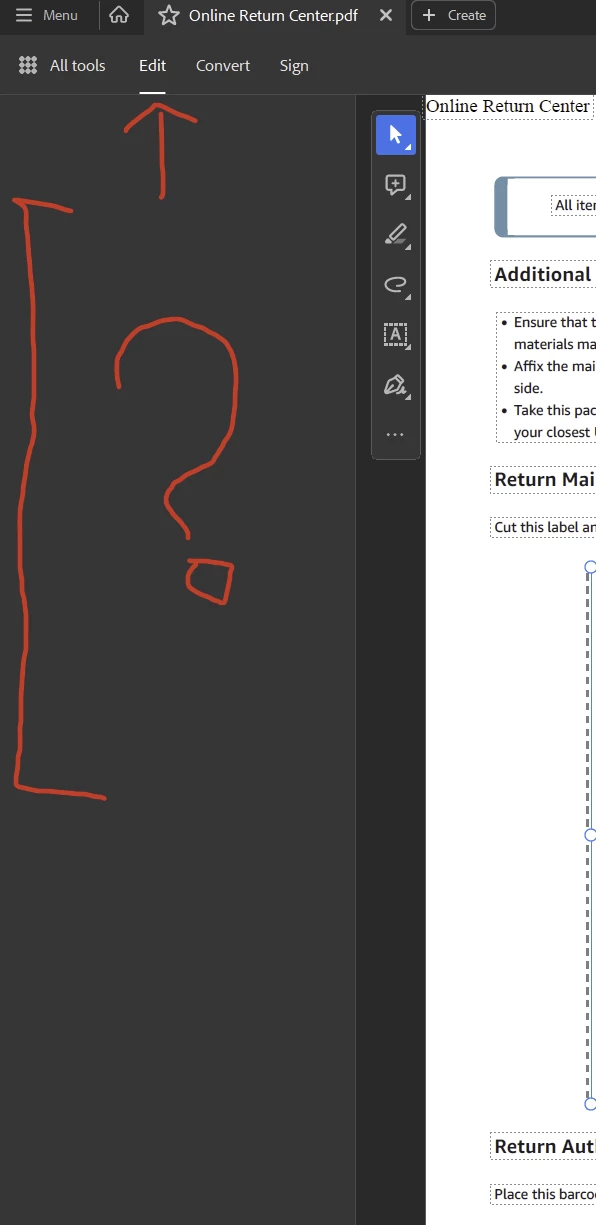
No edit options visible in tool bar.

  • June 1, 2023
  • 4 replies
  • 3018 views

Hello,

I am new to CC I have Acrobat installed with "Protected Mode" turned off (not sure if that matters).

When I open a PDF doc to take a snapshot or crop. I don't see any tools or options when I click "Edit"


Is there a reason for that?
 

This topic has been closed for replies.

4 replies

Meenakshi Negi
Community Manager
Community Manager
June 13, 2023

Hi D30226114ch06,


Thank you for reaching out, and sorry about the delay in response. 


Please confirm if the tools are not visible only for the Edit option. Could you please check other tools as well?

Also, try clicking on the blank space and check if you get any errors.

Share the Acrobat and OS version numbers.


Try reinstalling the application using the following steps:
- Remove the application and run the cleaner tool (https://www.adobe.com/devnet-docs/acrobatetk/tools/Labs/cleaner.html).
- Reboot the machine
- Install Adobe Acrobat Pro from the following page: https://helpx.adobe.com/acrobat/kb/acrobat-dc-downloads.html.

Check if that makes any changes.


Let us know how it goes.


Thanks,

Meenakshi

Participant
June 13, 2023

Hello Meenakshi,

The other tools such as covert and sign seem to be working.

There are no errors.

I have uninstalled and reinstalled 2 times, with no success, currently it is uninstalled as it did not work. I will have to reinstall it and give it a try.


Thanks!


Legend
June 13, 2023

Sigh. This is the "new UI" which is so user friendly it needs no help or pop-ups to explain it. All the old functions are removed, and the Edit tab isn't what it used to be. Use the hamburger menu for all menu options. That is, the one with three lines, top left corner.

Participant
June 13, 2023

Thanks Test, I will check it out once I reinstall it.

Participant
June 13, 2023

Anyone?

Participant
June 2, 2023

hi