
Known Participant
December 9, 2024
Question

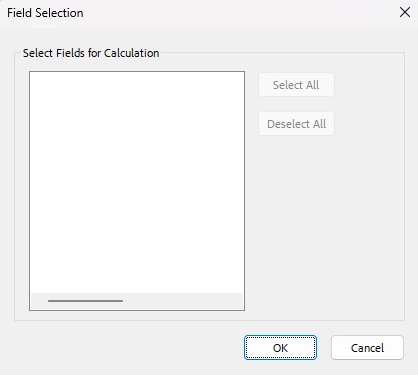
No fields appear in "field selection"

  • December 9, 2024
  • 2 replies
  • 1027 views

Thanks to the wonderful @try67 I have nearly wrestled a document into submission. However, I need to amend some summary fields and the fields to pick have all disappeared. Has Acrobat just collapsed under the weight of all the fields?!?! 


I am writing scripts which do work but it's a slower way of doing things, and I have written a lot of these summary fields so every time I need to amend one I need to write a new script. Any idea how I can sort this? Thank you.


2 replies

Thom Parker
Community Expert
Community Expert
December 9, 2024

My mistake, I didn't look close enough.  You want to select fields using one of the built-in calculations.  You must mean a Sumation.   However, the same comments apply. Your form has been corrupted somehow.  Posting the form so we can see it is the only way we will be able to help you. 


Thom Parker - Software Developer at PDFScriptingUse the Acrobat JavaScript Reference early and often
Known Participant
December 11, 2024

Thank you for your reply. I can't post the whole document as it's a confidential work document; however, the fact that there are also "ghost fields" on it suggests that it has been corrupted as well as the fields disappearing. As I need to use this as a template for future documents, what is the best way of saving it uncorrupted please? Do I need to copy and paste all the fields into a new document? I did look at creating a Template in PDF or 'spawning' pages as was recommended on a previous threads, but by the time I realised there was some corruption I'd done a huge amount of work on the document so couldn't start all over again. Thank you.

Thom Parker
Community Expert
Community Expert
December 11, 2024

Copying and pasting the fields to a new PDF might be a solution. This could force Acrobat to reset the internal form structure. However, with out more infomation on the underlying issue it is impossible to provide specific advice. 


Thom Parker - Software Developer at PDFScriptingUse the Acrobat JavaScript Reference early and often
Thom Parker
Community Expert
Community Expert
December 9, 2024

So it doesn't look like Acrobat is recognizing any field calculation scripts on the PDF. If you have placed calculation scripts on some fields then the empty calculation order dialog would be a good indication that the PDF has been corrupted. 


And Yes, there are many ways to create more efficient field scripting. For example, generalizing the scripts that perform similar calculations into a single script that is placed in a document level function. There are many other techniques. But we'd have to know something about the PDF form to make any suggestions. Can you post your form?


Thom Parker - Software Developer at PDFScriptingUse the Acrobat JavaScript Reference early and often