

Dario de Judicibus
Known Participant
March 27, 2020
Question

No PDF printout if an Adobe font is used in PowerPoint

  • March 27, 2020
  • 1 reply
  • 1828 views

I developed a PowerPoint presentation that uses an Adobe font, that is a font that is obtained from the Adobe account: Univers Condenses Light.
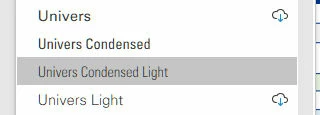
Everything works fine until I try to create a PDF file by using the Adobe PDF virtual printer (Distiller), that is,
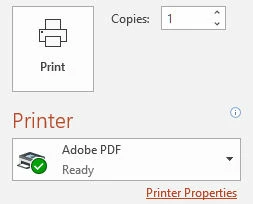
In fact, I get the following error:

%%[ ProductName: Distiller ]%%
Univers-LightCondensed not found, using Courier.
%%[ Error: invalidfont; OffendingCommand: xshow ]%%
Stack:
[83 83 84 83 46 150 42 105 42 42 38 52 42 83 83 52 73 44 52 83 73 83
52 73 84 0]
(  !
)
%%[ Flushing: rest of job (to end-of-file) will be ignored ]%%
%%[ Warning: PostScript error. No PDF file produced. ] %%

No PDF file is saved. However, if I use the native PowerPoint function Save as Adobe PDF, I get the expected PDF document, and it is much faster than using Distiller. 
Any idea why?

This topic has been closed for replies.

1 reply

Participating Frequently
March 27, 2020

Two ways to fix:


1.Change your PostScript Output configuration from the default “speed” to “portability” 
https://www.adobe.com/devnet-docs/acrobatetk/tools/Wizard/pdfprinter.html#postscript-output-option


2. Open Distiller. Go to Settings>Edit Adobe PDF settings>Uncheck optimize for fast web view>Ok

Dario de Judicibus
Known Participant
April 2, 2020

I did it but it does not work. I still get


%%[ ProductName: Distiller ]%%
Univers-LightCondensed not found, using Courier.
%%[ Error: invalidfont; OffendingCommand: show ]%%
Stack:
()
%%[ Flushing: rest of job (to end-of-file) will be ignored ]%%
%%[ Warning: PostScript error. No PDF file produced. ] %%


Furthermore in Distiller Settings the UNivers-... fonts are not listed. But they are Adobe Fonts that I regularly use in all my Office application since I have a Creative Cloud license!