Exit
  • Global community
    • Language:
      • Deutsch
      • English
      • Español
      • Français
      • Português
  • 日本語コミュニティ
  • 한국 커뮤니티
0

Number and Calculations Formats Missing

New Here ,
Jan 28, 2025 Jan 28, 2025

I cannot find any property setting for number and calculations settings. It's not included in any property formats that I can find. 


Appreciate any help on this.

TOPICS
How to , PDF forms
532
Translate
Report
Community guidelines
Be kind and respectful, give credit to the original source of content, and search for duplicates before posting. Learn more
community guidelines
1 ACCEPTED SOLUTION
Community Expert ,
Jan 28, 2025 Jan 28, 2025

Here's an article on setting field properties. 

https://www.pdfscripting.com/public/Editing-Fields-Properties.cfm


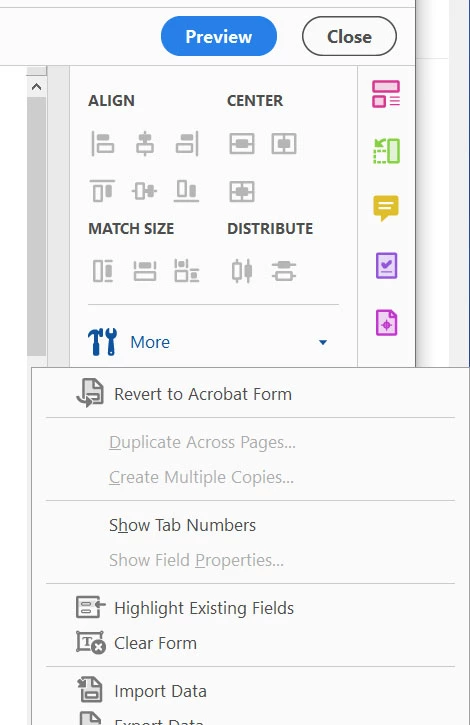
It's possible that the form is an Adobe Sign form, so you'd need to change it back to a regular PDF form.
Acro_Sign2Form.jpg


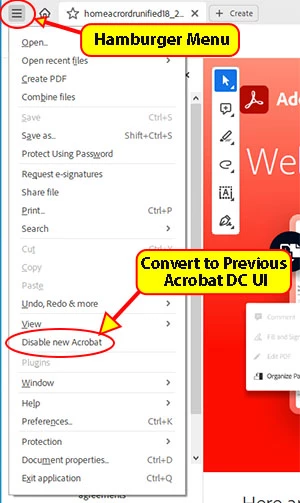
You also may need to change the Acrobat UI so you can find the Acrobat Options. 
Acrobat64_DisableNew.jpg


Thom Parker - Software Developer at PDFScripting
Use the Acrobat JavaScript Reference early and often

View solution in original post

Translate
Report
Community guidelines
Be kind and respectful, give credit to the original source of content, and search for duplicates before posting. Learn more
community guidelines
Community Expert ,
Jan 28, 2025 Jan 28, 2025
Translate
Report
Community guidelines
Be kind and respectful, give credit to the original source of content, and search for duplicates before posting. Learn more
community guidelines
New Here ,
Jan 28, 2025 Jan 28, 2025
LATEST

Hi Bernd.

I was able to revert back to the older UI.

Thank you.


Sigrid

Translate
Report
Community guidelines
Be kind and respectful, give credit to the original source of content, and search for duplicates before posting. Learn more
community guidelines
Community Expert ,
Jan 28, 2025 Jan 28, 2025

Here's an article on setting field properties. 

https://www.pdfscripting.com/public/Editing-Fields-Properties.cfm


It's possible that the form is an Adobe Sign form, so you'd need to change it back to a regular PDF form.

Acro_Sign2Form.jpg


You also may need to change the Acrobat UI so you can find the Acrobat Options. 

Acrobat64_DisableNew.jpg


Thom Parker - Software Developer at PDFScripting
Use the Acrobat JavaScript Reference early and often

Translate
Report
Community guidelines
Be kind and respectful, give credit to the original source of content, and search for duplicates before posting. Learn more
community guidelines
New Here ,
Jan 28, 2025 Jan 28, 2025

Hi Thom.


This worked! Thank you!


Sigrid

Translate
Report
Community guidelines
Be kind and respectful, give credit to the original source of content, and search for duplicates before posting. Learn more
community guidelines