
Participant
February 19, 2021
Question

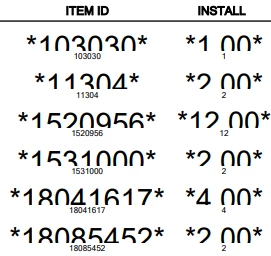
Numbers being cut off / overlapping
  • February 19, 2021
  • 1 reply
  • 249 views

Please see the attched image for the issue. I've tried updating but Adobe is saying I'm on the latest version. I tried uninstalling and reinstalling as well as running a repair. 

This PDF is being exported from a software and no one else but this user is having the issue. Which leads me to believe it is not the software but rather Adobe. 

This topic has been closed for replies.

1 reply

Luke Jennings3
Community Expert
Community Expert
February 19, 2021

I suspect the PDF has unembedded fonts, and the unfortunate user does not have the needed font installed on their computer. With the PDF open in Acrobat, go to File> Properties> Fonts, all of the listed fonts should say embedded, or embedded subset, if they don't, you may be able to adjust the export settings to embed the fonts or you can run an Acrobat preflight fixup to embed the fonts (from a computer that is displaying the fonts correctly). Tools> Print Production> Preflight> Fixups (blue wrench icon)> Embed missing fonts.