
New Participant
May 23, 2023
Answered

Numbers showing as symbols

  • May 23, 2023
  • 4 replies
  • 88706 views

Hi,

We recently ordered number of Acrobat Pro licenses for our team, but a few are having a problem when editing documents; whenever they try to change a letter or number with another number it shows as a symbol (doesn't happen with alphabetical inputs). The latest updates have been installed and noteably they are running on the 64bit version; my 32bit installation does not have this problem (each time i try to update to 64bit it says the "operation failed").


Is there a known issue with this for 64bit versions or is it something else (settings between us look the same). If it is 64bit related, is there a way of downgrading to 32bit to see if that changes anything?


Correct answer Abambo

Hi this still didn't work for me.  Although I have chosen Application Language: Same as operating system. Numbers are still being written in Arabic script


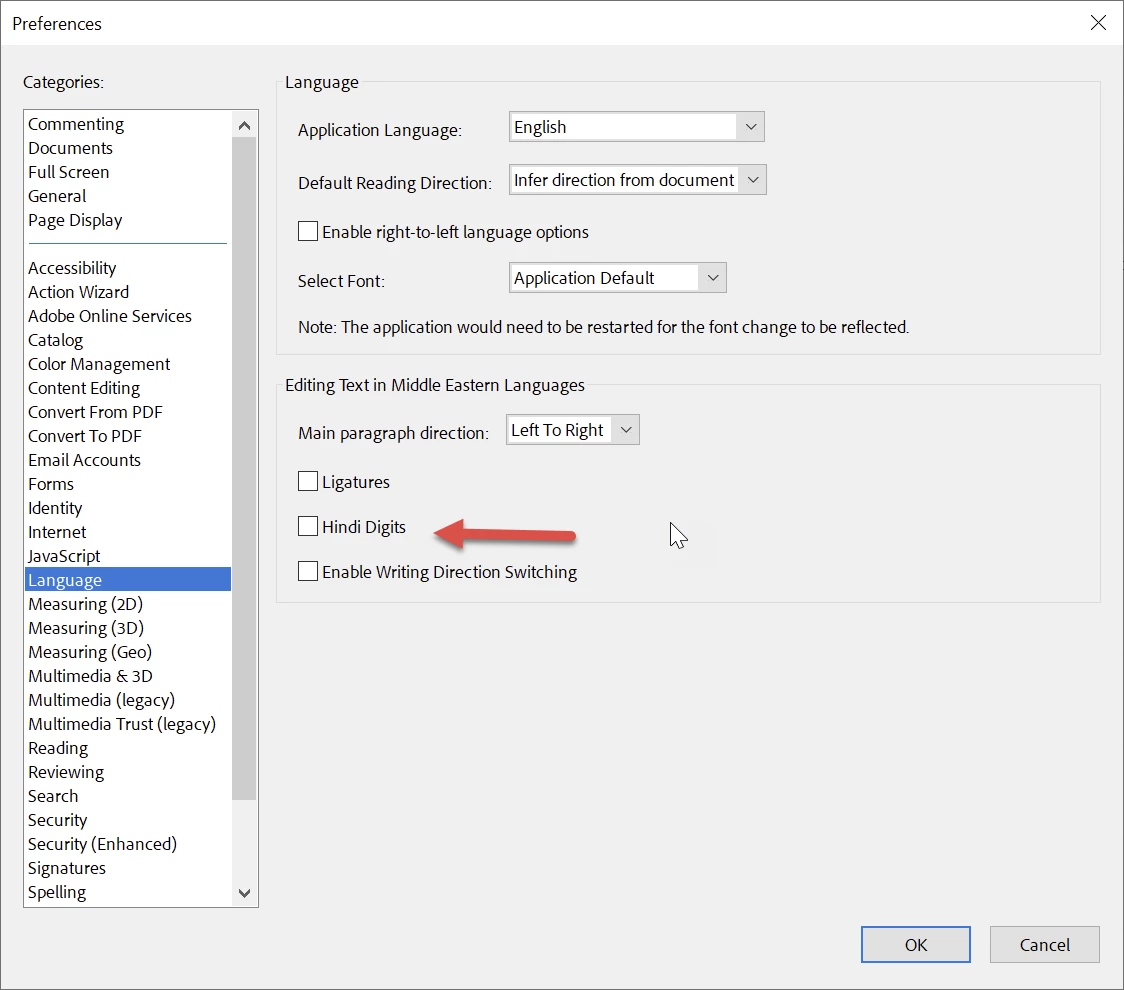
Check in the preferences, Language, the “Hindi Digits”.

That needs to be turned off, well, except if you want Hindi digits.

4 replies

New Participant
July 15, 2024

July 2024 and still had this problem. It seems that Acrobat is still being shipped with this error that is so frustrating to solve. Turned the 30 second job of entering a date into an application form into an hours unpaid research to find a fix. I have used acrobat for well over thirty years and it just gets more bloated, and buggy, whilst the UX seems to reinvent its underlying logic  every couple of years forcing relearning. It is used to be a program that was a pleasure to use but now it is just a grind and I avoid it when I can despite paying for a subscription.

New Participant
September 25, 2024

Totally agree.  To think I insisted that my company paid for this terrible buggy software.  What a massive waste of my time and everyone else's, fixing things that the Adobe team should have sorted out BEFORE releasing the software.

Donza3D
New Participant
March 9, 2024

I have the same problem but with Photoshop Beta. It only happens with system fonts (Arial, Times, Calibri, etc - so they are installed) & not with any other fonts. It also does not happen with my normal version of Photoshop or any other graphic or desktop program. I am running Windows 10 with 16gb & a graphics card so not a resource issue. I put in a bug report but have had at least 3 version upgrades that still have not fixed the problem. None of the other incidents deal with Photoshop Beta so the other suggested fixes are not available to me.  I dont think it's an available setting or a pref.  I am attaching a screenshot showing text ("test 123")  in Arial & Times NR fonts.  current Adobe Photoshop Beta Version: 25.7.0 20240307.m.2537 cf1d3bc x64 

Anyone else having this issue?

Donza3D
New Participant
March 9, 2024

I just realized I had already received my solution from one of the techs (I forgot I had posted it). Basically I needed to delete the Preferences settings folder "Adobe Photoshop (Beta) Settings" & just restart the program. I had to retweak my UI but that only took a minute & everything is now showing up like it's supposed to. Thank you CoryShubert


If anyone else is having the same issue you can check out this help page:

https://helpx.adobe.com/photoshop/using/preferences.html#Manually  

Scott6471Author
New Participant
May 24, 2023

Thanks Luke,

Checked that and everything seemed ok. However, when looking at the fonts under properties, it lists Helvetica but doesn't say "Embedded" at all. Interestingly, if the user tries to edit this file no text works (tool bar says Arial, but in the drop down list Helvetica is not shown as an installed font, which is I suspect why no text can be used?

Note: That is not the same document we were having issue with yesterday, we just chose another random PDF. 

We opened the original doc we were having issue with and looked at fonts under properties. It shows all fonts as "Embeded subset" but the Arial fonts are all Arial Bold MT and that does not show in the fonts list in the editing pane of the doc.

Would this suggest missing fonts on the PC or are there some missing from Acrobat Pro? If Acrobat Pro, how do we get them?)

Luke Jennings3
Community Expert
May 24, 2023

"Would this suggest missing fonts on the PC or are there some missing from Acrobat Pro? If Acrobat Pro, how do we get them?)"

Fonts might be needed on the PC, not in the Acrobat application.

It's hard to say why you can't edit on some PC's, I would find a pdf that is having issues and run the embed preflight (do this on a PC that does not have issues), then try to edit the pdf after confirming all fonts say embedded subset. If this works, you have a soultion. Are you able to request pdfs with properly embedded fonts? adjusting the settings when creating the pdfs might also be a solution.

Scott6471Author
New Participant
May 25, 2023

Thanks again Luke.


Initially I have reached out to my IT department because strangelty there do appear to be sificant differences between the fonts I have installed (PDF's all editable ok, no issues with anything) and what others have who are having issues editing properly.

I'll revert back once that part has been resolved.

Luke Jennings3
Community Expert
May 23, 2023

It's usually better to make edits to the original document and produce a new pdf*, my guess is the fonts are not embedded in the pdfs and/or the needed fonts are not installed on the individual computers. You can try to run a preflight profile on one of the pdfs to embed the fonts (Tools> Print production> Preflight> Fixups) or embed the fonts when creating the pdf, if possible. If you go to File> Properties> Fonts, all fonts should say embedded subset.

I don't know if this issue is related to 64bit.

*Acrobat cannot re-flow the copy or adjust spacing easily.