
Known Participant
November 3, 2018
Answered

OCR makes files much bigger

  • November 3, 2018
  • 3 replies
  • 7987 views

I have a copy of a PDF that I downloaded from Google Books. It's a book from 1897 (Matheseos Libri VIII edited by Kroll and Skutsch), and has been scanned but the quality is pretty good - even at 800% in Adobe Acrobat there are no obvious artifacts, and only a few occasional inky marks. It's 295 pages, and the file is just over 6Mb.

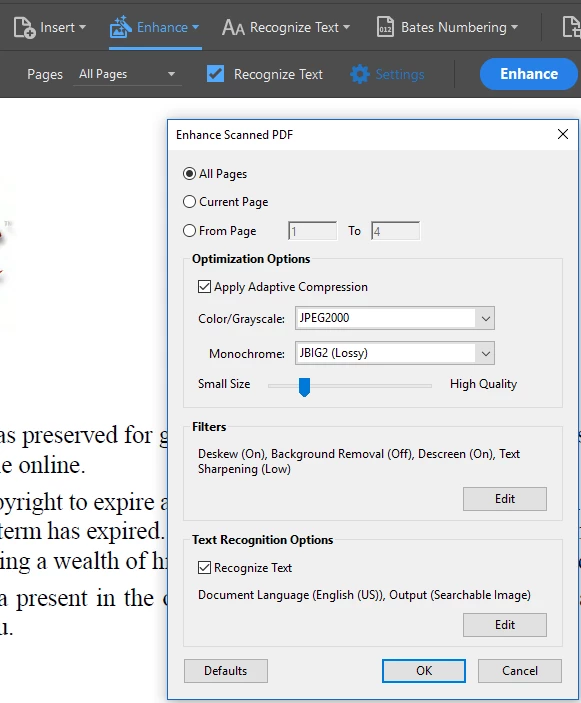
When I use the "Enhance Scans" tool and select "Recognize Text"  to recognise text and create a searchable PDF, it works fine - but now the file does have some artifacts at high magnification, and the searchable PDF is 264Mb. This is more than a forty-fold increase.

Any ideas why, or isn't "enhance scans" the best way of creating a searchable PDF?

Chris.
This topic is closed to new replies. Start a new post to keep the conversation going.
Correct answer Adorobat

Hi Chris,

Sorry for the delay in response. 

"choose the setting searchable image" is same as "recognize text" or OCR in Acrobat Pro DC. I also tried to replicate the issue with the files you shared on windows 10 machine with acrobat pro dc, but the issue was not reproducible.

Please find below the link for the file.

Shared Files - Acrobat.com

You may try changing the setting for the OCR and check if that helps.

Thanks,

Shivam

3 replies

Adorobat
Participating Frequently
November 29, 2018

Hi Chris,

Sorry for the delay in response.  

As per the issue description mentioned above, file size increase when running ocr on the pdf, is that correct?

Refer to the following forum threads discussing the similar topic:

PDF file size increases several folds after OCR

How come the same file increases ten fold during OCR process on different computers with same file & same settings (…

https://acrobatusers.com/forum/general-acrobat-topics/file-size-after-ocr/

Thanks,

Shivam

Known Participant
November 29, 2018

Thanks for getting back, Shivam.

I didn't understand the advice in the first link - it says "choose the setting searchable image". I don't have that on my version of Acrobat - I'm using Adobe Acrobat Pro DC. The only OCR option I can see is "Enhance Scans", which then lets me recognise text. Is there another way of doing OCR?

When I do that, and Save As a new file, this is when I get the massive searchable file.

Here's a shorter example - it's an extract from a catalogue in the public domain, in the British Library. This is a 4-page PDF:

https://drive.google.com/open?id=1UEI806v44FwAjQtLHq23Dnxzcrulf4iG

It's 155KB.

After doing Enhance Scans, I get a searchable version:

https://drive.google.com/open?id=17q9brvKxbPSEomCuSjqFmzfZCcJvWJ7H

However, this new PDF is 2597KB - so over 16 times bigger.
Thanks in advance,
Chris.
P.S. I can't see a way of attaching files in this forum, so I've provided links to my Google Drive storage for these examples.
Adorobat
AdorobatCorrect answer
Participating Frequently
January 3, 2019

Hi Chris,

Sorry for the delay in response. 

"choose the setting searchable image" is same as "recognize text" or OCR in Acrobat Pro DC. I also tried to replicate the issue with the files you shared on windows 10 machine with acrobat pro dc, but the issue was not reproducible.

Please find below the link for the file.

Shared Files - Acrobat.com

You may try changing the setting for the OCR and check if that helps.

Thanks,

Shivam