Exit
  • Global community
    • Language:
      • Deutsch
      • English
      • Español
      • Français
      • Português
  • 日本語コミュニティ
  • 한국 커뮤니티
4

OCR seems very poor

Community Beginner ,
Jan 17, 2021 Jan 17, 2021

I don't want to seem overly negative, as I really like Adobe products in general... but I've just paid full subscription for Adobe Acrobat Pro, hoping that the OCR would do a good job, and it's terrible. No better for accuracy than OCR scanning I used 20 years ago. Are there no settings to adjust the scanning quality? To adjust the contrast. It's one option and that's it seemingly.


I was hoping to convert this PDF document (1981 PDF Document) to maintain the original 1981 look, but be possible for blind people to use with a screen reader, without having to almost re-type the entire document. I can't see any options to tweak the AI / method used to try to get a better result. Am I barking up the wrong tree with Acrobat?

TOPICS
Edit and convert PDFs
15.4K
Translate
Report
Community guidelines
Be kind and respectful, give credit to the original source of content, and search for duplicates before posting. Learn more
community guidelines
1 ACCEPTED SOLUTION
Jan 17, 2021 Jan 17, 2021

I strongly endorse the response from @gary_sc.


It goes under GIGO, garbage in, garbage out! The original document appears to have been printed on a daisywheel, dot matrix, or low resolution inkjet printer typical of the time period (1981) and then photocopied!


Further analyzing the PDF file provided, to make matters worse, it appears to be a PDF file created by placing images into a Microsoft Word document and using Microsoft's own PDF creation which is notoriously problematic. That is probably the source of the images being 200-225 dpi and in fuzzy-wuzzy JPEG format. Microsoft Word has preferences as to what resolution to store placed images at. Always us the High fidelity resolution setting:
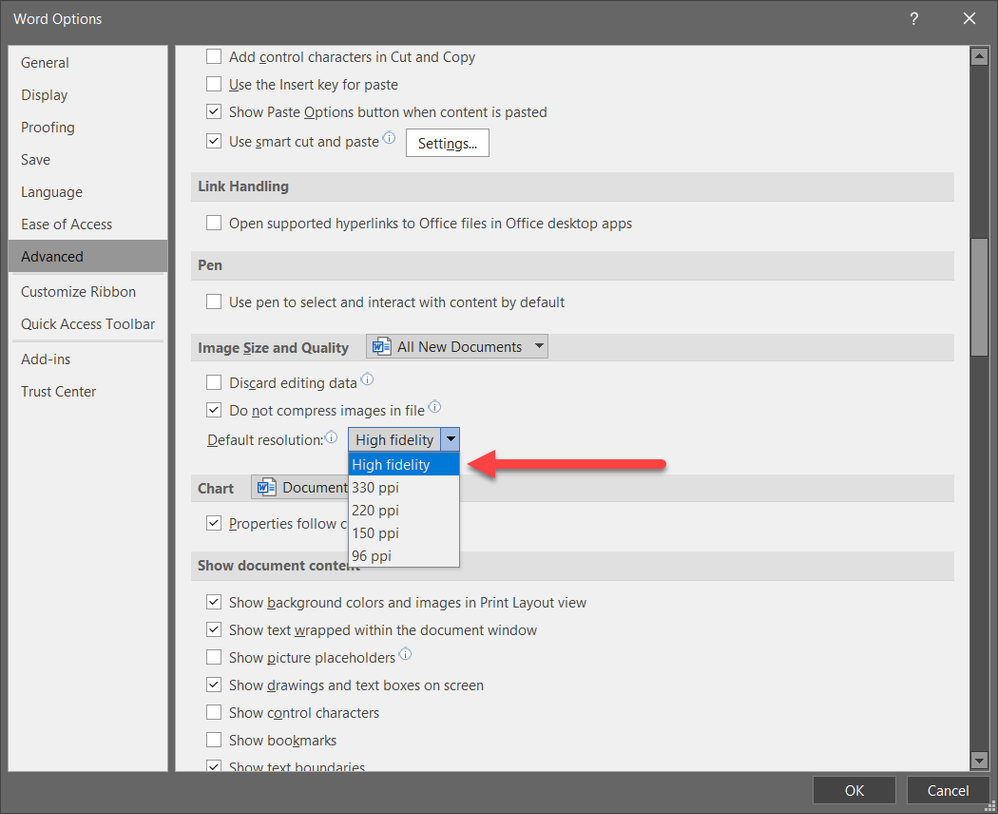
 

2021-01-17_16-05-01.png


Furthermore, use Acrobat's Save as Adobe PDF PDFMaker facility to create PDF from Word, not Microsoft's! Create special options that result in images not being downsampled and ZIP-compressed within the PDF file. You absolutely don't want JPEG or even JPEG2000 for this purpose.


However, if there is a way for you to get the original scan images and ascertain whether they are significantly higher resolution (and preferably not JPEG), I would suggest creating a PDF file directly from such images and trying OCR in Acrobat from there. Even better, if you have the original paper, I would suggest totally rescanning at 600 dpi into lossless TIFF format and for pages with issues, doing some edits in Photoshop.


Good luck!


- Dov Isaacs, former Adobe Principal Scientist (April 30, 1990 - May 30, 2021)

View solution in original post

Translate
Report
Community guidelines
Be kind and respectful, give credit to the original source of content, and search for duplicates before posting. Learn more
community guidelines
Community Expert ,
Dec 29, 2025 Dec 29, 2025
LATEST

Hi, @alejandro_9317, I was digging into some reviews I wrote a long time ago, and in 2011, I reviewed TypeReader (by Expervision), which allows the user to mark out zones for what to read or not read. They are still around, and it appears that they can still utilize zones. However, I cannot comment on their quality, ease of use, etc., since it's been a long time since I've used them.

Translate
Report
Community guidelines
Be kind and respectful, give credit to the original source of content, and search for duplicates before posting. Learn more
community guidelines