
toddw43631036
Participating Frequently
January 13, 2017
Question

Parts of text not printing out in Adobe Acrobat Pro DC but if opened in Nitro PDF Reader they print fine

  • January 13, 2017
  • 2 replies
  • 2437 views

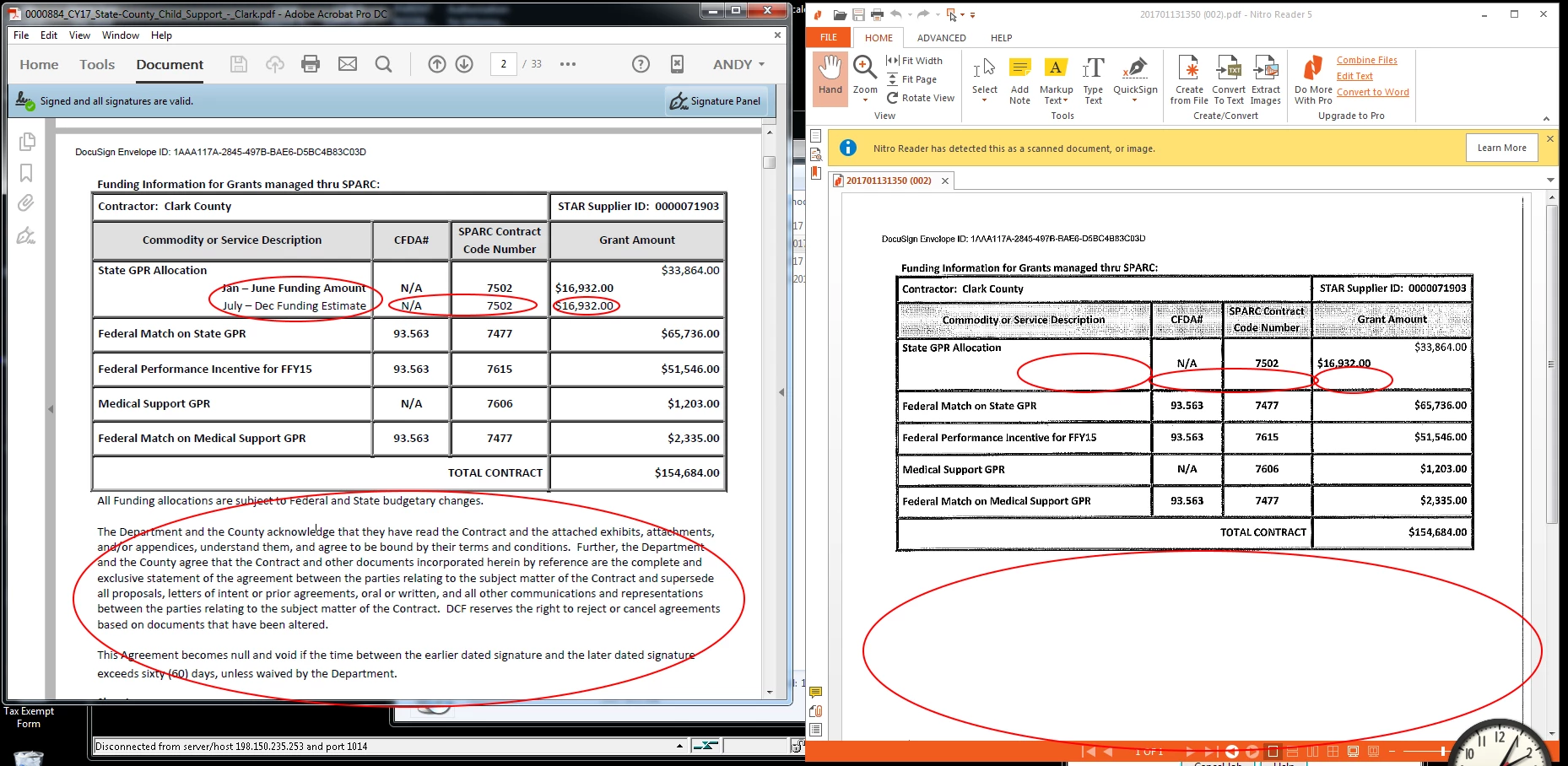
I have had three users now contact me that some parts of documents are not printing out from Adobe Acrobat but if I install and open them in NitroReader they print the text fine.

The image here on the left is the original document and on the right is a scan of what prints out and circled in red are the parts that are missing.

Any help would be greatly appreciated.  Already tried uninstalling and reinstalling with the latest version / updates.
This topic has been closed for replies.

2 replies

toddw43631036
Participating Frequently
February 15, 2017

Is there any reason to not always "Print As Image"?  Is that an option to default to that?

Community Manager
February 6, 2017

Hi toddw43631036,  

How was the document created? If the document was created using LiveCycle i assume these fields might have non-printable.

The same feature could also be set using Acrobat. 

Nitro may not be respecting those security properties of those fields. Is it possible for you to share the file with us?

If yes, you may use Adobe Send or Google drive or DropBox to share the file with us using Private message:   

-Tariq Dar.

toddw43631036
Participating Frequently
February 14, 2017

I sent you the document.

Community Manager
February 14, 2017

Hi toddw43631036, 

Thank you for sharing the file.


I am also able to reproduce the issue and I can see the file is not created using Adobe solution.

Also, I was able to print if you check option "Print as Image". Click Print > Printing Window "After selecting your printer" > Advanced option > Check "Print As Image". Click Ok. Try printing again.

I will still keep looking into the issue and I will keep you posted probably via private message.

-Tariq Dar.