Known Participant
October 18, 2018
Answered

paste "Trimsize" after impostion

  • October 18, 2018
  • 2 replies
  • 19391 views

Hi.

I have a 50 * 90 mm business card

And I want to duplicate it so that it goes into the page (through the "quite imposing" plug-in).

After the duplication I created a new sheet with 20 tickets,

I want the top corner of the sheet to say "trim size"

So that the employee who cuts the cards knows what final size he needs to cut it.

How can I do it?

Please note that I have licenses for pitstop and for quite imposing

But none of their support knew how to give me an automatic solution. (In pitstop you can paste the trim size on the document But after imputation the number is deleted.)

It's clear to me that I can always type manually but I'm looking for an automated script.

It is important to emphasize that each time the size of the card varies from work to work.

Attached file with the target.

Thanks!

This topic has been closed for replies.
Correct answer Stephen Marsh

I have looked and played with the action list steps, but have not had a breakthrough. It works on some files automatically, other files require a manual cut/paste of the text that is selected after running the second action. It is certainly a puzzle, just one that I can’t crack at this time.


OK, it has taken me a while as I am new to scripting, however I now have a fallback plan. I originally wanted to add the trim info into document properties metadata using PitStop Pro, however there appears to be a maintenance issue which Enfocus are now aware of…

Step 1: So the fallback plan is to add the trim box info as metadata using an Acrobat Pro javascript. Before imposition, run the following script on the 1up file. The script could be run in any number of ways, I tested with an Acrobat Action, then settled on installing it into the File menu instead:

//Add trim size to document title.js

//Acrobat Pro javascript

//https://forums.adobe.com/message/10778492

//https://forums.adobe.com/thread/1246108

function TrimInfo(){

var aRect = this.getPageBox("Trim");

var width = aRect[2] - aRect[0];

var height = aRect[1] - aRect[3];

this.info.title = ("Trim: " + Math.round(width*0.3528) + " mm x "

+ Math.round(height*0.3528) + " mm");

}

app.addMenuItem ({cName: "Add trim size to title", cParent: "File", cExec: "TrimInfo()" });

The installation path would be similar to:

C:\Program Files (x86)\Adobe\Acrobat DC\Resource\Javascripts\

/Applications/Adobe Acrobat DC/Adobe Acrobat.app/Contents/Resources/JavaScripts

Then one would run the script from the foot of the File menu:
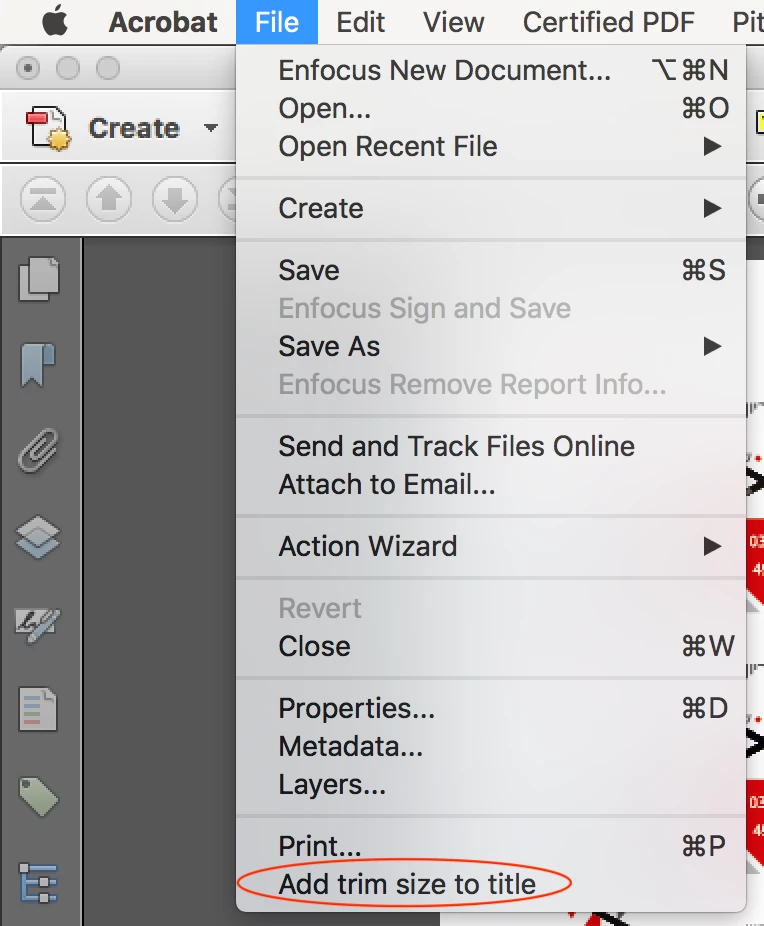
Note: it is presumed that the input file is either a single page or if multi-page, that all pages have the same trimbox size.

Step 2: After imposing with Quite Imposing Plus, a simple PitStop Pro Action List then adds the text from the document properties as a text slug on the upper left of the file.
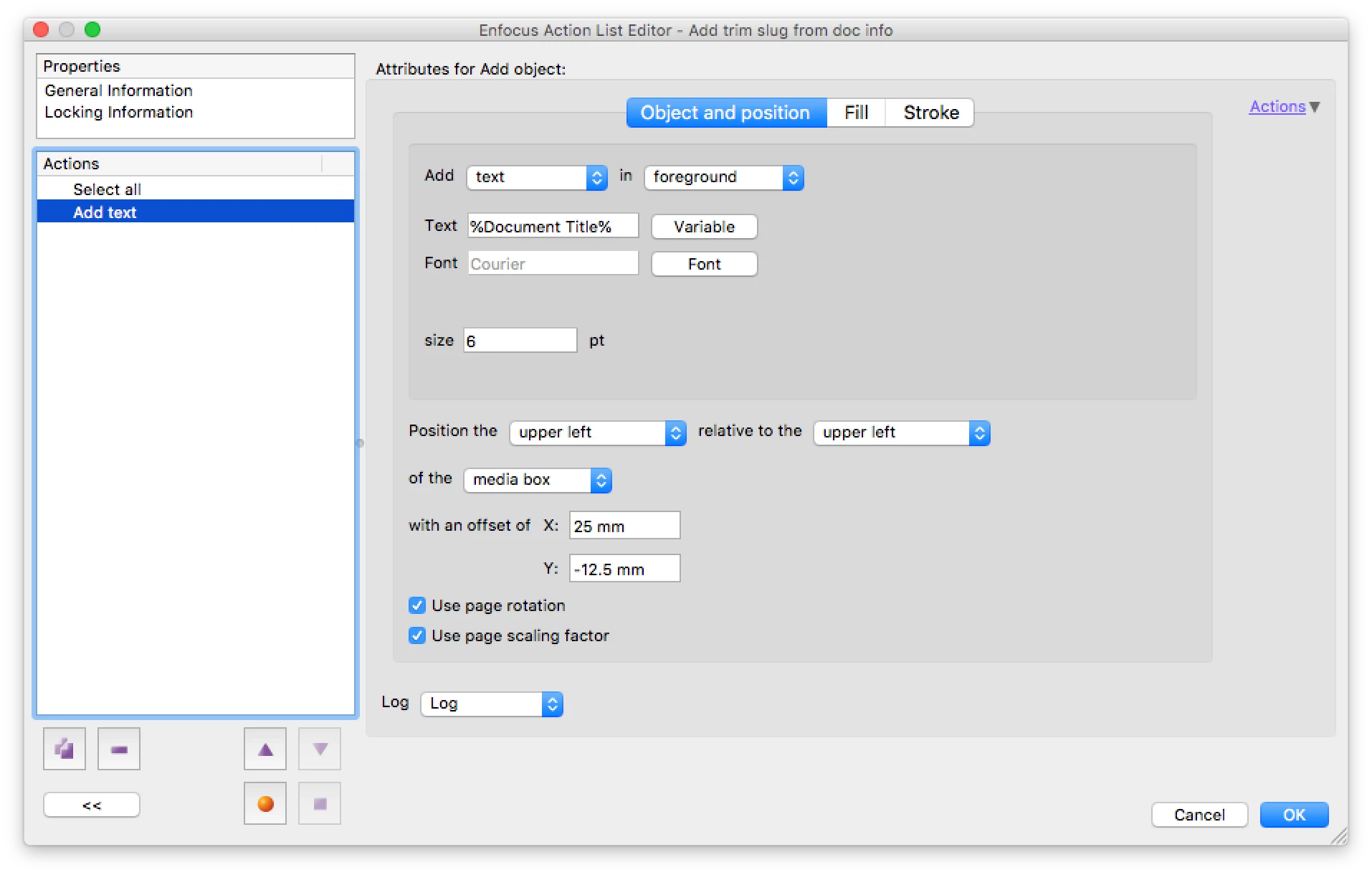
The final result:

Enjoy!

P.S. If anybody can share code to add the text slug using an Acrobat script, then that would be fantastic!

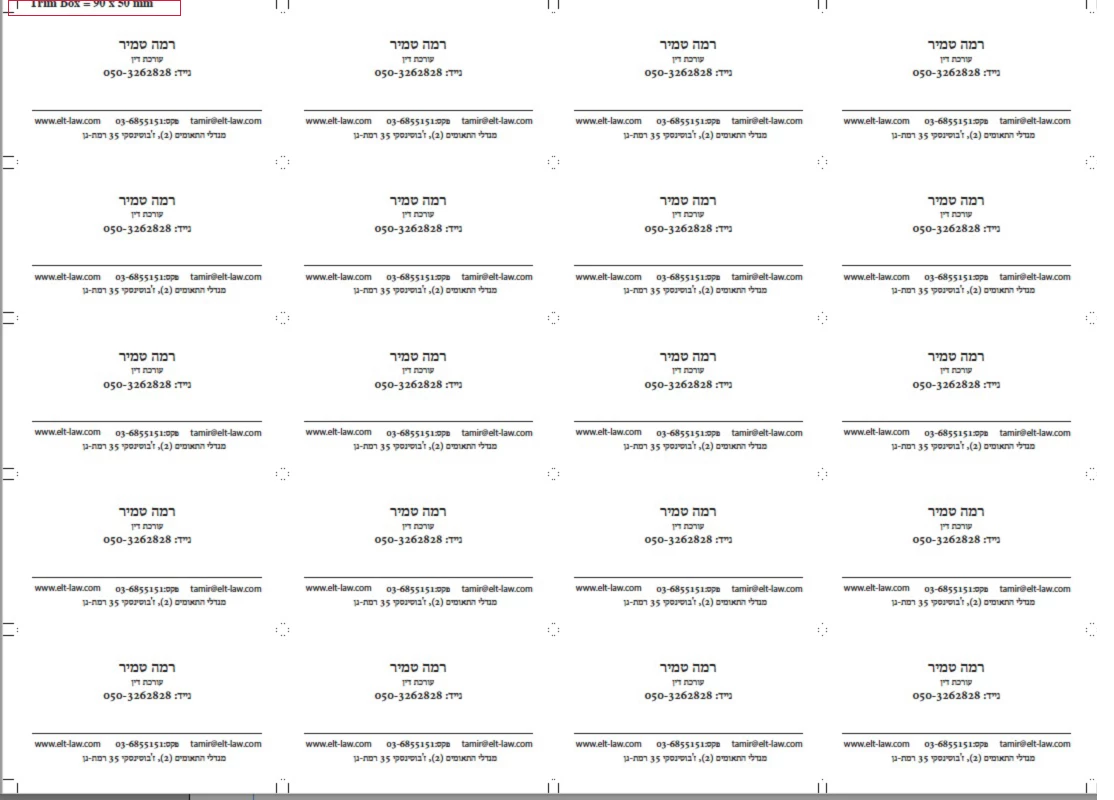
2 replies

aviel222Author
Known Participant
November 9, 2018

Could I please remind you in a few weeks

Maybe you'll have time / idea?

Stephen Marsh
Community Expert
Community Expert
November 13, 2018

I thought I had it fixed but on further testing it still needs work!

Stephen Marsh
Community Expert
Community Expert
April 19, 2019

Hey Stephen.

A final question for this round.

I have a letter size A4, which is the size of the trim size, but the size of the media size

And crop size are a3.

I want to build action where at the click of a button all sizes of the box

Will change to A4.

(I know i can change all the page box through the inspector but I'm looking for a faster way

Do it).

It is also desirable that all graphics around the A4 size be deleted - and not just disappear.

Also, I can set different sizes in Insert one size (for example: the same case - only the letter size is A5)

Thanks a lot !!!


I have a letter size A4, which is the size of the trim size, but the size of the media size

And crop size are a3.

I want to build action where at the click of a button all sizes of the box

Will change to A4.

Do you have a sample file?

I don’t understand why/how the CropBox is larger than the MediaBox and TrimBox?

It is better to define the new size based off an existing PageBox, so pick either the TrimBox or MediaBox as the source size.

(I know i can change all the page box through the inspector but I'm looking for a faster way

Do it).

Did you know that you can create a new action list, press the record button, do whatever you require in the Enfocus Inspector panel and then go back to the action list and press the stop button – and that everything that you did between the start/stop recording will be captured as steps in the action list?

Action Lists can be built manually by inserting and configuring each step. Action Lists can also be built by recording. Or an Action List may be built by combining both inserted and recorded steps.

It is also desirable that all graphics around the A4 size be deleted - and not just disappear.

There may be objects that extend past the TrimBox, so they would likely need to be retained and it is only art that is completely outside of the TrimBox that should be removed.

Also, I can set different sizes in Insert one size (for example: the same case - only the letter size is A5)

Thanks a lot !!!

Sounds possible, that would require a variable, however I would need to look into that. It may depend on what version of PitStop Pro you are using.

Stephen Marsh
Community Expert
Community Expert
October 18, 2018

Later versions of PitStop Pro can add the trim size as a variable in an action list. Here is an example setup:

I have manually moved the text onto the card in this example so that you can see it, as it was originally placed off the card on the lower left.

After adding the text, I then changed the TrimBox from 55mm to 50mm to test that the variable text is not “live” and it only references the original trim size when the variable text was first added, after that it is just a static string of text and not a variable. So there is no need to worry that if QuiteImposing changes or removes the original trim info, it is still there if placed on the original 1up card. The ArtBox which is often unused can also be used as a temporary placeholder to store the TrimBox info, however it all depends on what is happening to the various PageBoxes after QuiteImposing has processed the original file.

As I mentioned in the other topic thread, the forum really needs links to the actual PDF files, the 1up and the imposed versions. I don’t know what QuiteImposing is doing to the various page boxes.

So the variable text could be added to the 1up or the imposed version, depending on what is going on with the unknown output from QuiteImposing.

Please download the following PDF and impose it, then provide a link to the imposed PDF version so that I can evaluate what has happened to the page boxes and the added text. I will then have a better idea on how to move forward.

Dropbox - impo-test-input.pdf

aviel222Author
Known Participant
October 21, 2018
Stephen Marsh
Community Expert
Community Expert
October 21, 2018

Initial findings:

  • Quite Imposing is removing the art/bleed/trim boxes and setting the media/crop boxes to the new imposed size.
  • The trim box text slug that was added off the page on the 1up file is retained.