Participant
December 5, 2020
Answered

Pdf convert to editable text and turn page

  • December 5, 2020
  • 1 reply
  • 795 views

Hi, I sometimes stumble upon an article that is either wrongly scanned, such as that the pages aren't on the correct side, and that the text also isnt editable.

Whenever i then select "Edit PDF" it resolves this for the particular page I'm on, but it doesn't do it for all of them. 

So my question; Is it possible to allign all the pages and make all pages' text editable in one go?
 

This topic has been closed for replies.
Correct answer Dave Creamer of IDEAS

Go to the Tools tab at the top of Acrobat Pro and use/add the Scan & OCR tools. 

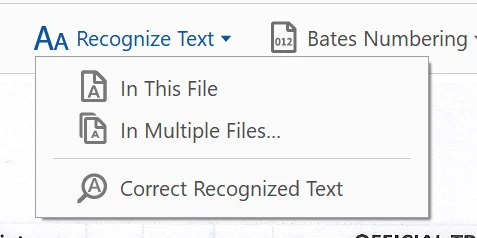
When you activate the OCR tools, you should see these tools at the top:

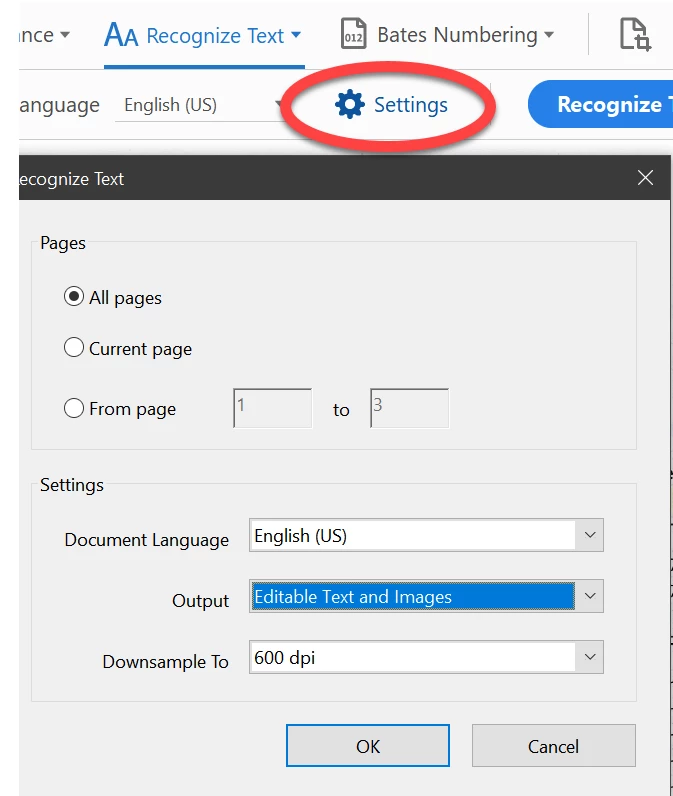
Select in this file and be sure to check your settings--they should be editable text:

1 reply

Dave Creamer of IDEAS
Community Expert
Dave Creamer of IDEASCommunity ExpertCorrect answer
Community Expert
December 5, 2020

Go to the Tools tab at the top of Acrobat Pro and use/add the Scan & OCR tools. 

When you activate the OCR tools, you should see these tools at the top:

Select in this file and be sure to check your settings--they should be editable text:

David Creamer: Community Expert (ACI and ACE 1995-2023)
Ziggy0D44Author
Participant
December 13, 2020

Dear Creamer Training,


Thanks so much for the instructions. This'll really speed up my reading!


Best wishes!