
Participant
July 12, 2017
Answered

Pdf field names appended when exported from InDesign

  • July 12, 2017
  • 2 replies
  • 1118 views

I have a weird issue where I have set up my form in InDesign and names each field a unique name.

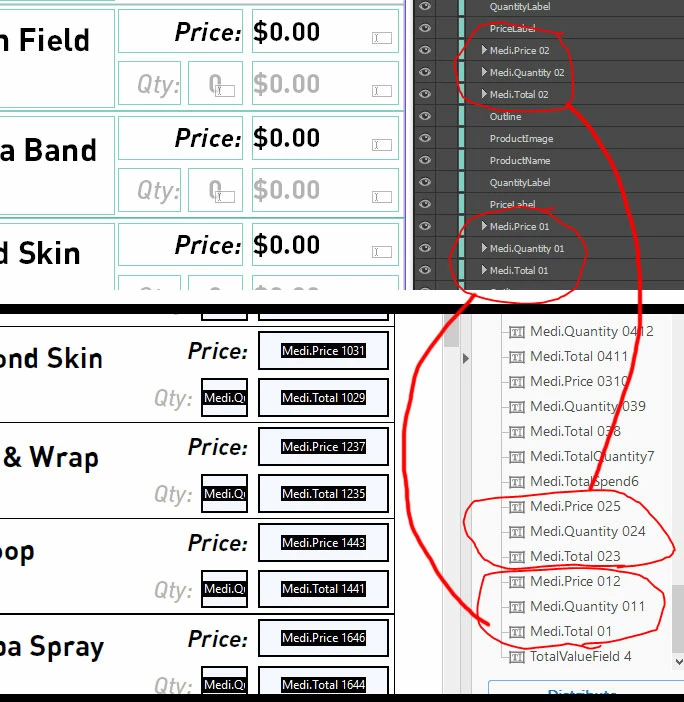
When I export to pdf and open the fields, they all have an extra number or 2 added after the field name. It is like the are adding an incremental number to every field as a suffix.

See the image below.

The annoying part is I just spent the last hour renaming the fields in InDesign to be unique and I don't want to have to do it again in acrobat. (Plus this will be the first of many forms I need to make)

Is this a bug?
This topic has been closed for replies.
Correct answer George_Johnson

That's just what InDesign does when you use hierarchical field names. A fix would be to remove and periods in the field names. It certainly could be considered a bug in InDesign.

2 replies

Participant
April 25, 2021

Yes, this is most likely my problem, I am trying to duplicate/copy the text field in Indesign. I am forcing to rename them but it won't work. I wish there were copy/paste options for this one.

George_JohnsonCorrect answer
Inspiring
July 12, 2017

That's just what InDesign does when you use hierarchical field names. A fix would be to remove and periods in the field names. It certainly could be considered a bug in InDesign.

8r3nd4nAuthor
Participant
July 12, 2017

Ah,

I was trying to save myself work in PDF by using the periods to make it easier to call calculations of all fields starting with a certain string. Definitely a pain and seems strange that the 2 products don't seem to play that well with each other.

A short follow up then (somewhat related but another question), can the field values from InDesign come into pdf as the default values? They always come in as blank.

Cheers

Inspiring
July 12, 2017

I don't know of a way.

I primarily use InDesign to create the form design, and add the final fields using Acrobat, for a number of reasons, including bugs like this. To make it easier, over the years I've developed a number of tools to automate the process of adding fields and modifying the field properties. I usially use a spreadsheet to manage and document the fields in a form, so it's fairly easy to automate things.