
Exit
  • Global community
    • Language:
      • Deutsch
      • English
      • Español
      • Français
      • Português
  • 日本語コミュニティ
  • 한국 커뮤니티
1

PDF-files change name and filetype when working with portfolio in Adobe Acrobat DC PRO FRL

Community Beginner ,
Sep 21, 2022 Sep 21, 2022

Hi 

We're having trouble with our new version of Adobe Acrobat DC PRO FRL, since some of the PDF-files change  name, when the files are open as a portfolio. The name of the file changes around every 3 senconds, and it is random files every time. Not files with specific names. It changes back and forth to PDF, but when the file has .pdf + what looks like Chinese, it is not possible to acces the file. 

How can we fix this? Any suggestions? We would like to have the titles of the files to show properly in our own language - Danish. 
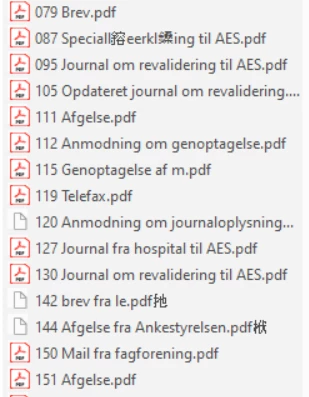
 

 image.png


TOPICS
Edit and convert PDFs
988
Translate
Report
Community guidelines
Be kind and respectful, give credit to the original source of content, and search for duplicates before posting. Learn more
community guidelines
Community Expert ,
Sep 21, 2022 Sep 21, 2022

Does it change the file names on your file system?

Translate
Report
Community guidelines
Be kind and respectful, give credit to the original source of content, and search for duplicates before posting. Learn more
community guidelines
Community Beginner ,
Sep 21, 2022 Sep 21, 2022

No, only while the file is open. 

Translate
Report
Community guidelines
Be kind and respectful, give credit to the original source of content, and search for duplicates before posting. Learn more
community guidelines
Community Expert ,
Sep 21, 2022 Sep 21, 2022

OK

Translate
Report
Community guidelines
Be kind and respectful, give credit to the original source of content, and search for duplicates before posting. Learn more
community guidelines
Community Expert ,
Sep 22, 2022 Sep 22, 2022

Repair your Acrobat installation.

Translate
Report
Community guidelines
Be kind and respectful, give credit to the original source of content, and search for duplicates before posting. Learn more
community guidelines
Community Beginner ,
Sep 22, 2022 Sep 22, 2022

Thank you for your reply, but it has done so even after the very first installation and it does it among different ppl, who all just got the new version. 

Translate
Report
Community guidelines
Be kind and respectful, give credit to the original source of content, and search for duplicates before posting. Learn more
community guidelines
Community Expert ,
Sep 22, 2022 Sep 22, 2022

Can you share a sample file?

Translate
Report
Community guidelines
Be kind and respectful, give credit to the original source of content, and search for duplicates before posting. Learn more
community guidelines
Community Beginner ,
Sep 26, 2022 Sep 26, 2022

I'm sorry, but I can't. We're working with sensitive cases. 

Translate
Report
Community guidelines
Be kind and respectful, give credit to the original source of content, and search for duplicates before posting. Learn more
community guidelines
Community Expert ,
Sep 26, 2022 Sep 26, 2022
LATEST

Then I can't help.

Translate
Report
Community guidelines
Be kind and respectful, give credit to the original source of content, and search for duplicates before posting. Learn more
community guidelines