Participant
March 26, 2024
Question

PDF form prints with multiple layers per field

  • March 26, 2024
  • 3 replies
  • 3184 views

After updating o the most recent version of Adobe Acrobat in our office, PDF forms that normally get printed out are showing up incorrectly. The fields themselves appear correct when viewing the document (more on that later), but when printing, the information from those text fields looks like if someone had been trying to use a typewriter to fill out the form, and went over it multiple times. 



Further testing has shown that the multi-layered effect of each text field appears in the print preview, and when selecting a text field.
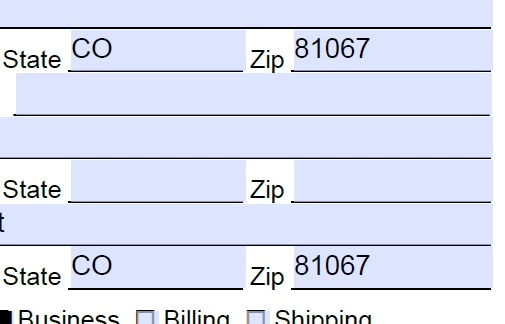
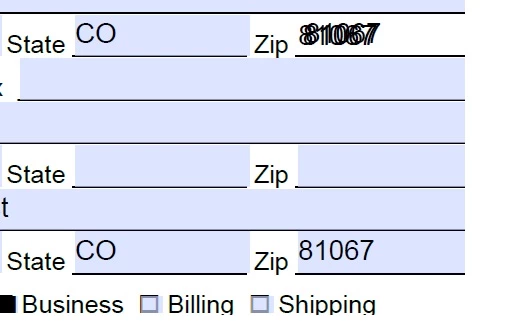
 

If I open the PDF in a 3rd party PDF reader, the document appears correct, and prints without issue. 

3 replies

kennethh78742812
Participant
April 12, 2024

How do we stop this from happening?

IM having the same problem, and cannot print or export without multiple texts layered on top of each other?

Thom Parker
Community Expert
Community Expert
April 14, 2024

Accidentally copying fields is easy to do. This happens when clicking of fields when the control key is pressed. If the cursor moves when this happens a copy is made. You can tell this is what happened because the copy is slighly offset from the original. To stop this from happening either never ctrl-click on a field, or if you do this, then don't move the cursor while the control key is pressed. 


Thom Parker - Software Developer at PDFScriptingUse the Acrobat JavaScript Reference early and often
Participant
December 17, 2024

This is happening to me and I'm not copying fields. Each week I pull up a pdf of an invoice I created the previous week to pay a worker, and just change the date and invoice number and the contents of a few other fields, and then save it out as the pdf for that week and move on. But every pdf I try to open in Adobe has double fields like the first user. That's not me, and it only started happening 2-3 weeks ago after having worked fine for 6 months. Please advise.

Thom Parker
Community Expert
Community Expert
March 27, 2024

The problem appears to be that there are multple stacked copies of the form fields. This can easily happen when using the Ctrl key to select several fields and move or copy them.   Just delete the extra fields. 


Thom Parker - Software Developer at PDFScriptingUse the Acrobat JavaScript Reference early and often
Participant
April 1, 2024

I switched to the "Prepare a form" to check for stacked copys of the form fields. I did not find multiple fields in the same location. However, what I did find, is that if I resized the existing fields, then used ctrl+ z to undo back to the original location, that returning to the standard ability to edit the PDF showed no extra layers of text behind as well. 


Thom Parker
Community Expert
Community Expert
April 1, 2024

Can you post a copy of the problem form?


Thom Parker - Software Developer at PDFScriptingUse the Acrobat JavaScript Reference early and often
Bernd Alheit
Community Expert
Community Expert
March 27, 2024

Can you share a sample PDF file?