
Participant
June 14, 2022
Answered

PDF from clipboard to full size page

  • June 14, 2022
  • 2 replies
  • 3777 views
I have always been able to copy text to the clipboard, and create a PDF that appeared to be a full size page. Just today when I have done it, the text is in a tight text box, with no margins. I cannot seem to find the settings again that make a pdf created from clipboard text start with a full page. Any tips? 
This topic has been closed for replies.
Correct answer Tanvi Rastogi

Hi 


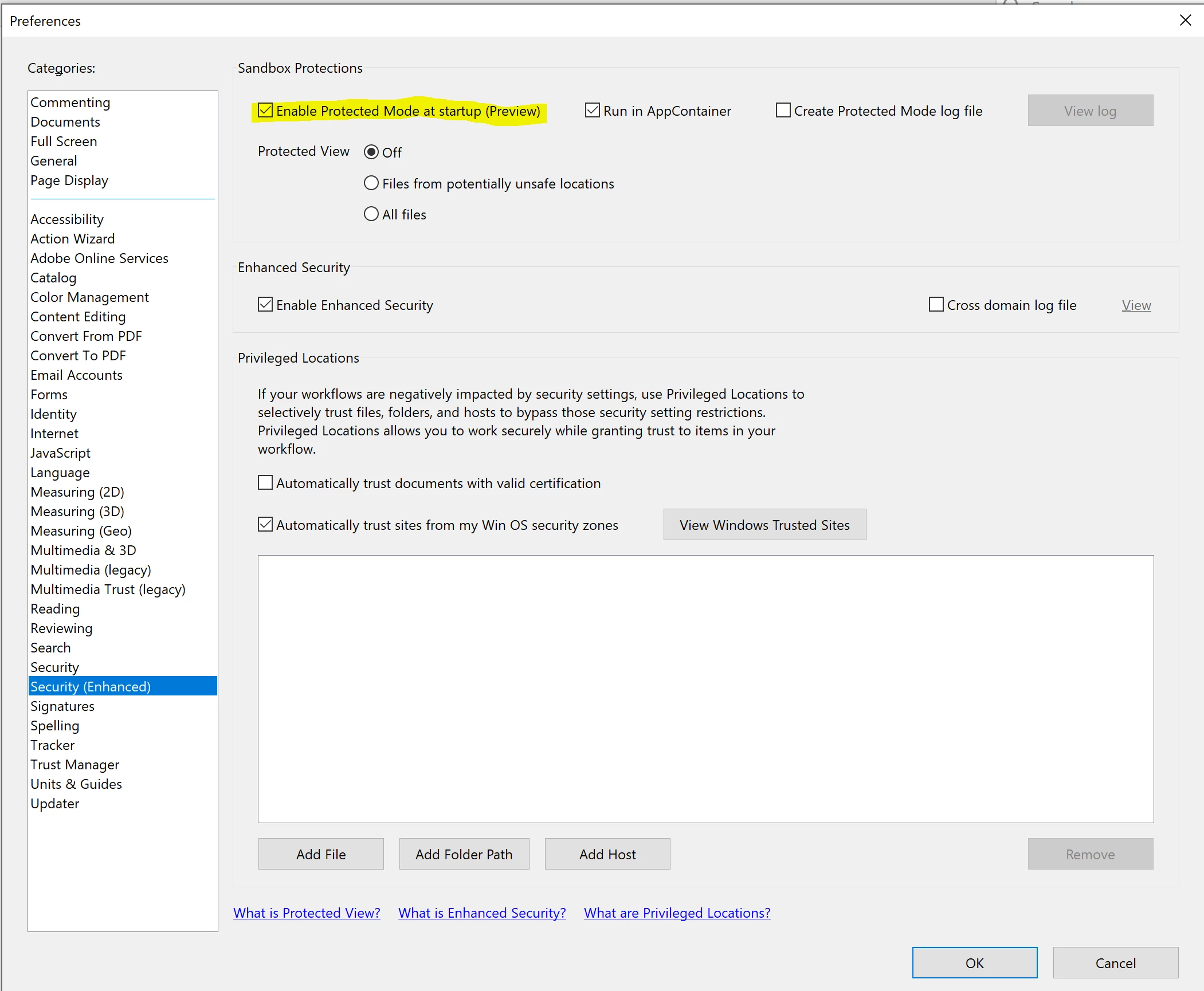
Can you please try switching the highlighted preference OFF under Edit > Preferences and let us know if that fixes the issue?


Thanks

Tanvi

2 replies

Meenakshi Negi
Community Manager
Community Manager
June 15, 2022

Hi Haley,


Thank you for reaching out.


Please try changing the file view to a Full page using the tool provided on the floating toolbar at the bottom. Click on the third icon from the extreme right on the floating toolbar. Check if that makes any difference.


If that doesn't help, would you mind sharing the complete workflow you do to create the PDF from clipboard text?

Share the Acrobat and OS version you are using.


Thanks,

Meenakshi


Haley5E5FAuthor
Participant
June 15, 2022

Thanks Meenakshi. The full page view seems to work like a zoom in, fill the whole page, but still missing margins and the necessary white space. 

I am using adobe acrobat pro DC on windows 11. I'm generally converting text from an email to a PDF page, I copy the text from the email to my clipboard (ctrl + v) and then file>create>pdf from clipboard. Until yesterday, I did not have issues creating a normal looking page document of the text. 

Haley5E5FAuthor
Participant
June 14, 2022

I have always been able to copy text to the clipboard, and create a PDF that appeared to be a full size page. Just today when I have done it, the text is in a tight text box, with no margins. I cannot seem to find the settings again that make a pdf created from clipboard text start with a full page. Any tips? 

Peru Bob
Community Expert
Community Expert
June 15, 2022

I've moved this from the Using the Community forum (which is the forum for issues using the forums) to the Acrobat forum so that proper help can be offered.