
Exit
  • Global community
    • Language:
      • Deutsch
      • English
      • Español
      • Français
      • Português
  • 日本語コミュニティ
  • 한국 커뮤니티
2

PDF Image Rendering Streaky

New Here ,
May 07, 2024 May 07, 2024

Images render streaky in the PDF Acrobat Program, but the images are exported to PDF are high quality images and display in other viewers (Chrome, flipdocs) just fine. I figure my image rendering preferences are messing with it, but when I change the toggles, the images turn pixilated, so I'm not sure where I'm going wrong. 


Adobe Preferences:AdobeSettings.png
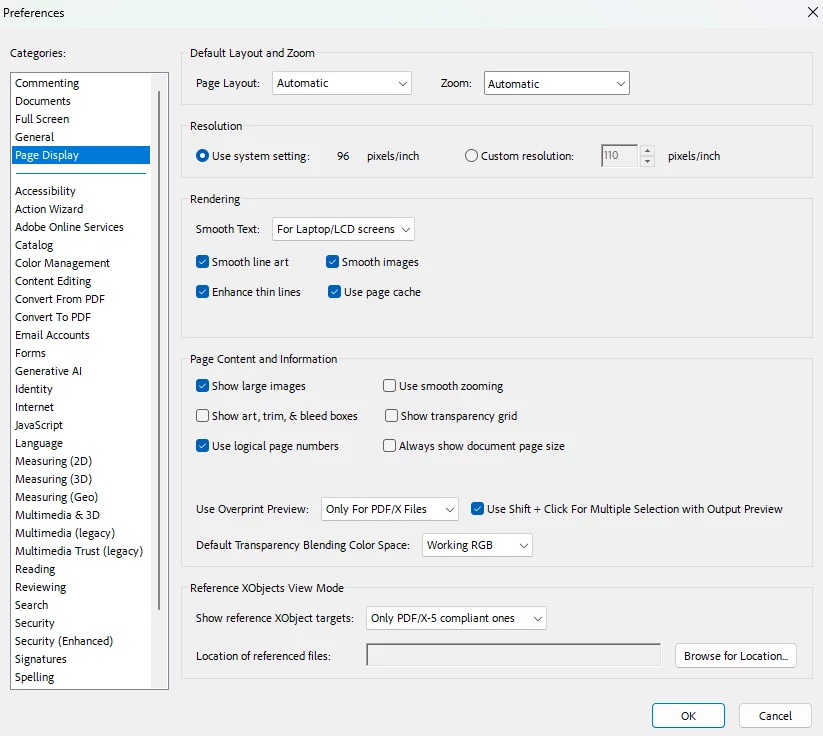
Adobe Displaying the images:

AcrobatView.png

Chrome Displaying the images:

AdobeChromeComparison.png

Adobe after I turn off "Smooth Line Art" "Smooth Images" "Enhance Thin Lines"

AdobeEnhancementsOff.png

TOPICS
Create PDFs , General troubleshooting , Modern Acrobat , PDF , Rich media and 3D
420
Translate
Report
Community guidelines
Be kind and respectful, give credit to the original source of content, and search for duplicates before posting. Learn more
community guidelines
Adobe Employee ,
May 29, 2024 May 29, 2024
LATEST

Hi there 
 
Hope you are doing well and sorry to hear that
 
What is the version of the OS and the Acrobat DC you are using? To check the version go to Help > About Acrobat and make sure you have the recent version 24.02.20759 installed. Go to Help > Check for updates and reboot the computer once.


Also in the Acrobat preferences > Page Display > try changing the resolution to 'Custom Resolution' and see if that works.
 
Try to repair the installation from the help menu (Win Only) and see if that works.
 
Please try to reset the Acrobat preferences as described here https://adobe.ly/3yINb7u and see if that helps.


~Amal

Translate
Report
Community guidelines
Be kind and respectful, give credit to the original source of content, and search for duplicates before posting. Learn more
community guidelines