
Participant
April 14, 2020
Question

PDF Maker does not work correctly. Conflict between Microsoft Word and Adobe Acrobat. Help me!!!!!

  • April 14, 2020
  • 1 reply
  • 3196 views

Constantly, I try to make the PDF Maker works but my Microsoft Word always stops working and It suddendly closes.


It occurs when I try to send automatically adobe PDF files by email (using the Outlook) through the button "Mail Merge To Adobe PDF" on the Acrobat tab of Microsoft Word. Clicking this button, normally a dialog box appears on the screen:
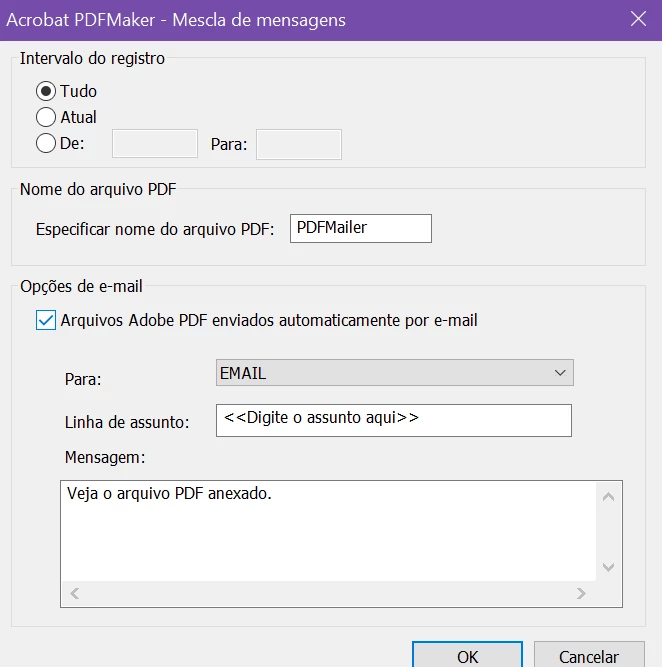


So when I click on "OK" button, on another dialog box I choose the folder where I will keep the PDFs files:
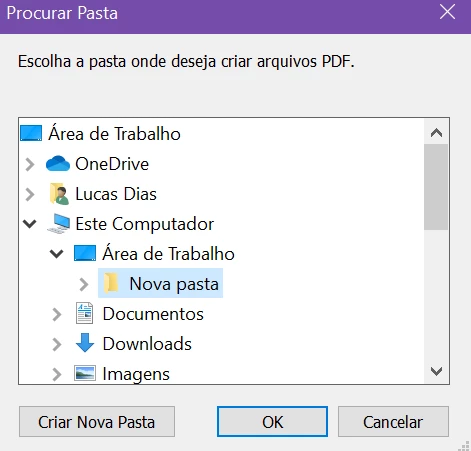


Clicking on "OK", automatically the Microsoft Word closes. Trying to open it again a pop up appears on the screen. The error is like: "Word is running into problems with the 'pdfmaker.officeaddin' add-in. If this keeps happening, disable this add-in and check for available updates. Do you want to disable it now?"


The language of my machine is portuguese, find bellow the printscreen
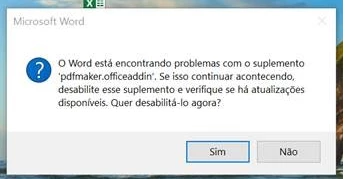
 

All my apps is updated on the last version. I already have repaired the Adobe Acrobat DC also the Microsoft Office. I reinstalled the both of programs a million times. I do not know what else can I do.


I have been searching on web and I found many posts, instructions or tutorials to fix this, but I was not able to see any useful proceed to correct it.


Please, help me!

This topic has been closed for replies.

1 reply

Bevi Chagnon - PubCom.com
Legend
April 14, 2020

It appears that you're using a utility that automatically creates a PDF and attaches it to an email, correct?


Because that utility is having problems for you, try to break the task into 2 separate tasks:

  • Export the PDF from Word.
  • Attach the PDF to the email.


This might correct the problem, or at least give us a better idea of what's causing the problem.


FYI, this forum post gives instructions on how to make a PDF from MS Word. https://community.adobe.com/t5/acrobat/saving-word-files-to-pdf-option-will-not-remain-in-word-program/m-p/10677471?page=1


|    Bevi Chagnon   |  Designer, Trainer, & Technologist for Accessible Documents ||    PubCom |    Classes & Books for Accessible InDesign, PDFs & MS Office |
Participant
April 14, 2020

Hi Bevi Chagnon, thanks for the fast response.

Yes. I am using the utility that automatically creates a PDF and attaches it to an email. But the aim of getting the PDF Maker purchase is to use this utility to send many PDFs attachment at one time instead of attach one-by-one. 

I have a spreadsheet with over 50 emails addresses and each file attached needs to have a unique information. None PDF will be the same.


Now, I followed the new steps from the 'how to make a PDF from MS Word' post you sent but unfortunatelly the error keeps occurring.

If they did and you want to use Adobe's PDF Maker plug-in, you'll have to re-installed a licensed copy of Acrobat Pro or Standard so that it can add the PDF Maker plug-in to Word.  You can do this through the Adobe Creative Cloud manager, the red infinity icon:

Creative Cloud.

  1. After the manager apps opens, locate Acrobat and select UNinstall from the options.
  2. Shut down your computer. (Full shut down so that it's "off", rather than a reboot.)
  3. Restart your computer and re-launch the Creative Cloud manager app.
  4. Locate Acrobat and select Install from the options.


Do you know why this is happening?

Bevi Chagnon - PubCom.com
Legend
April 15, 2020

Hi Bevi,

This error happens (Word is running into problems with the 'pdfmaker.officeaddin' add-in...) as I open my MS Word after it closes suddenly without complete the mail merge.


Answering your questions:


  • Are you able to make a PDF the traditional way, that is from MS Word using the Acrobat PDF Maker ribbon (which is the MS Office plug-in)?

Yes and No.

1. To create the PDF file I need to save the document first then 'Create PDF' using the Acrobat PDF Maker ribbon. It works well. After creates the PDF my MS Word suddenly closes and it opens itself without my command. Is that right?


2. But without saving the document if I just click on 'Create PDF' using the Acrobat PDF Maker ribbon a new error appears: "PDFMaker was unable to save the file. Please save the file and run PDFMaker again".


  • Are you able to do the mail-merge part? YES.
    • If so, which software program is doing the mail merge: MS Word or the Acrobat PDFMaker? MS Word does the mail merge using the PDF Maker utility.
  • Are you able to send any email with an attachment? YES.


<Quote> After creates the PDF my MS Word suddenly closes and it opens itself without my command. Is that right?


No, it isn't right. This indicates that there might be an incompatability between the versions of your MS Word and Acrobat/PDF Maker. After you run PDF Maker, it becomes disabled and also MS Word crashes.


You could also have something corrupted in the MS Word mail merge template.


Try these simple tasks that might correct the problem.


  1. Resave your Word mail merge template.
    File / Save As and give the file a new name. This often clears out any residual old coding in the file.
  2. Try to mail merge & PDF using the new template.
    If it still crashes, go on to the next step, update Word and Acrobat/PDFMaker.
  3. Run Microsoft's update utility and update your version of MS Word to its latest version.
  4. Try to mail merge & PDF in the updated version of Word.
    If it still crashes, go on to the next step, reinstall the latest version of Acrobat (and the PDF Maker plug-in).
  5. Because PDF Maker is a module of the full Acrobat program, you can't update only PDF Maker. Instead, you must update Acrobat itself, which will also update the PDF Maker plug-in you see in MS Word.
    1. Open Acrobat. Do not have any PDF files open, just the Acrobat program's window.
    2. From the Help menu, select Repair Installation.
    3. From the Help menu, select Check for Updates (sometimes this is done automatically with the repair utility, sometimes not).
    4. If you're asked to reboot your computer at any point, do it.
  6. Try to mail merge & PDF using the new template in Word.


Let us know how well this works out.


|&nbsp;&nbsp;&nbsp;&nbsp;Bevi Chagnon &nbsp;&nbsp;|&nbsp;&nbsp;Designer, Trainer, &amp; Technologist for Accessible Documents ||&nbsp;&nbsp;&nbsp;&nbsp;PubCom |&nbsp;&nbsp;&nbsp;&nbsp;Classes &amp; Books for Accessible InDesign, PDFs &amp; MS Office |