

PDF page labels created in Adobe Acrobat Pro DC breaks bookmark behavior in Apple Preview
Context
The first 8 pages of my scanned book are Cover, blank, Title, Copyright, ..., and Table of Contents pages. Then start the pages with the actual pagination printed at the bottom (1, 2, 3,...).
So in order to get the page numbers aligned, I set the page labels of the first 8 pages to roman numerals i to viii. Then the rest of the pages automatically start from 1.
I especially do this because creating bookmarks to the ton of chapters in the book is easier this way (as the page numbers are aligned, I can simply follow the information in the Table of Contents page to quickly create bookmarks).
FYI, this is how I renumber the pages: http://www.adobepress.com/articles/article.asp?p=2415896&seqNum=4
Problem
Once I export the PDF (with re-organized pages & bookmarks), as I am on Mac, I use the default tool to view my PDF documents, i.e. Apple Preview.
Problem is, for PDFs with re-numbered/re-organized pages, when I click the bookmarks Preview takes me half-way to the relevant page. As in, this:
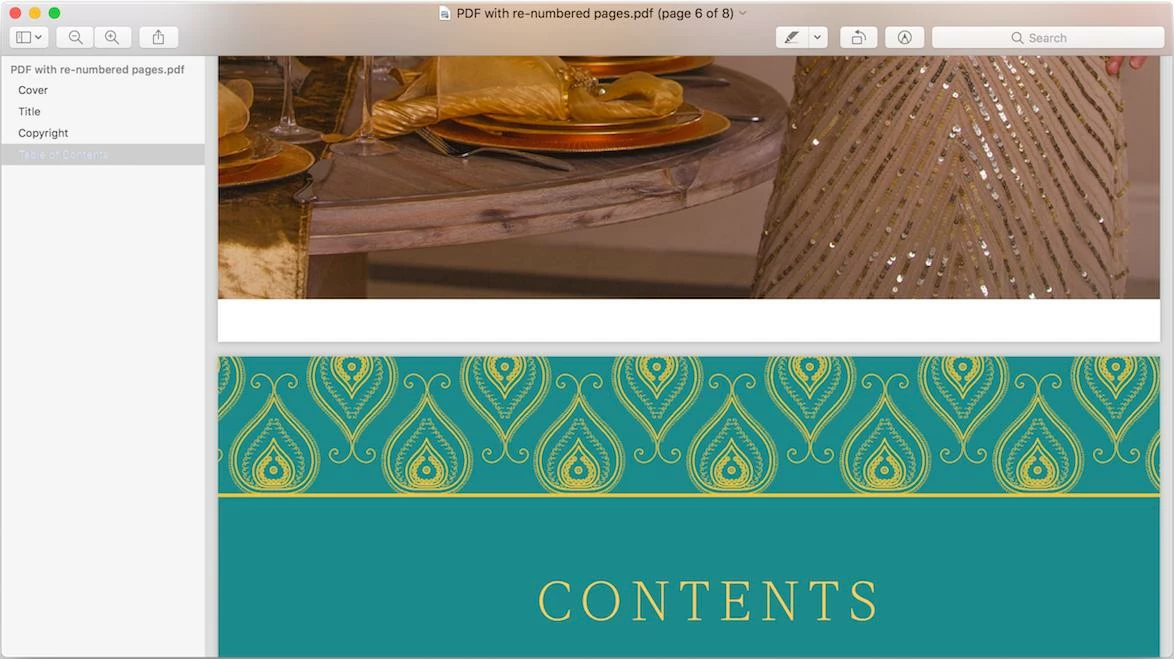
(Part of) Table of Contents* page being shown when its respective bookmark is clicked.
This happens sometimes with PDFs with untouched page organization (i.e. no custom page labels defined), and never with PDF ebooks that I purchased, ever!
So I am pretty sure something can be done to fix this in my PDF. I just don't know what setting in Adobe Acrobat Pro DC can help me fix this. What am I missing?
NOTE: For those interested, I made a sample PDF (temporarily) available here.
Generally Suggested Fix
Go to Preview > Preferences > PDF (tab) > check "Use logical page numbers". But that's already checked in my case and the problem persists.
 AdChoices