
JenYonkers
Participant
November 7, 2017
Question

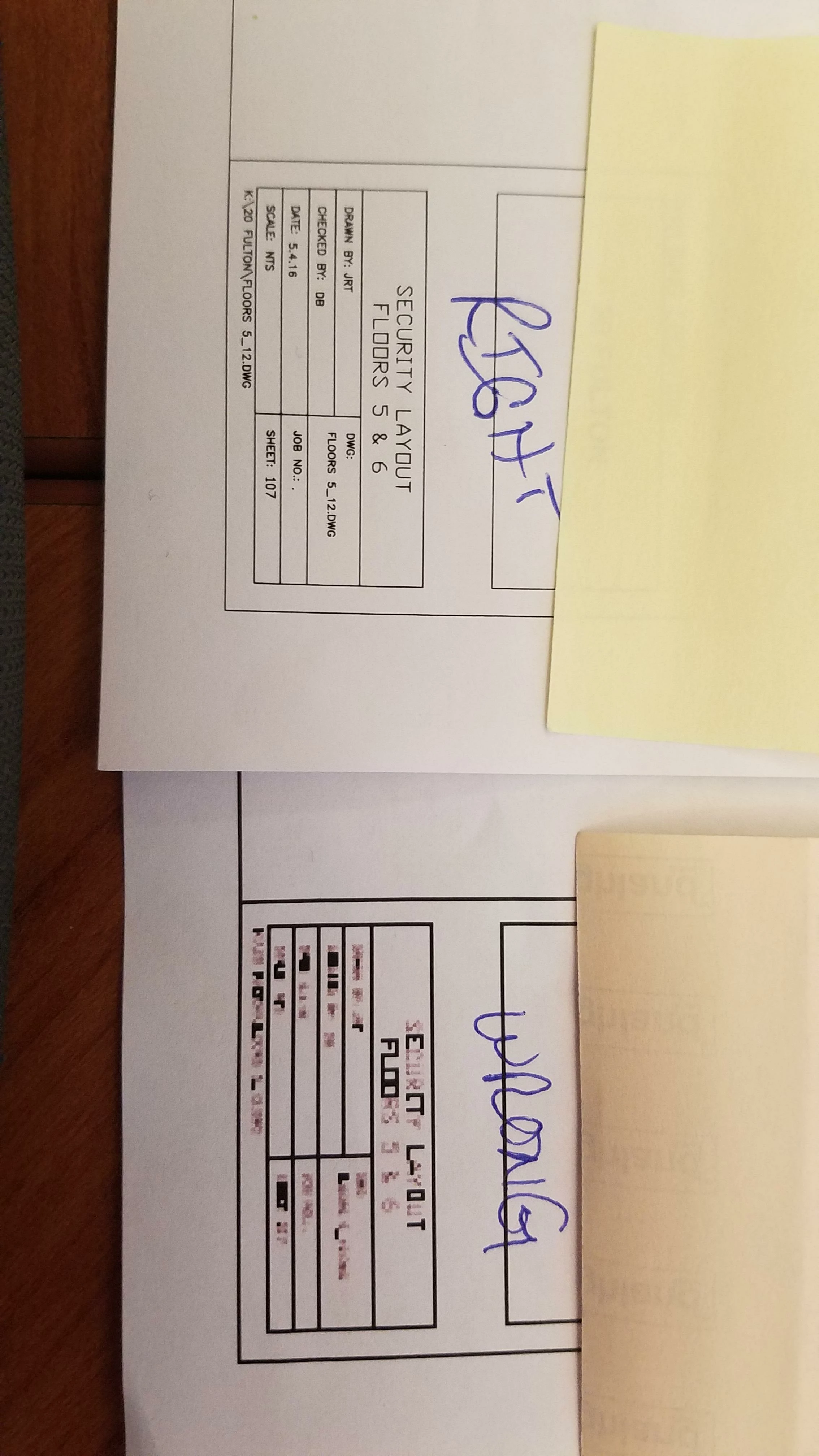
PDF prints pixelated to one printer, clear to another

  • November 7, 2017
  • 2 replies
  • 6774 views

When I print this pdf to my networked printer, I get the image labeled "wrong". When I print it to my networked plotter, I get the image labeled "right".

I'm using Adobe Acrobat XI Standard and Windows 10.

It was printing fine until yesterday.

I've updated my drivers twice.

I've rebooted my computer.

It only seems to happen with PDFs.

If I export it to a Word doc it will print right, but I can't export larger PDFs and make them work.

Is there a patch for Adobe I'm missing?

It still prints wrong if I save as to my network

What else can I do to fix this issue? My IT guy is more hardware than software so I'm on my own and I print PDFs often so I NEED this resolved!
2 replies

JenYonkers
Participant
November 8, 2017

Issue seemed to be it was already set to "print as image" at 72 dpi.....   Not sure how/why that feature was set but I'm back to printing clear!  Thank you!

Abambo
Community Expert
Community Expert
November 8, 2017

Well, the print as image at 72dpi is for sure producing such results. The „good“ thing is, that Acrobat keeps trace of some user preferences. Print as image is one of those. If you have problems printing, print as image is a good work around. But at 300+ dpi, prints tend to get slow, because of the big data transfer to the printer.

ABAMBO | Hard- and Software Engineer | Photographer
Participant
January 12, 2025

Abambo
Community Expert
Community Expert
November 8, 2017

You are missing a whole PDF generation: Current version is Acrobat DC...

Your print looks to me as a low res rasterization, which is quite bizarre as we are talking about a vector file (as your "plot" shows). Is it a good old fashioned pen plotter or a laser/inkjet plotter?

What is the WRONG printer's make?

When you scale your PDF on screen, does it look crisp or pixelated?

What you could try as a first is using the "print as image" option (advanced-option in the printer dialogue box). This does the rendering in our computer (by Acrobat) and sends an image to the printer. This is a work around, that works for most printing problems.

Please try and report then back!

ABAMBO | Hard- and Software Engineer | Photographer