Correct answer Bevi Chagnon - PubCom.com

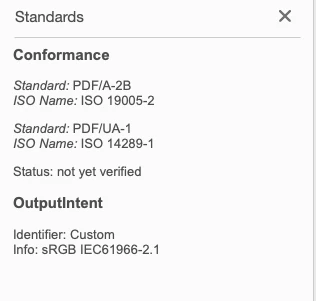
"Status not confirmed" means that Acrobat can't verify that the file actually meets the PDF/A or PDF/UA standards at all. A human being needs to confirm whether the file meets the standards or not.


The identifiers (aka, "medallions") shown in your screen capture merely indicate that someone THINKS the file meets the standard and has slapped the identifier on it.


For example, it is possible to have the PDF/UA identifier on a file that doesn't contain any tags whatsover.


2 replies

Participant
March 8, 2022

Hi,


Thank you for your response. I have read through the posts you suggested.  From the posts it looks like I should:

  1. Verify the version of Acrobat that I have. I do have Acrobat Pro DC.
  2. Run the document through the Pre-Flight tool. I have also done this. Although I do not see an option in the Pre-Flight tool that will verify the status of a document.

    Are there any other things I should try? I am also wondering ig The Status needs to be verified for the PDF to be accessible.
Bevi Chagnon - PubCom.com
Legend
March 8, 2022

"Status not confirmed" means that Acrobat can't verify that the file actually meets the PDF/A or PDF/UA standards at all. A human being needs to confirm whether the file meets the standards or not.


The identifiers (aka, "medallions") shown in your screen capture merely indicate that someone THINKS the file meets the standard and has slapped the identifier on it.


For example, it is possible to have the PDF/UA identifier on a file that doesn't contain any tags whatsover.


|    Bevi Chagnon   |  Designer, Trainer, & Technologist for Accessible Documents ||    PubCom |    Classes & Books for Accessible InDesign, PDFs & MS Office |
brennanyoung
Participating Frequently
September 14, 2022

What if you've performed (and passed) an Accessibility Check, including manual steps?
The UI allows those manual checks (e.g. read-order or color/contrast) to be flagged as complete, so Acrobat 'knows' that it has happened.
Shouldn't Acrobat insert the PDF/UA flag automatically at that point? What is the reasoning behind not doing so?

It seems perversely difficult to go through preflight. Why do we have to jump through hoops?

Amal.
Community Manager
Community Manager
March 8, 2022

Hi there


Hope you are doing well and sorry for the trouble.


Please go through the similar discussion https://community.adobe.com/t5/acrobat-discussions/pdf-a-1b-conformance/m-p/10384240#M135962 and see if that helps.


Also go through the help page https://community.adobe.com/t5/acrobat-discussions/pdf-a-1b-conformance/m-p/10384240#M135962 and check if that works.


Regards

Amal