January 4, 2020
Answered

PdfAnnotations Yellow Mark

  • January 4, 2020
  • 2 replies
  • 3191 views

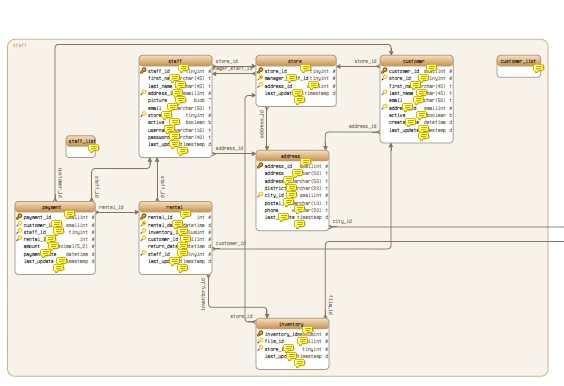
Is any way to suppress the yellow annotation marker ? I create diagrams with mouse-over tooltips, one for each record in diagram. This creates many yellow rectangles. I would suppress them if possible. 

 final PdfAnnotation annotation = PdfAnnotation.createStamp(writer, 
            new Rectangle(300, 600, 400, 700), "Text", "#Comment");
    annotation.setAppearance(PdfName.N, writer.getDirectContent().createTemplate(100, 100));
    writer.addAnnotation(annotation);

I create them using openpdf java library.

Here a sample image:
 

This topic has been closed for replies.
Correct answer Thom Parker

The "note" icon indicates that there is a popup comment attached to the annotation (this is your rollover note). It is displayed for any of the standard markup annotations that have associated comment text. 

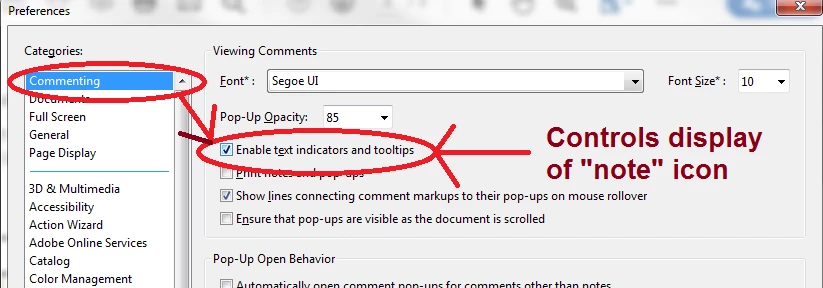
However, in Acrobat/Reader there is a preference that controls the display of this icon, as well as other behaviors associated with the annotation comment text.  You can change it on your system, but can't control how other users will view it.


2 replies

Thom Parker
Community Expert
Thom ParkerCommunity ExpertCorrect answer
Community Expert
January 5, 2020

The "note" icon indicates that there is a popup comment attached to the annotation (this is your rollover note). It is displayed for any of the standard markup annotations that have associated comment text. 

However, in Acrobat/Reader there is a preference that controls the display of this icon, as well as other behaviors associated with the annotation comment text.  You can change it on your system, but can't control how other users will view it.


Thom Parker - Software Developer at PDFScriptingUse the Acrobat JavaScript Reference early and often
Document Geek
Community Expert
Community Expert
January 5, 2020

Try reducing the opacity of them. Or you can instead use the highlighter tool. That will make the text show through the highlight without being obscured. You can also reduce the opacity of the highlight, as well as change to a different color. 

But if you really want to still use the sticky note tool, there is a free script to change  sticky note size. It's written to enlarge the size, but can probably be easily adapted to reduce the size. 

https://documentgeek.blogspot.com/2016/08/are-your-sticky-note-icons-too-small.html