


Copy link to clipboard
Copied
It would be really helpful to be able to pin regularly used documents so they could be opened readily without a plodding through File > Open or scrolling through Home > Recent. MS office products do this so nicely...




Copy link to clipboard
Copied
This was a while ago but just in case you are still interested (I only found out recently myself) :
The star is not visible until you hover over the row and it turns grey. Don't know why I haven't noticed it before 😞 .

Click on the star and then it appears at the top:

Thanks to @AkanchhaS .
 7
Replies
7
7
Replies
7


Copy link to clipboard
Copied
Hey!
I read your suggestion given above, that's a good idea. Well there's a way you can make your regular used documents easily accessible within Acrobat/Reader DC.
On the "Recent" files list, right next to the file, there is a "Star" icon to mark your document as starred file. All those files which have been starred will be shown/listed under "Starred" folder at the left hand side pane.
Hope this would help!
Thanks,
Akanchha

Copy link to clipboard
Copied
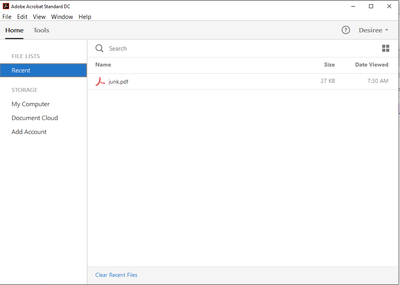
I have been looking for this in my Adobe Acrobat Standard DC and do not see it. Is my version too old or am I just looking in the wrong place?
Copy link to clipboard
Copied
This was a while ago but just in case you are still interested (I only found out recently myself) :
The star is not visible until you hover over the row and it turns grey. Don't know why I haven't noticed it before 😞 .
Click on the star and then it appears at the top:
Thanks to @AkanchhaS .

Copy link to clipboard
Copied
Thanks for showing the image in your question. That helped me locate the list and figure out how to pin the file.
GS

Copy link to clipboard
Copied
Copy link to clipboard
Copied
I have the version you mention. When I click on the HOME tab, it opens a page that shows the starred items at the top with thumbnails, just like desireec27405027 shows above. Fortunately, I do not need to pin many files in Acrobat, but one or two starred pins will be a huge time help. It would be nice if there was an option to have them in a list like you do in Excel.

Copy link to clipboard
Copied
It would be even more helpful to be able to pin commonly used FOLDERS into the Save As dialog box, rather than having it constantly shuffled into the 5 most recently used folders.
Again Microsoft Office does this very nicely and uniformly across all apps.


Get ready! An upgraded Adobe Community experience is coming in January.
Learn more
 AdChoices
