craigt25746955
Participant
August 16, 2021
Answered

Please explain the following error that a user sent in.

  • August 16, 2021
  • 3 replies
  • 1992 views

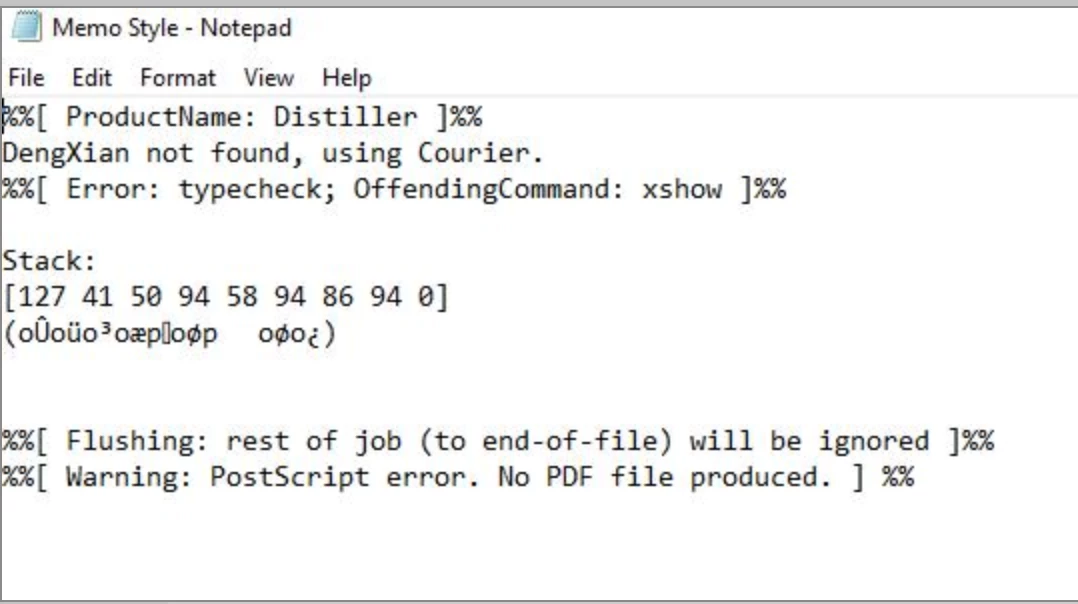
Can someone please explain the following error message that a user sent to me and also a solution on how to resolve this. Thanks.

This topic has been closed for replies.
Correct answer ls_rbls

DengXian font is a Chinese (Simplified) supplemental font that is shipped with Ms Windows and other MS Office programs.


The error you're getting (in my opinion) seems to be related to a licensing restriction.


Either the user will have to manually download and install this font type for the intended Windows version from here:


https://www.microsoft.com/en-us/download/details.aspx?id=49113


More additional info here:  https://docs.microsoft.com/en-us/typography/fonts/windows_10_font_list


Or have him/her go visit  this link: https://docs.microsoft.com/en-us/typography/font-list/dengxian


and scroll down to the section "Licensing and Distribution" to see if postscripting or distilling is something that is simply not allowed:


3 replies

ls_rbls
Community Expert
ls_rblsCommunity ExpertCorrect answer
Community Expert
August 17, 2021

DengXian font is a Chinese (Simplified) supplemental font that is shipped with Ms Windows and other MS Office programs.


The error you're getting (in my opinion) seems to be related to a licensing restriction.


Either the user will have to manually download and install this font type for the intended Windows version from here:


https://www.microsoft.com/en-us/download/details.aspx?id=49113


More additional info here:  https://docs.microsoft.com/en-us/typography/fonts/windows_10_font_list


Or have him/her go visit  this link: https://docs.microsoft.com/en-us/typography/font-list/dengxian


and scroll down to the section "Licensing and Distribution" to see if postscripting or distilling is something that is simply not allowed:


Luke Jennings3
Community Expert
Community Expert
August 16, 2021

I'm guessing your user is using the Notepad app on an Android phone to take notes, and is trying to make a PDF of their notes by printing postscript (.ps) and trying to open it in Acrobat (which is using distiller to try to convert it to PDF).

I assume Notepad can't save-as or export to a PDF. If it can save a text file, Acrobat may be able to open and save it as a PDF. They can also try placing the Notepad file, or text file into InDesign and exporting to a PDF. If they can create a PDF, they should confirm the fonts are embedded, and if they aren't, they should run an Acrobat preflight profile to try to embed the fonts.

Brad @ Roaring Mouse
Community Expert
Community Expert
August 16, 2021

Firstly, it's no longer a proper workflow to Print to Postscript and then to Distill.

What program are you working with?


That aside, the error is related to a missing font: It's saying that the font DengXian was not provided in the Postscript file, so it attempted to substitute Courier but could not, likely because your missing font is a Chinese font with a very different encoding.

The processing stopped there because your current Distiller Job Setting is probably set to "Cancel job" on a font embedding error.