Exit
  • Global community
    • Language:
      • Deutsch
      • English
      • Español
      • Français
      • Português
  • 日本語コミュニティ
  • 한국 커뮤니티
0

Popup and required field

Community Beginner ,
Mar 23, 2021 Mar 23, 2021

Hi. I need to insert a popup message when a user not to fill out a required text field.
I don't know javascript...
Someone can help me?
Thank you

TOPICS
Create PDFs , JavaScript , PDF forms
2.6K
Translate
Report
Community guidelines
Be kind and respectful, give credit to the original source of content, and search for duplicates before posting. Learn more
community guidelines
1 ACCEPTED SOLUTION
Community Expert ,
Mar 23, 2021 Mar 23, 2021

Remove the space between the back-slashes and the double-quotes (") characters.

View solution in original post

Translate
Report
Community guidelines
Be kind and respectful, give credit to the original source of content, and search for duplicates before posting. Learn more
community guidelines
Community Expert ,
Mar 23, 2021 Mar 23, 2021

What should trigger this pop-up to appear? You have to use an event, not a non-event...

Translate
Report
Community guidelines
Be kind and respectful, give credit to the original source of content, and search for duplicates before posting. Learn more
community guidelines
Community Beginner ,
Mar 23, 2021 Mar 23, 2021

My pdf has a lot of fields, but only one must be mandatory.
If the user does not fill in this field, when saving the file, the popup must show: required field.
Thanks

Translate
Report
Community guidelines
Be kind and respectful, give credit to the original source of content, and search for duplicates before posting. Learn more
community guidelines
Community Expert ,
Mar 23, 2021 Mar 23, 2021

OK, but be aware that won't prevent the user from saving the file.

What's the name of that field?

Translate
Report
Community guidelines
Be kind and respectful, give credit to the original source of content, and search for duplicates before posting. Learn more
community guidelines
Community Beginner ,
Mar 23, 2021 Mar 23, 2021

Ok, i doesn't matter if you can save anyway. The important thing is that you see the alert.

The field is called: Data di trasferimento

Thanks again!

Translate
Report
Community guidelines
Be kind and respectful, give credit to the original source of content, and search for duplicates before posting. Learn more
community guidelines
Community Expert ,
Mar 23, 2021 Mar 23, 2021

OK, go to Tools - JavaScript - Set Document Actions and under the Document Will Save event add the following code:


var f = this.getField("Data di trasferimento");
if (f.valueAsString==f.defaultValue) app.alert("You need to fill in \"Data di trasferimento\"!",1);


(You can adjust the text of the message to whatever you want it to be, of course)

Translate
Report
Community guidelines
Be kind and respectful, give credit to the original source of content, and search for duplicates before posting. Learn more
community guidelines
Community Beginner ,
Mar 23, 2021 Mar 23, 2021

Sorry... it says:

SyntaxError: missing ) after argument list

2: to the line 3
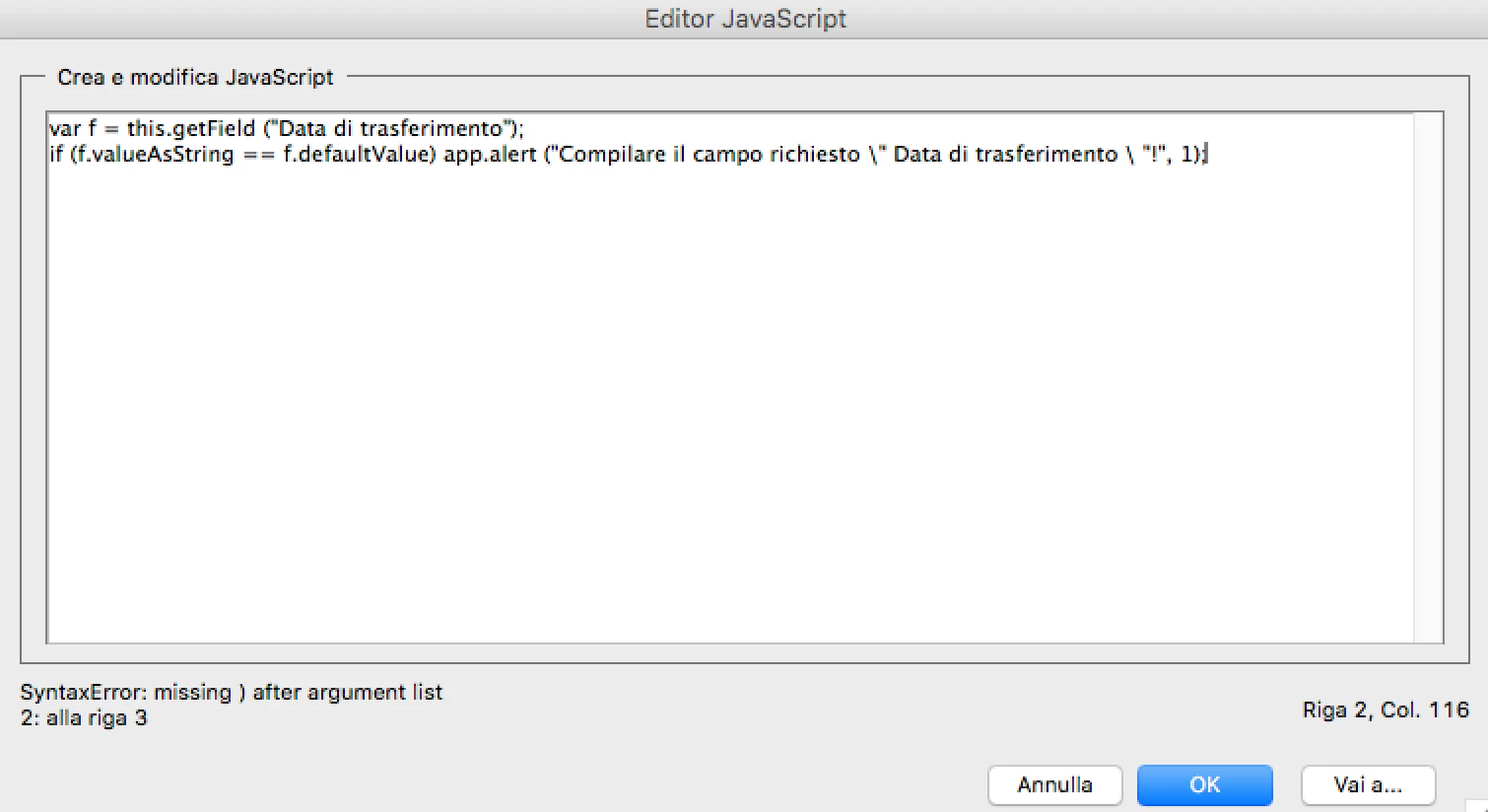
screen.png


Translate
Report
Community guidelines
Be kind and respectful, give credit to the original source of content, and search for duplicates before posting. Learn more
community guidelines
Community Expert ,
Mar 23, 2021 Mar 23, 2021

Remove the space between the back-slashes and the double-quotes (") characters.

Translate
Report
Community guidelines
Be kind and respectful, give credit to the original source of content, and search for duplicates before posting. Learn more
community guidelines
Community Beginner ,
Mar 23, 2021 Mar 23, 2021
LATEST

Great! It works!

Many many thanks!

Ciao!

Translate
Report
Community guidelines
Be kind and respectful, give credit to the original source of content, and search for duplicates before posting. Learn more
community guidelines