


Participating Frequently
May 11, 2023
Answered

Pre-Flight Profiles Missing after New Install

  • May 11, 2023
  • 2 replies
  • 6791 views

I bought Adobe Pro specifically to use Pre-Flight.

I did a fresh install of Adobe Pro on a brand new Windows 11 laptop.

And now, there are no listed Profiles in Pre-Flight.
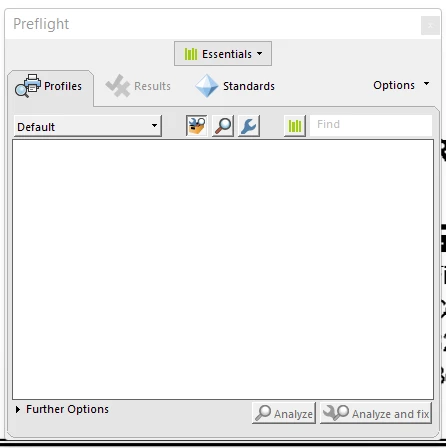
I need a fix for this now or a refund for my purchase.

Correct answer Nishu254088549w1n

The Preflight Continuous folder was not exactly where you indicated, but I found it and deleted it.

I restarted Adobe, opened a PDF, and went into Preflight and it worked.

Thanks for working through this with me.


Hi @Mark V.2956975591ad , Thank you for the response.
Can you please help me with the following steps which will help me understand the issue better as it is not reproducible in-house?
1.  Where was the "Preflight Acrobat Continuous" folder present in your system?  
2.  Can you please switch ON PM -> quit app -> delete "Preflight Acrobat Continuous" folder -> then try the workflow? 
3. Does the issue in PM On mode occur when a specific file is opened or for all files.

Regards,

Nishu Gupta

Acrobat Engineering Team


2 replies

Participating Frequently
May 11, 2023

I have the following version.

I will try a reboot. I already tried to look for updates and repair.


Participating Frequently
May 11, 2023

I tried a reboot, but I still have the same issue.

Adobe Employee
May 12, 2023

Hi @Mark V.2956975591ad ,


Thanks for reporting the issue and apologies for the inconvenience caused. The issue is not reproducible on our side. Hence for further investigation of the issue , I would need following information :

System OS and its version


Regards,

Divya Kumar Singh

Acrobat Engineering Team

Amal.
Community Manager
Community Manager
May 11, 2023

Hi @Mark V.2956975591ad 


This issue was addressed with version 23.01.20143. What is the version of the Acrobat DC you are using? To check the version, go to Help > About Acrobat and ensure you have the recent version 23.01.2017x installed. Go to Help > Check for updates and reboot the computer once.

Also, try to repair the installation from the help menu (Win Only) and see if that works.


Let us know if you still get the same issue


Regards

Amal