
Inspiring
August 4, 2021
Question

Preflight Fixup results inquiry

  • August 4, 2021
  • 1 reply
  • 582 views

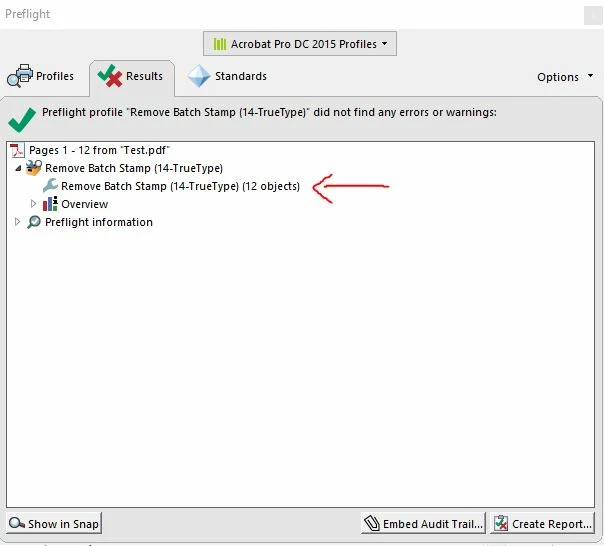
I used a fixup to remove objects from a PDF.  The results seemed to work but I'm worried it removed some objects that shouldn't be removed.  This particular example was only 12 pages so it's easy to review but if there are thousands of pages, is there a way to expand the results in preflight to show what exactly was removed or somehow highlight in the document what was removed (or even an analyze feature that highlights all objects that are about to be removed before the fixup is applied)?
This topic has been closed for replies.

1 reply

Amal.
Legend
August 4, 2021

Hi there


Hope you are doing well and sorry for the trouble. As described, you want to expand the results in preflight to show what exactly was removed or somehow highlight in the document what was removed.


Preflight > Fixup is a powerful tool and its result totally depends upon how you have defined it.

You can use the Preflight tool to fix many errors in a document. To do this, you add error corrections, called fixups, to a profile. The fixup automatically corrects the problem, if possible, or provides information so that you can correct the problem in the source file. A profile with a fixup has the gray wrench icon next to it. An outline of a wrench means that no fixups are associated with the profile.


Preflight includes several predefined fixups that you can add to a profile. These cover a broad range of errors that affect color, fonts, images, print production, compliance with international standards like PDF/X and PDF/A, and other areas. Preflight also includes a toolkit for creating your own single fixups.


For more information please check the help page - https://helpx.adobe.com/acrobat/using/correcting-problem-areas-preflight-tool.html

Note: A fixup permanently changes the document.


Hope this information will help


Regards

Amal

m2ramosAuthor
Inspiring
August 4, 2021

Hello Amal, 


Thanks for the reply.  I'm not sure if I missed the answer to my question but it seems you just described what a fixup is and the link does the same.  I was looking to see if there was a way to get more information from the results tab after the fixup has been applied to the PDF.  As you can see from the screenshot in the prior post, the fixup removed 12 objects, is there a way to see what 12 objects it removed and from what page?

Amal.
Legend
August 5, 2021

Hi there


Hope you are doing well. As described earlier, the result of the fixup depends upon the way it has been defined.


Would you mind sharing the steps that you did to apply the fixup to remove the objects from the document?


Also, what happens when you click on the drop down arrow for 'overwiew' and 'preflight information' as shown in the screenshot you have shared.


Regards

Amal