
Community Expert
March 28, 2024
Question

preflight for commercial printing and low rez images

  • March 28, 2024
  • 1 reply
  • 524 views

I need to do a print ready pdf from Adobe FrameMaker. FrameMaker has issues with this, but most are fixable using Acrobats preflight feature. What I can't figure out is: Where in Acrobats Preflight tools can I find information regarding low rez images? IS there an option somewhere?

B
Best regards

Bjørn


This topic has been closed for replies.

1 reply

Eric Dumas
Community Expert
Community Expert
March 28, 2024

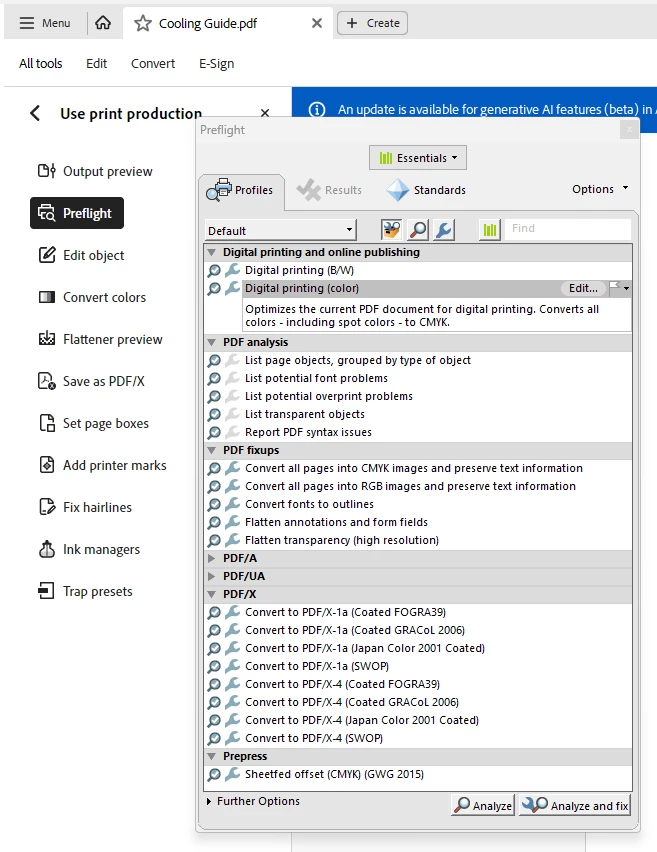
3 options:

  1.  (Essentials group at the top of the window) In the PDF Analysis section > PDF Analysis > List page objects, grouped by type...
  2. (In the Prepress Group at the top of the window) PDF Analysis > List potential problems
  3. Make your own profile

    For 1 and 2, you can create a report to have a seperate list while you fix your document.


    Doesn't Frame Maker have its own preflight? I used FrameMAker several years ago, I cannot remember.
Eric Dumas
Community Expert
Community Expert
March 28, 2024

To make your own profile, use the Options drop down on the top right and fill the details you need (new name, dpi values...)


gary_sc
Community Expert
Community Expert
March 28, 2024

Thanks a million! I have not put together the job originally and there a LOT of pages with a LOT of images i all sorts of color spaces and resolutions. I believe they are going to print this thing in traditional offset printing, so I shall have to find a way to fix all the errors. FrameMaker DOES have some preflighting, but the distance between what works inside FrameMaker and what actually comes OUT of FrameMaker in PDF has grown, unfortunately.


Let me add to Eric's correct answer about low-resolution images: That is way beyond Acrobat's capabilities. You need to have an image-based application to increase the resolution of an image. Photoshop can do this to some degree, but it is restricted to file types. Other applications, such as "Topaz Photo AI," are more reliable and can work on almost all image types. But, whatever image application you use, the image must be removed from the document, processed by the image application, and replaced. There is NO solution for applying the process from within Acrobat. 


Sadly, and I know you do not want to hear this, all image upgrades and enhancements should be completed before the PDF process is initiated. 


Good luck