
Participant
June 12, 2017
Question

Preflight overprint AND blend mode

  • June 12, 2017
  • 3 replies
  • 4494 views

Hi all,

Got a head scratcher here... I'd like a preflight to flag if an element has Overprint AND a Multiply applied.

An example would be: A greyscale tif, coloured with black, exported as a 1.4 PDF, and a preflight which provides these results

conatiner with:

  • Overprint On + Multiply On = Fail
  • Overprint Off + Multiply Off = Pass
  • Overprint Off + Multiply On = Pass
  • Overprint On + Multiply Off = Pass

Here are 2 examples of the Graphic state properties, of different options. I can't see any difference, but think I may be looking in the wrong place?
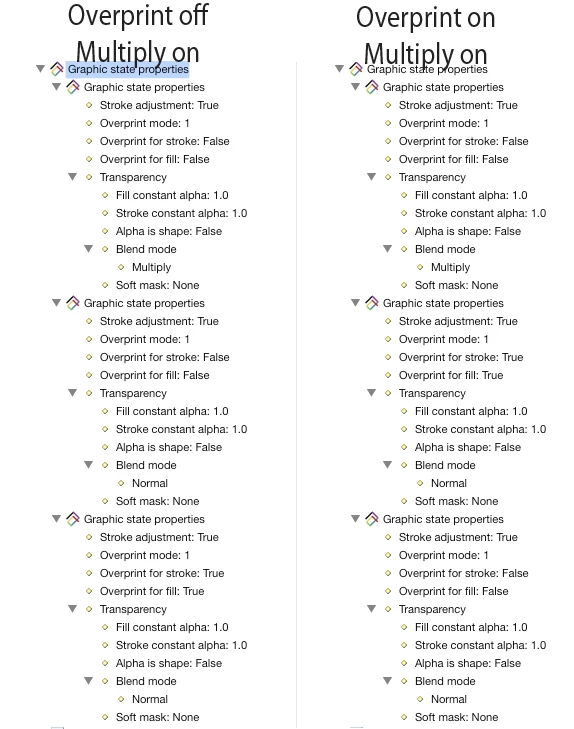
It sounds like it should be super simple! But for the life of me I can't get it...

Any help would be greatly appreciated!

Tom

This topic has been closed for replies.

3 replies

abailescollins
Participating Frequently
April 30, 2018

Seems pretty straightforward in PitStop actually..

Select if fill overprint is on

Select by blend mode (configure for multiply)

AND

Log Selection (write a custom message)

If you want to check for the possibliity of a overprint stroke as well that's also possible, but would need a few extra actions.

dario.
Known Participant
April 27, 2018

Can I ask you why you need this?
...I'm having a similar issue!

Stephen Marsh
Community Expert
Community Expert
April 27, 2018

Does your RIP/DFE choke or produce incorrect results if both overprinting and multiply blend mode are used?

Stephen Marsh
Community Expert
Community Expert
April 27, 2018

Yeah, kind of 'ghost effect'.

Eg if a pdf has a spot-colored object with overprint AND multiply used together the result is this object will affect the underlying objects.

I've talk about it with an ESKO technician and they also confirm that - regardless the software you are using.

I'm trying to preflight it too.

You can also test it inside Adobe Illustrator. Check this pic - it's Italian but I think it's clear.


So Esko is involved… Does your Esko software have the ability to use Enfocus PitStop Pro action lists or preflight profiles?

Legend
June 13, 2017

Look at overprint for stroke and overprint for fill, independent properties. 

Participant
June 13, 2017

Thanks for the reply, but it's not that.

The graphic state properties shown in my screen grab are created from a single tif in Indesign set to overprint AND multiply. It's been split into 3 parts.

  • The image
  • The image with overprint
  • The image with multiply

I need to be able to check these properties as if the image was one element.

I've attached a .zip here which contains an Indesign file, a tif, and 4 PDFs. The PDFs are named with the result I would like a preflight to find.

https://drive.google.com/file/d/0B6tR5XpHS_KwSkExbzNjR0l0Yk0/view?usp=sharing

Any help is appreciated!

Cheers

Tom

Stephen Marsh
Community Expert
Community Expert
June 17, 2017

This may be possible in Enfocus PitStop Pro 2017, which has a new “geomapper” feature that can look at the interaction of stacked objects as if they were one object… However this is a new feature which I have not had much time to play with and it may be limited at this time in what it can check.