
Peter Goodey
Participating Frequently
August 14, 2019
Answered

Previously valid signing certificate shows invalid policy constraint in DC 2019

  • August 14, 2019
  • 2 replies
  • 27652 views

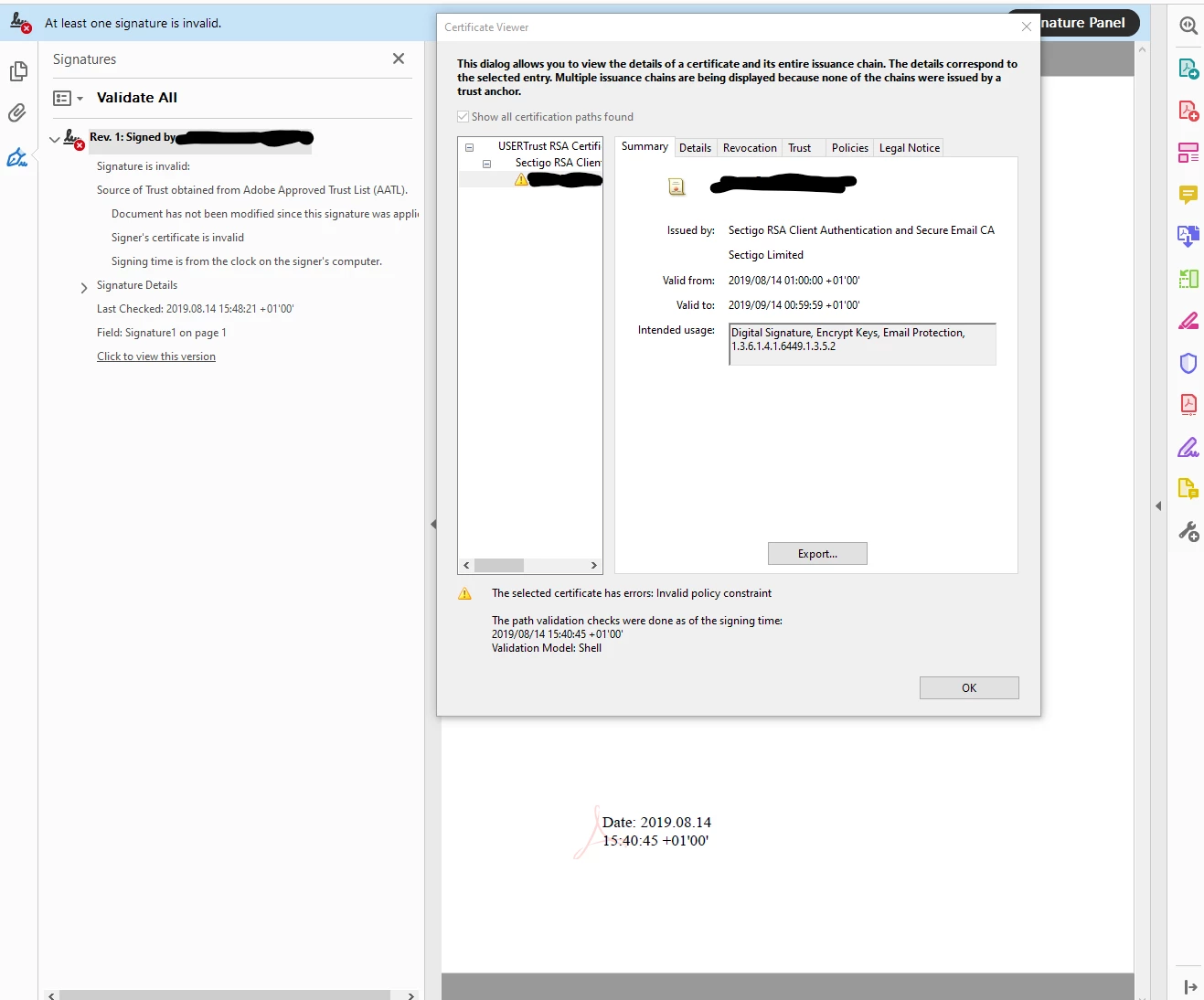
We have previously been able to sign documents with certificates with the following intended usages: Digital Signature, Encrypt Keys, Email Protection, 1.3.6.1.4.1.6449.1.3.5.2

As per Steven.Madwin​'s response to Document signing requires code signing certificate this should be fine. However as of Acrobat Reader DC 2019 the signature is marked as invalid. The certificate path shows "Invalid policy constraint" for the issuing certificate paths and the signing certificate. The certificate we are using is issued by Sectigo and is AATL approved.

Has Acrobat become fussier about the types of certificates it will accept. If so what needs to be present in the certificate?
This topic has been closed for replies.
Correct answer Steven_Madwin

The Object Identifier (OID, the number in the Certificate Policies edit field) is a representation for a document that lays out all of the requirements of a the Sectigo AATL Policy. If the digital ID that Sectigo issued you met those requirements then they wound have include that specific OID in your Public-key Certificate (PKC), or more specifically, the Certificate Policy extension in your PKC.

The missing piece of this picture puzzle is what is listed in your PKC? If you highlight your cert in the tree view on the left of the Certificate Viewer dialog, then select the Details tab, you can scroll the list view and find the Certificate Policy extension. If you click on that entry you will see a Policy OID that is a short-hand for which set of requirements your certificate met when it was issued. If it had matched the OID displayed above then the signature would have been valid.

Steve

2 replies

Participant
February 16, 2022

كيف يمكن كتابة كلمات لها علاقة بتعلم اللغة الانجليزية باستخدام أدوبي دي سي مثل جمل بالانجليزي

Steven_Madwin
Adobe Employee
Adobe Employee
August 14, 2019

Hi

Peter Goodey
Participating Frequently
August 15, 2019

Hi Steven Madwin

Thanks for getting back to me so quickly. Here's the policy details from the UserTrust/Sectigo CA Cert. Look reasonable? I could delve into the cert to dump lower level details?

Steven_Madwin
Adobe Employee
Steven_MadwinCorrect answer
Adobe Employee
August 15, 2019

The Object Identifier (OID, the number in the Certificate Policies edit field) is a representation for a document that lays out all of the requirements of a the Sectigo AATL Policy. If the digital ID that Sectigo issued you met those requirements then they wound have include that specific OID in your Public-key Certificate (PKC), or more specifically, the Certificate Policy extension in your PKC.

The missing piece of this picture puzzle is what is listed in your PKC? If you highlight your cert in the tree view on the left of the Certificate Viewer dialog, then select the Details tab, you can scroll the list view and find the Certificate Policy extension. If you click on that entry you will see a Policy OID that is a short-hand for which set of requirements your certificate met when it was issued. If it had matched the OID displayed above then the signature would have been valid.

Steve