
phillipr30442542
Known Participant
October 3, 2021
Question

print 2-sided for multiple pages prints multiple pages per sheet

  • October 3, 2021
  • 1 reply
  • 810 views

I want to print selected pages of a document 2-sided. Acrobat chooses the options to print multiple pages per sheet. 

PRINTER OPTIONS
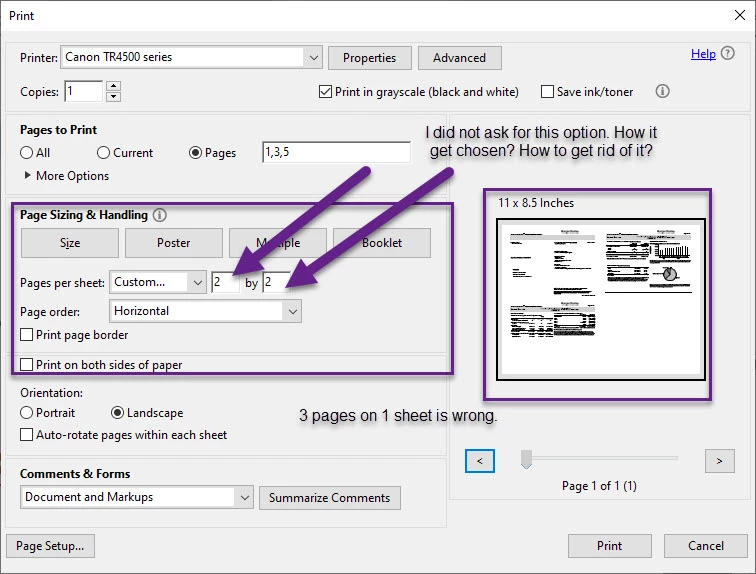
I've done this kind of printing in Acrobat for years, never saw this problem.
TIA for your help.

This topic has been closed for replies.

1 reply

phillipr30442542
Known Participant
October 6, 2021

I'm using Acrobat on 2 computers in my home: a Dell PC and a Microsoft Surface Book 2. The document in question prints fine on the SB but not on the PC. Both computers print to the same printer. Both computers are running version 2021.007.20095 of Acrobat DC.

I can't think of any setting on either computer that would change the printing behavior.

Isn't there some way to open a support ticket for this type of issue, even for the free product?

TIA. Cellist.

SweetTasha
phillipr30442542
Known Participant
October 14, 2021

I spent a while researching this issue and found a way to open a support ticket. I don't remember exactly how I located that but it was by using acrobat HELP and using the virtual assistant that finally got me to a chat session with an actual person. At that point I was hopeful and optimistic that I would eventually get resolution to this issue.


After several chat sessions I learned that was not to be the case. The advice was to use the Export PDF (pay-for) feature. In other words, export the pdf to an Excel or Word file and do the printing from there. However, my experience with Export PDF is that it requires a lot of editing of the raw output to get the text into a usable state.


I downloaded a trial of Acrobat DC Pro (also pay-for if I wanted to keep it), but it would not print the document correctly either.

Bottom line is that Adobe refuses to fix the problem. In my opinion, Adobe is ignoring the fact that there was no problem before I upgrading the release. But I feel that is the most plausible explanation.

I've learned that there are alternative software products to work with pdfs, and the one that I downloaded does the printing correctly. It would be improper for me to mention the name of the product openly in this forum, but feel free to private message me.

TIA. Cellist.

SweetTasha