Answered
Printer-one sheet per page
I needed to print two sheets per page and now I cannot return to single sheet per page. Any suggestions>
Thanks
JF

I needed to print two sheets per page and now I cannot return to single sheet per page. Any suggestions>
Thanks
JF
Assuming you're using Acrobat (or Reader), the print dialog box is quite feature-packed. Most of the time that I've encountered folks with a similar question, it is because the last settings used are remembered to the next session. In the screen shot below, I am still set up to print 2 pages per sheet from the last print job. In order to get back to single sheet printing, I'd need to click on the Size button. Once clicked on, the options fro output change and SHOULD allow you to print as desired.
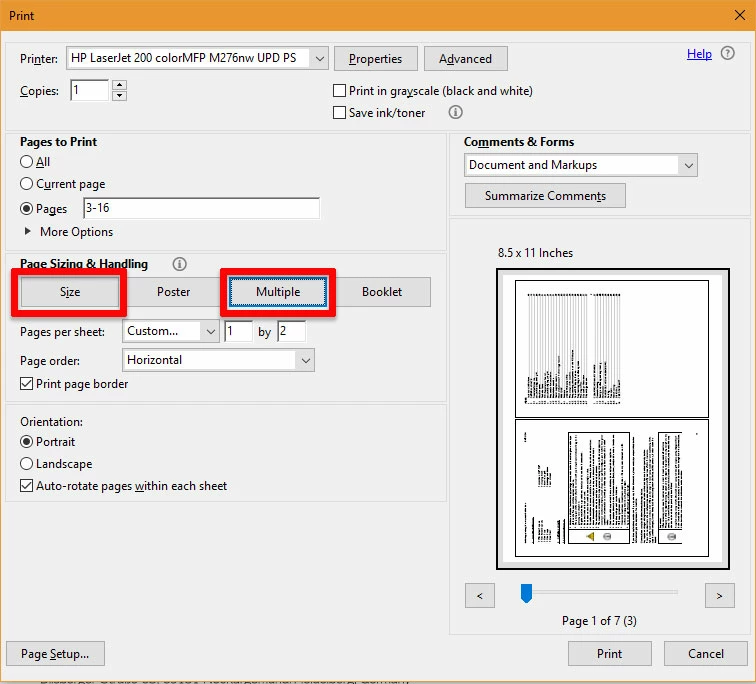
If this is not the case, the Repair Installation, as mentioned above by Meenakshi would be my next step.
I hope this is helpful.
My best,
Dave
Already have an account? Login
Enter your E-mail address. We'll send you an e-mail with instructions to reset your password.
 AdChoices