
yankleber
Inspiring
September 23, 2022
Answered

Printing 2 pages per sheet (front only and collated) for quick and easy spiral binding

  • September 23, 2022
  • 2 replies
  • 1468 views

I will try to explain my issue.


I have an A4 document with 100 pages that I need to convert in an A5 booklet, printed front only (back will be left blank) and spiral bound.


The idea is have pages 1-50 at the left side of the A4 sheet and the 51-100 pages at the right side of the A4 sheet, then after print it is just cut the ream in the half, move the left half over the right half and bind it. Quick and easy.


To make it more clear this is what I want to do:
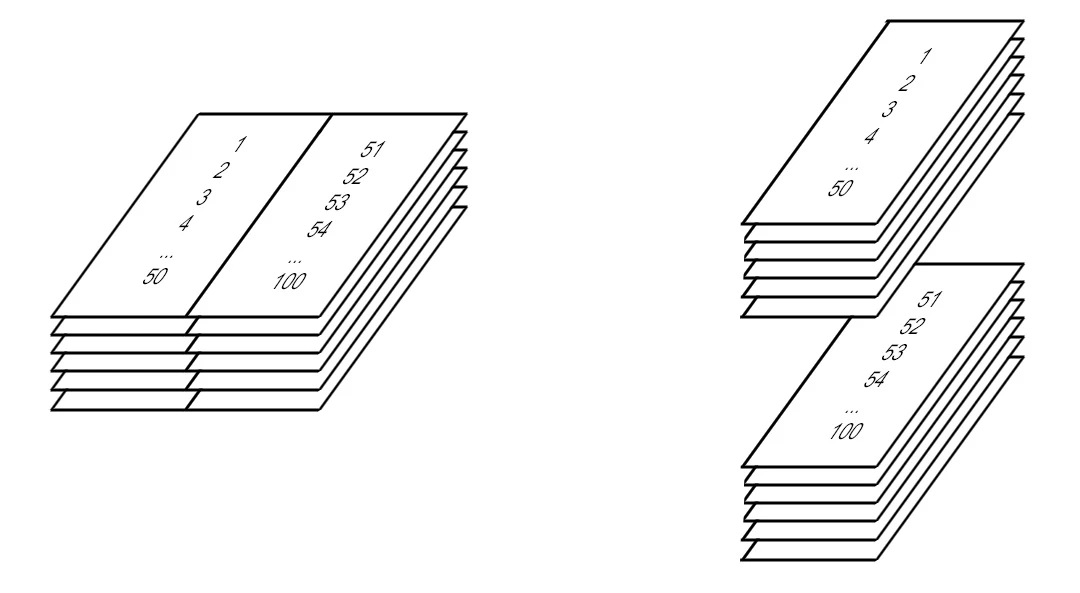
The solution would be to use the Multiple handling option, then choosing 2 pages per sheet and filling the Pages field with this:

1,51,2,52,3,53,4,54,5,55,6,56,7,57,8,58,9,59,10,60,11,61,12,62,13,63,14,64,15,65,16,66,17,67,18,68,19,69,20,70,21,71,22,72,23,73,24,74,25,75,26,76,27,77,28,78,29,79,30,80,31,81,32,82,33,83,34,84,35,85,36,86,37,87,38,88,39,89,40,90,41,91,42,92,43,93,44,94,45,95,46,96,47,97,48,98,49,99,50,100


The problem is that the Pages field has a limit of 100 chars, so it will cut my pages sequence to this:

1,51,2,52,3,53,4,54,5,55,6,56,7,57,8,58,9,59,10,60,11,61,12,62,13,63,14,64,15,65,16,66,17,67,18,68,1


Any idea?


Thanks!

This topic has been closed for replies.
Correct answer yankleber

I solved the problem myself. In fact I already had fifty percent of the way done. It was just a matter of create a new sequence of pages and reprint it to a new PDF. And I already had wrote a .NET program to resequence it as I showed in my OP.


The problem is that it's impossible to reprint the PDF with Adobe Reader for such long sequence because it doesn't accept more than 100 characters in the printing dialog pages field.


The solution was finding an app which does. In this case it was Wondershare PDFElement which accepts as much characters as you need to insert there. 👦


Problem solved.

2 replies

yankleber
yankleberAuthorCorrect answer
Inspiring
September 23, 2022

I solved the problem myself. In fact I already had fifty percent of the way done. It was just a matter of create a new sequence of pages and reprint it to a new PDF. And I already had wrote a .NET program to resequence it as I showed in my OP.


The problem is that it's impossible to reprint the PDF with Adobe Reader for such long sequence because it doesn't accept more than 100 characters in the printing dialog pages field.


The solution was finding an app which does. In this case it was Wondershare PDFElement which accepts as much characters as you need to insert there. 👦


Problem solved.

Bernd Alheit
Community Expert
Community Expert
September 23, 2022

With a script reorder the pages and then print 2 pages per sheet.

yankleber
yankleberAuthor
Inspiring
September 23, 2022

How can I reprint if the page fields of Acrobat Reader won't accept more than 100 chars? In fact I said that in my OP. Anyway, if you could supply me with an example of doing this "magic" I would appreciate though. 😉

Bernd Alheit
Community Expert
Community Expert
September 23, 2022

I don't have an example.