
Participant
October 31, 2022
質問

Problem that third-party plug-ins are not displayed in the tool list of Acrobat DC Pro

  • October 31, 2022
  • 返信数 6.
  • 9775 ビュー

Regarding the Windows version, there is a problem that third-party plug-ins are not displayed in the Acrobat tool list.
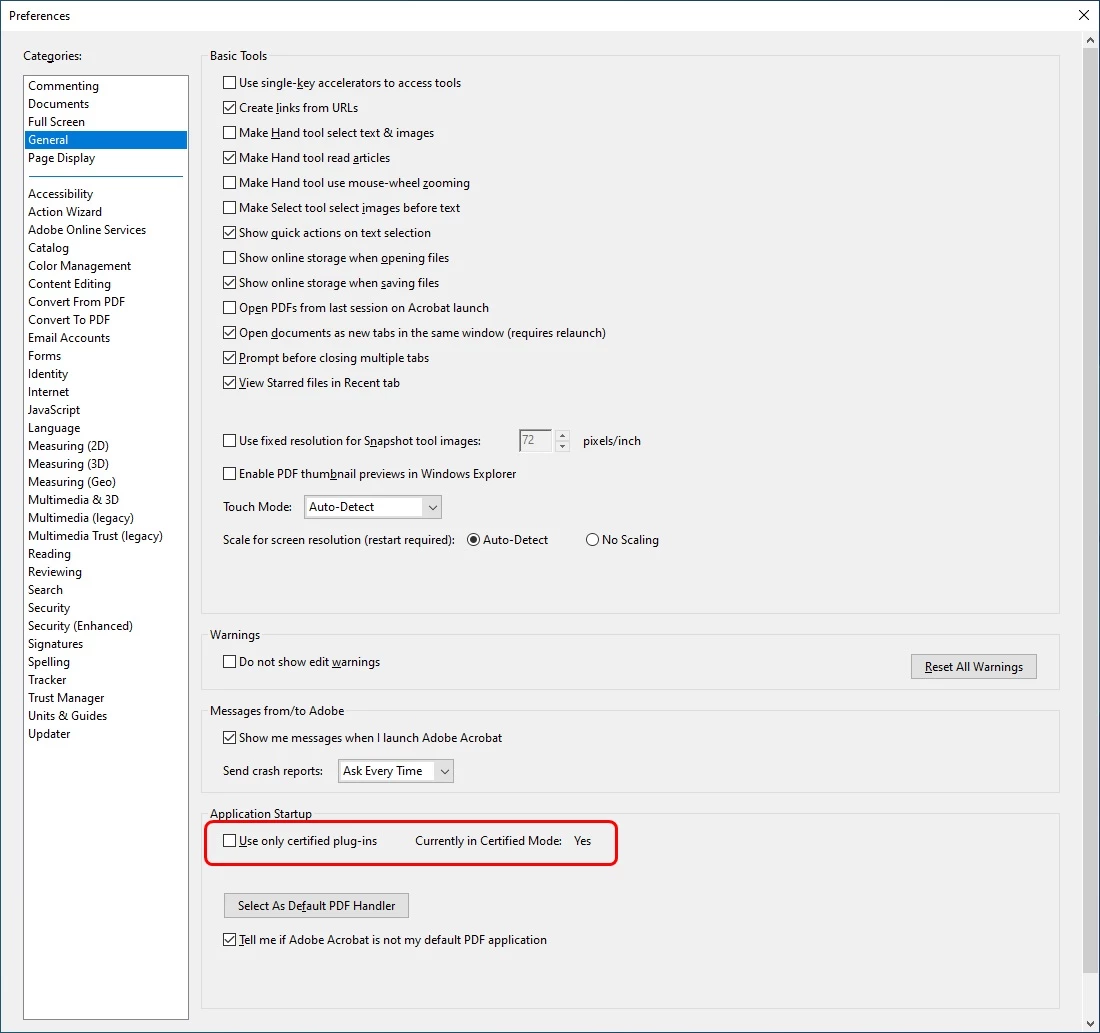
"Use only certified plug-ins" in the following settings (Edit -> Preferences -> General -> Application Startup) is not checked, but it is set to "Currently in Certified Mode: Yes",
It looks like it's stuck in a state where only Adobe-Certified plugins can be used.
I've done some research and haven't found a way to change the settings for "Currently in Certified Mode".

The Mac version has "Currently in Certified Mode: No", and you can use third-party plug-ins without problems.
I suspect that this is a problem with the Windows version of Acrobat.

Please tell me how to change the setting of the "Currently in Certified Mode" of Acrobat for Windows.

Thank you.
返信数 6

clayc
Participant
September 10, 2025

This is still an issue.  WIndows 11 Pro, Acrobat 2024 64-bit, add-in is a 64-bit.  I've set the above properly, set the recommended settings of the add-in provider, and it won't install in acrobat.  It successfully installs on all MS365 applications.  What's up with Adobe?  If the other vendors begin to support a pdf program other than Acrobat I'm out of here.  As it is, it's required.  So I have an overpriced product I have to use that doesn't work.  Adobe gets richer, and I work more hours.  Grand.

Participant
March 13, 2024

Were you ever able to resolve this issue by chance? I've encountered the same problem as well.

Participant
April 10, 2024

Same here. I can reach the PlugIn via Pull Down Menu "PlugIns" but it´s not listed in the Tools List. 

Participant
November 1, 2022

I'm thinking that if I can change the Application Startup setting to "Currently in Certified Mode: No", my plug-in will appear in the tools list.

Bernd Alheit
Community Expert
Community Expert
November 1, 2022

You will see "Currently in Certified Mode: No" when one or more non-ceritified plugins were loaded.

Participant
November 1, 2022

Yes, the plug-in is also 64-bit version.

Participant
October 31, 2022

it is 64bit version.

Bernd Alheit
Community Expert
Community Expert
October 31, 2022

The plug-ins are also 64bit versions?

Bernd Alheit
Community Expert
Community Expert
October 31, 2022

32bit or 64bit version of Acrobat?

Participant
October 31, 2022

Whether its a 64bit or 32bit everything should work properly. I was facing the same issue but solved that easily.  

https://kiacatherine.sg
Legend
October 31, 2022

you probably have 64/bit Acrobat. Check the plugins for compatibility. If they are over a year old they certainly won't work.