Inspiring
April 8, 2024
Answered

Problem with javascript code in form

  • April 8, 2024
  • 2 replies
  • 2048 views

Hello, I hope you are well. I need help with this code for a form with two conditional dropdown lists.


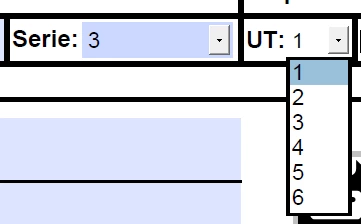
I have two dropdown lists. One is a series and you can choose from 1 to 5 and each of these has values ​​from 1 to 19 (some more, some less) so, when choosing a series, the following drop-down list should show what each one contains. So far it works for me and this is the code:


// Arrangement with the Series lists and the UTs of each one

var series = {
"1": ["1", "2", "3", "4", "5", "6", "7", "8", "9", "10", "11", "12", "13", "14", "15", "16", "17", "18", "19"],
"2": ["1", "2", "3", "4", "5", "6", "7", "8", "9", "10", "11", "12", "13", "14", "15"],
"3": ["1", "2", "3", "4", "5", "6"],
"4": ["1", "2", "3", "4", "5", "6"],
"5": ["1", "2", "3", "4", "5", "6", "7", "8"]
};


// Function to update the UT field based on the selected series

function actualizarUT() {
var serieSeleccionada = this.getField("Serie").value;
var utDropdown = this.getField("UT");
utDropdown.setItems(series[serieSeleccionada]); // Set the UTs according to the series

}


// Assign event to series field to dynamically update UT values

this.getField("Serie").setAction("Keystroke", actualizarUT());


This is what it would look like on the form:
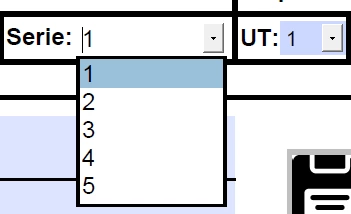


Now the problem is that, when selecting a number from the UT list, it is not selected, but rather the first number in the list is always placed. What can I do to keep the number on the list I want selected? I hope you can help me and I hope I have explained myself well. Thank you very much in advance!
This topic has been closed for replies.
Correct answer Joelis3620653204x2

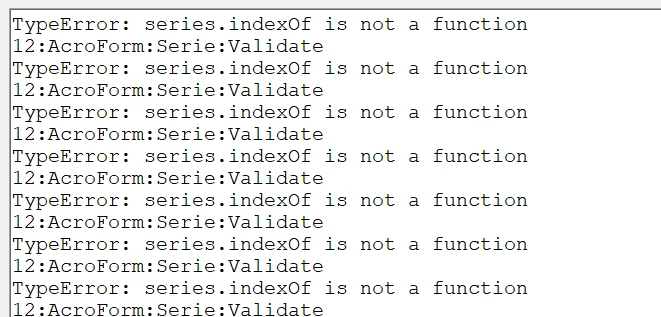
Every time I select a different series the console appears with this error, however, it allows me to select any value from the UT drop-down list without any problem and both values ​​of the series and the UT remain selected. That is to say, the selection is fine, I just don't know what caused the error since it still works.


I placed it this way in the validate section of "Series" and it worked! Thank you.

var series = {
    "1": ["1", "2", "3", "4", "5", "6", "7", "8", "9", "10", "11", "12", "13", "14", "15", "16", "17", "18", "19"],
    "2": ["1", "2", "3", "4", "5", "6", "7", "8", "9", "10", "11", "12", "13", "14", "15"],
    "3": ["1", "2", "3", "4", "5", "6"],
    "4": ["1", "2", "3", "4", "5", "6"],
    "5": ["1", "2", "3", "4", "5", "6", "7", "8"]
};

var oFldUT = this.getField("UT");
// Saving the previous value of UT field
var strPreValue = oFldUT.value;

// Set new list of items from the currently selected item "event.value"
oFldUT.setItems(series[event.value]);

// Test if previous value exists in the new list
// Set to Previous Value if it exists
var utOptions = series[event.value];
if (utOptions.indexOf(strPreValue) !== -1) {
    oFldUT.value = strPreValue;
}


2 replies

Thom Parker
Community Expert
Community Expert
April 8, 2024

Good try with the scripting. Although you neglected to say where this code was placed. And the code has some serious issues (coding errors).  You are close.


First, place the "var series = {..." code into a document script, so the "series" variable is document global. 

Next delete all code you are currently using and put this script into the custom "Validate" script for the "Serie" dropdown.


var oFldUT = this.getField("UT");
// Setting new items removes the previous value 
// and sets the default for the new items
// So save the previous value and reset it if possible
var strPreValue = oFldUT.value;

// Set new list of items from the currently selected item "event.value"
oFldUT.setItems(series[event.value]);

// Test new list for previous value
// Set to Previous Value if it exists 
if(series.indexOf(strPreValue) >= 0)
   oFldUT.value = strPrevValue;


Thom Parker - Software Developer at PDFScriptingUse the Acrobat JavaScript Reference early and often
Inspiring
April 9, 2024

Thanks @Thom Parker, I placed all the code in the "UT" field, in the calculation tab and the custom calculation scripts section. I deleted the script I had and placed this one that you gave me in the "Series" variable, in the validate section and I get this error:
TypeError: series.indexOf is not a function
12:Field:Validate

sorry, I'm new to this topic of javascript and forms and I don't understand the terms very well

Inspiring
April 9, 2024

Every time I select a different series the console appears with this error, however, it allows me to select any value from the UT drop-down list without any problem and both values ​​of the series and the UT remain selected. That is to say, the selection is fine, I just don't know what caused the error since it still works.


try67
Community Expert
Community Expert
April 8, 2024

Use the Validate event, not Keystroke. Also, the second parameter of setAction needs to be a string, like this:


this.getField("Serie").setAction("Validate", "actualizarUT()");

Thom Parker
Community Expert
Community Expert
April 8, 2024

Do not use the "setAction" function. There is no need to constantly be resetting the script to the same thing, over and over. 


Thom Parker - Software Developer at PDFScriptingUse the Acrobat JavaScript Reference early and often
Inspiring
April 9, 2024

and what function can I use? Sorry, I'm new to this whole topic.