
Participant
August 18, 2023
Answered

Problem with "fill & sign" function

  • August 18, 2023
  • 2 replies
  • 4118 views

When filling out a document using the fill and sign function, after saving the document and reopening, the entered text is displayed in an unreadable form. One line may display normally, but most of the text is unreadable
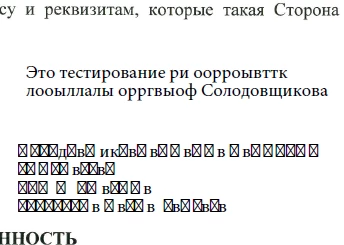
 

The document uses the Russian language.
But there is a problem with other languages as well.


https://community.adobe.com/t5/acrobat-discussions/adobe-reader-updated-to-2023-003-20269-asian-language-font-pack-stopped-working/td-p/14009477


Are the developers aware of this bug?
Wait for a decision or look for alternative software?

This topic has been closed for replies.
Correct answer Vinod Dobhal

Hi All,


The font corruption issue has been fixed in the latest update of Adobe Acrobat 23.003.20284.2636a55. Please try updating the application to the latest version.


Thanks,

Vinod

2 replies

Vinod DobhalCorrect answer
Adobe Employee
August 24, 2023

Hi All,


The font corruption issue has been fixed in the latest update of Adobe Acrobat 23.003.20284.2636a55. Please try updating the application to the latest version.


Thanks,

Vinod

Participant
August 24, 2023

thanks so much!

Eric Dumas
Community Expert
Community Expert
August 18, 2023

Can you try to open the filled/signed document in a web browser, just to check if the text appears correctly.

Next, in the File>Properties>Fonts tab, can you share a screenshot of the fonts used?

Participant
August 18, 2023

Hi!
Win10 1909
Adobe Reader DC 2023.03.20269 64-bit

Fill & Sign doesnt work properly!
When fill it with random characters such a 123___ asd фыв or something, after saving in pdf and reopened in Reader DC it shows crossed checkboxes. In browser it shows blanks with some characters.

Participant
August 18, 2023

and its works well with english chars..