
Known Participant
November 20, 2024
Answered

Problema de fuente Montserrat exportando desde word.

  • November 20, 2024
  • 1 reply
  • 1279 views

Hola a todos,
Tenemos un problema al exportar en PDF un word con montserrat (recientamente instalada e reinstalada en los puestos de trabajo y directamente desde google font). El PDF cambia todos los carracteres y eso con cualquier conversor Word to PDF es igual.
Adobe me genera este error : 

%%[ ProductName: Distiller ]%%
Aptos not found, using Courier.
%%[ Error: invalidfont; OffendingCommand: show ]%%

Stack:
-file-


%%[ Flushing: rest of job (to end-of-file) will be ignored ]%%
%%[ Warning: PostScript error. No PDF file produced. ] %%


Y el PDF sale así al exportar desde el conversor de word :
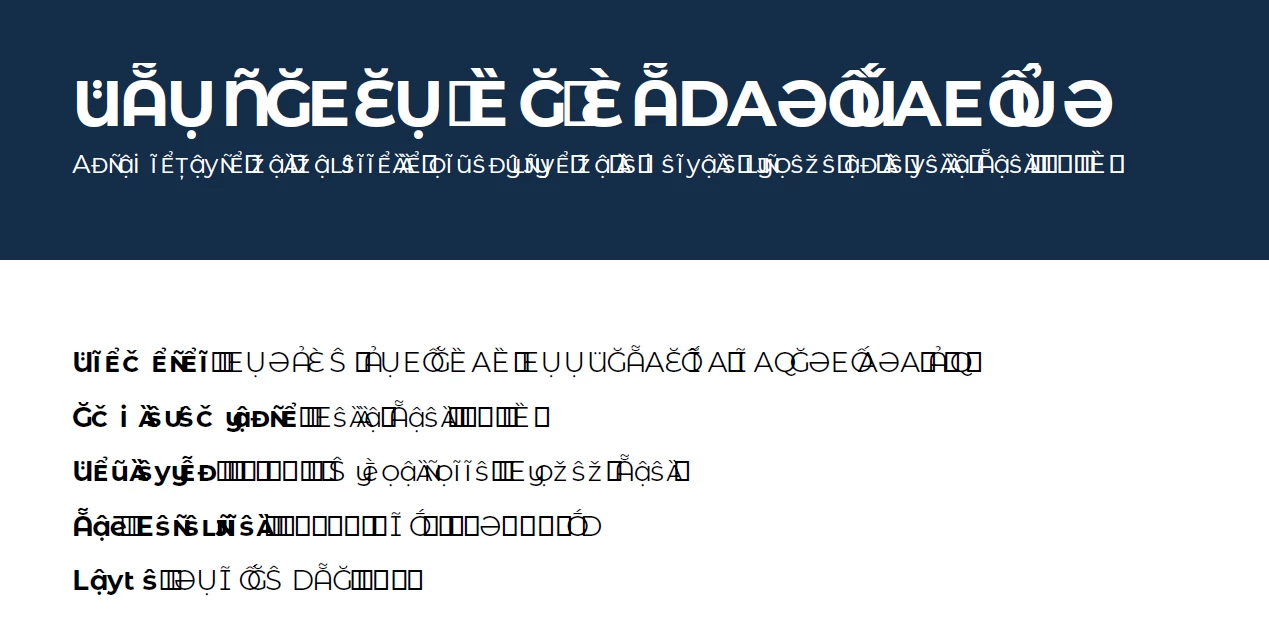

Hemos probado en 3 puestos de trabajos distintos.

This topic has been closed for replies.
Correct answer S_S

Hi @Olivier-R,


Hope you are doing well. Sorry for the trouble. 


Do you see this issue with every file you try to use? 

Would you mind sharing print logs with us to help us understand if this is related to Acrobat?

Steps can be found here: How to collect Print logs for Acrobat/Reader?


Also, for converting the files from Word using Acrobat PDF Printer, would you mind checking if this has been done: 

Go to Print-> Adobe PDF-> Printer properties-> uncheck "Rely on system fonts only, do not use document fonts"-> OK.


Look forward to hearing from you.


-Souvik

1 reply

S_S
Community Manager
S_SCommunity ManagerCorrect answer
Community Manager
November 20, 2024

Hi @Olivier-R,


Hope you are doing well. Sorry for the trouble. 


Do you see this issue with every file you try to use? 

Would you mind sharing print logs with us to help us understand if this is related to Acrobat?

Steps can be found here: How to collect Print logs for Acrobat/Reader?


Also, for converting the files from Word using Acrobat PDF Printer, would you mind checking if this has been done: 

Go to Print-> Adobe PDF-> Printer properties-> uncheck "Rely on system fonts only, do not use document fonts"-> OK.


Look forward to hearing from you.


-Souvik

Olivier-RAuthor
Known Participant
November 20, 2024

Gracais por tu respuesta 🙂

Pero si me pasa con todos los archivos. Incluso he creado un word con solo la palabra "test" dentro, y me pasa igual. Nos pasa igual en varios ordenadores... Es cierto que es cada vez con la misma versión de los programas.

S_S
Community Manager
Community Manager
November 21, 2024

Hi @Olivier-R,


Thanks for the response.


We are aware of the issue, and the team is working on a fix.

However, in the meantime, could you try the steps above and let me know if they work for you?


The steps can be found by going into the Acrobat Ribbon in Word -> and clicking on preferences.


Look forward to hearing from you.


-Souvik