
Exit
  • Global community
    • Language:
      • Deutsch
      • English
      • Español
      • Français
      • Português
  • 日本語コミュニティ
  • 한국 커뮤니티
8

Protected Mode: Why ship a feature that just breaks everything?

Community Beginner ,
Oct 17, 2023 Oct 17, 2023

My life improved markedly when I unchecked the "BREAK EVERYTHING" checkbox in Acrobat (shown cirlced below). I was happy at first, because my PDF edits went from 5 seconds of lag per keystroke (no exaggeration!) to near immediate responsiveness! Then I got angry--why does Adobe have a "BREAK EVERYTHING" checkbox? and WHY, in 2023.006.20320, is it checked by default?!!
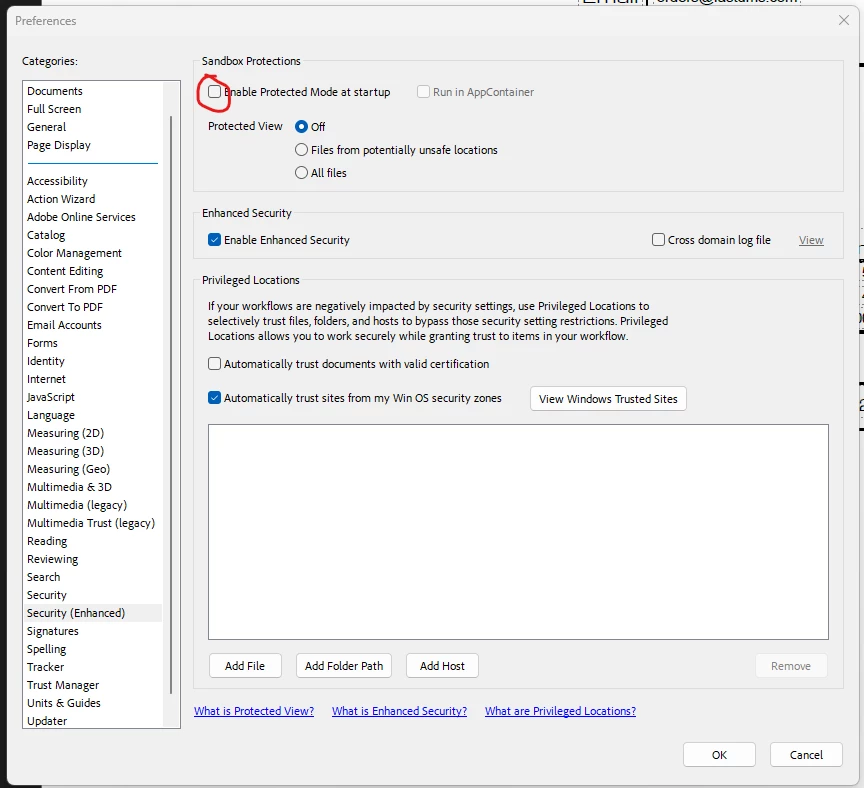
defaults2g3ht1zdvwu_0-1697591252842.png


TOPICS
Crash or freeze , Edit and convert PDFs , Modern Acrobat , PDF
344
Translate
Report
Community guidelines
Be kind and respectful, give credit to the original source of content, and search for duplicates before posting. Learn more
community guidelines
Adobe Employee ,
Feb 21, 2024 Feb 21, 2024
LATEST

Hi there


Hope you are doing well and sorry for the delay


Protected Mode continues to be Adobe's primary defense-in-depth security strategy for mitigating and preventing security vulnerabilities. Protected Mode protects you by limiting what malicious files can do and access. Protected Mode is enabled by default in Acrobat Reader, and is designed to run transparently in the background while protecting your hardware and data.


For more information please check the help page https://adobe.ly/3SPQgbY


Also update the application to the new version 23.08.20533 from the help menu > check for updates and reboot the computer once.


~Amal

Translate
Report
Community guidelines
Be kind and respectful, give credit to the original source of content, and search for duplicates before posting. Learn more
community guidelines