Participant
April 25, 2020
Answered

Publishing from Word to PDF

  • April 25, 2020
  • 1 reply
  • 16296 views

Hi. This is my first time trying to export a Word to PDF file. So first, I clicked export in word and create PDF. Then, i click to a file where I want to save my new PDF. I click "Publish". Does publish means publishing it online where everyone can see my life? or it simply just converting my file. Im actually really worried.

This topic has been closed for replies.
Correct answer Bevi Chagnon - PubCom.com

You're using a Microsoft export utililty to create the PDF. The word "Publish" is confusing, but it appears that the file will be stored on your computer, not in the cloud.


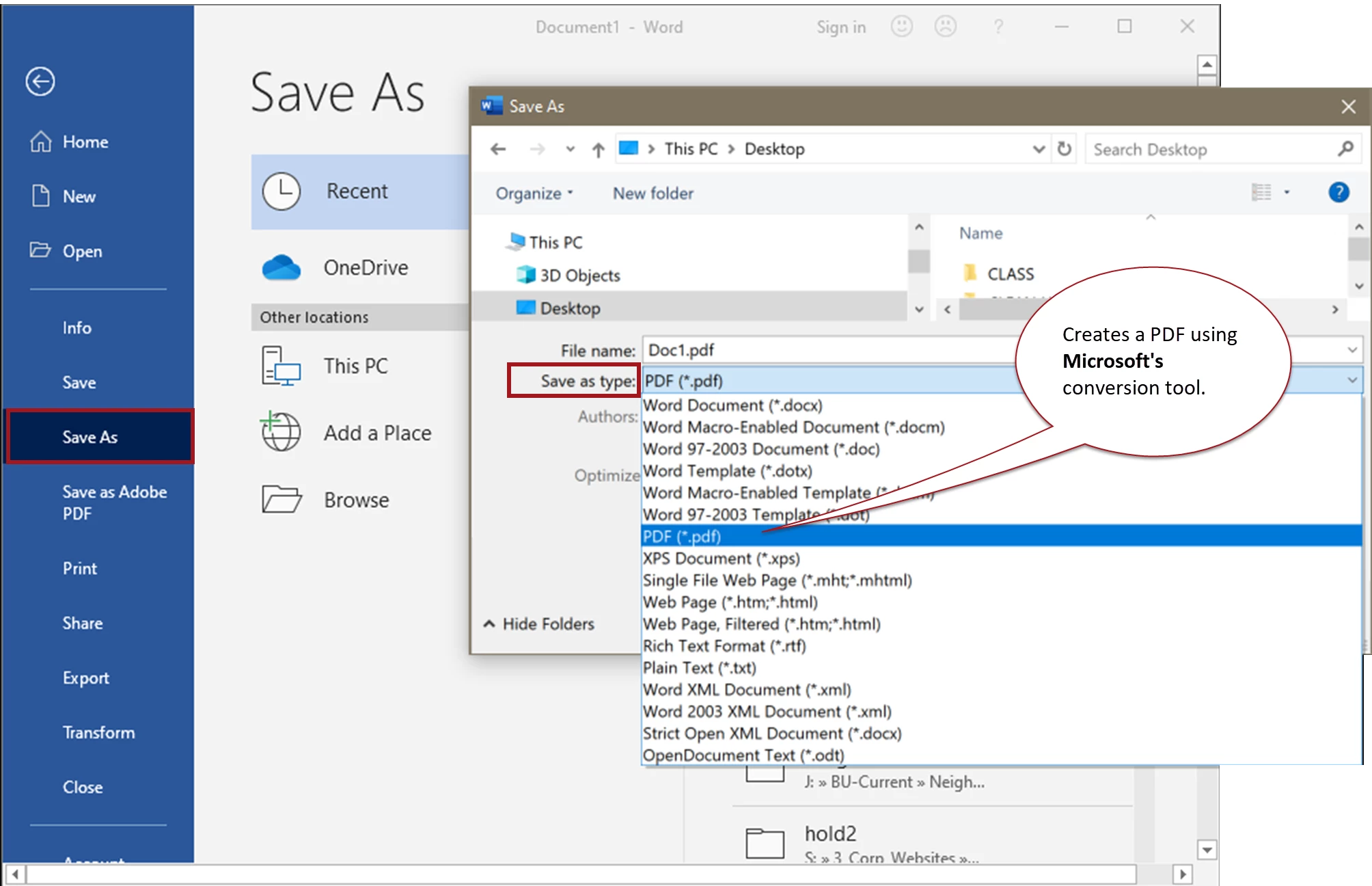
However, you can also "Save As" and select PDF for the file type, and as far as I know that PDF is stored only on your computer and not in Microsoft's cloud. (See the last screen capture below.)


This is an Adobe help forum staffed by volunteers, so we cover only Adobe's programs, not Microsoft's. You might want to ask your question in the MS Word forum at https://support.office.com/  to confirm whether your file will end up on a Microsoft cloud server or on your computer.


Some background that might help:

  • "Acer" is a brand of computer that runs the Miscrosoft Windows operating system.
  • "PDF" is a type of file that was originally developed by Adobe. But it is now an "open standard" that allows any software program to make PDF files. Microsoft uses its own conversion tool to make PDFs from your Office documents.
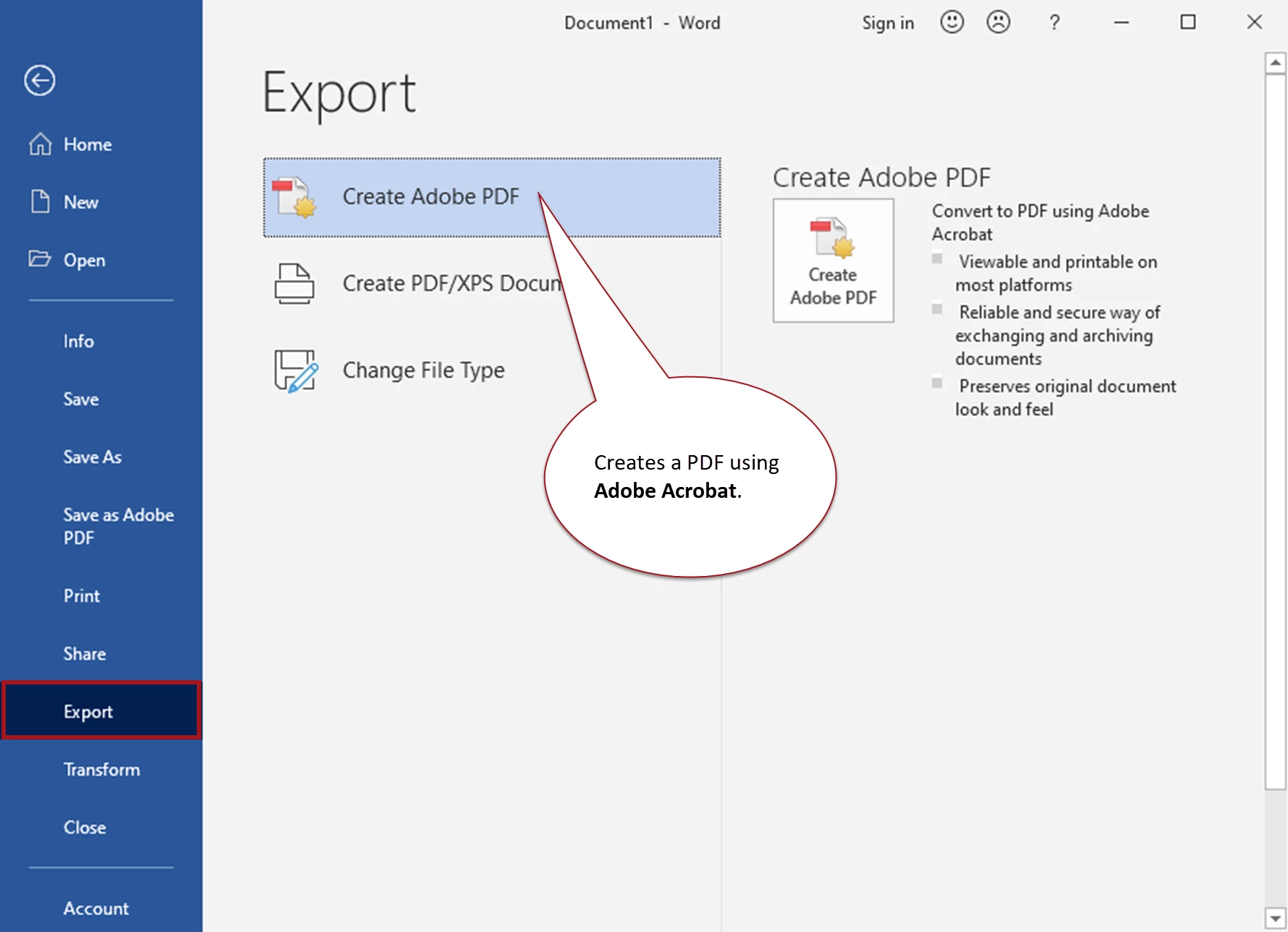
  • "Adobe®" and "Acrobat®" are trademarked names ® for Adobe's products. So when you see those words in a menu or tool, you're using an Adobe product that we can help you with.
  • You'll see "Adobe" or "Acrobat" only after you have installed Adobe Acrobat's plug-ins for MS Office.


These screen captures might help clear up the confusion...


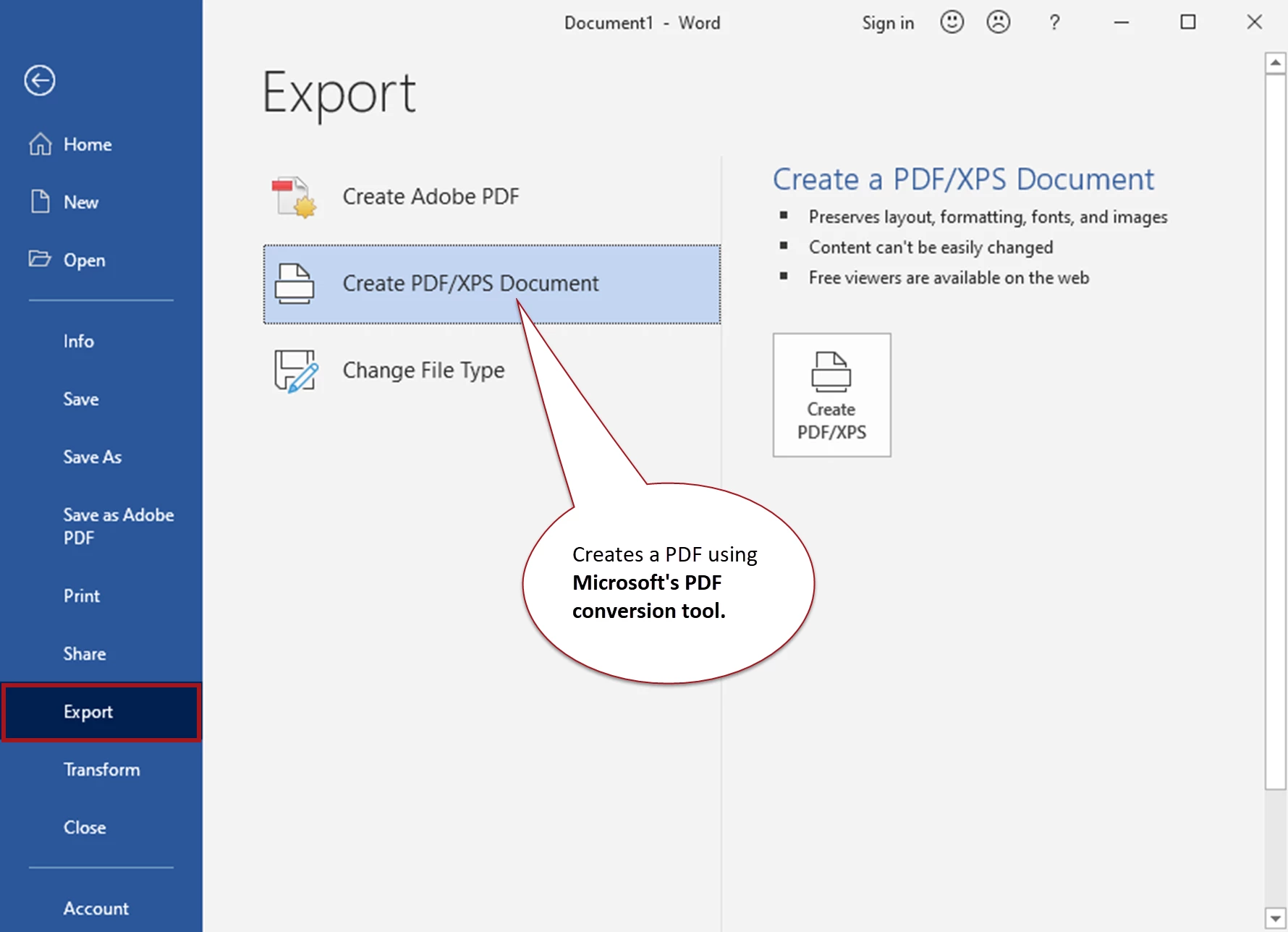
Export with the Microsoft® conversion tool
 

Export with Adobe® Acrobat® conversion tool
 

Save to PDF with the Microsoft® conversion tool
 

Hope this helps.

 

1 reply

Bevi Chagnon - PubCom.com
Legend
April 25, 2020

There isn't an "export" command in Word, so I don't know what steps you're taking.

Can you tell us the following so we can help?

  • The operating system are you using.
  • The version of Word you're using (FIle menu / Account / About Word / Version and Build).
  • The exact steps you're taking to do the export.
  • Are you using a Microsoft export tool, Adobe Acrobat's PDF Maker tool (the Acrobat ribbon), or some other manufacturer's export tool?


|    Bevi Chagnon   |  Designer, Trainer, & Technologist for Accessible Documents ||    PubCom |    Classes & Books for Accessible InDesign, PDFs & MS Office |
lilfry5Author
Participant
April 25, 2020

Im using acer. Everything start from the Word Document. Under the files, where theres an option to save and all, theres "export". When i click export, it says "create pdf/xps". It then brought me to my files and then, instead of save it says "publish". After that, a Pdf file is created.

Bevi Chagnon - PubCom.com
Legend
April 25, 2020

You're using a Microsoft export utililty to create the PDF. The word "Publish" is confusing, but it appears that the file will be stored on your computer, not in the cloud.


However, you can also "Save As" and select PDF for the file type, and as far as I know that PDF is stored only on your computer and not in Microsoft's cloud. (See the last screen capture below.)


This is an Adobe help forum staffed by volunteers, so we cover only Adobe's programs, not Microsoft's. You might want to ask your question in the MS Word forum at https://support.office.com/  to confirm whether your file will end up on a Microsoft cloud server or on your computer.


Some background that might help:

  • "Acer" is a brand of computer that runs the Miscrosoft Windows operating system.
  • "PDF" is a type of file that was originally developed by Adobe. But it is now an "open standard" that allows any software program to make PDF files. Microsoft uses its own conversion tool to make PDFs from your Office documents.
  • "Adobe®" and "Acrobat®" are trademarked names ® for Adobe's products. So when you see those words in a menu or tool, you're using an Adobe product that we can help you with.
  • You'll see "Adobe" or "Acrobat" only after you have installed Adobe Acrobat's plug-ins for MS Office.


These screen captures might help clear up the confusion...


Export with the Microsoft® conversion tool


Export with Adobe® Acrobat® conversion tool


Save to PDF with the Microsoft® conversion tool


Hope this helps.


|    Bevi Chagnon   |  Designer, Trainer, & Technologist for Accessible Documents ||    PubCom |    Classes & Books for Accessible InDesign, PDFs & MS Office |