sarahr9691477
Participant
October 3, 2016
Answered

"Add to trusted certificates" button is grayed out. Why?

  • October 3, 2016
  • 7 replies
  • 74062 views

And at the top of the document it says "The validity of the document certification is unknown. The author could not be verified." Can anyone help with this?

Correct answer Adorobat

Hi sarahr9691477

You might try the following steps for Acrobat DC/XI:

1- Launch Acrobat>navigate to Edit menu> select Preferences
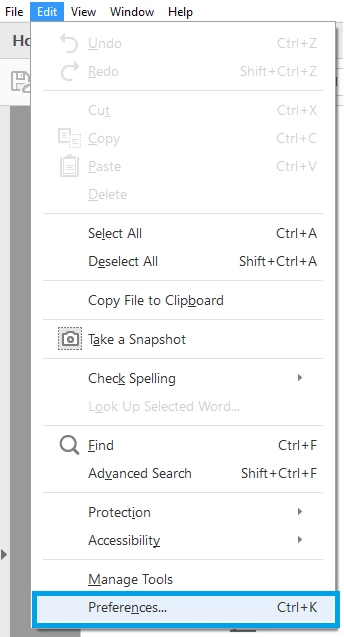
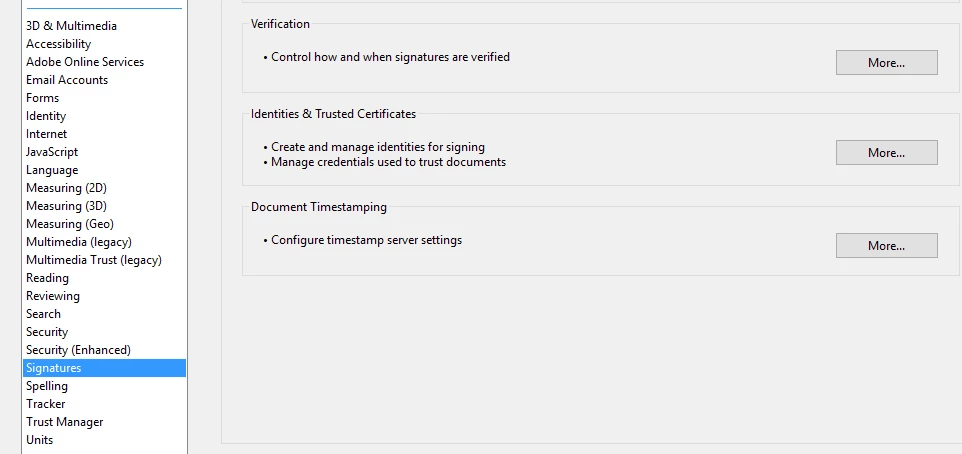
2- Under Preferences>select Signatures in the left hand pane.
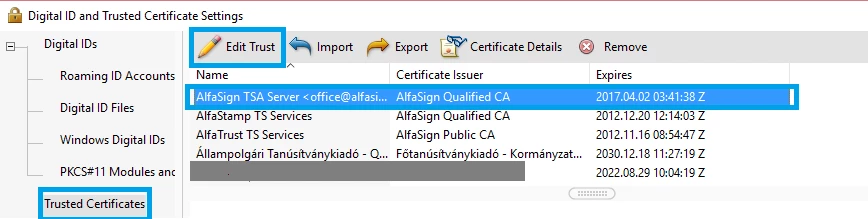
3- Select Trusted Certificates in the left hand pane, select the certificate for which you want to change settings>select Edit Trust
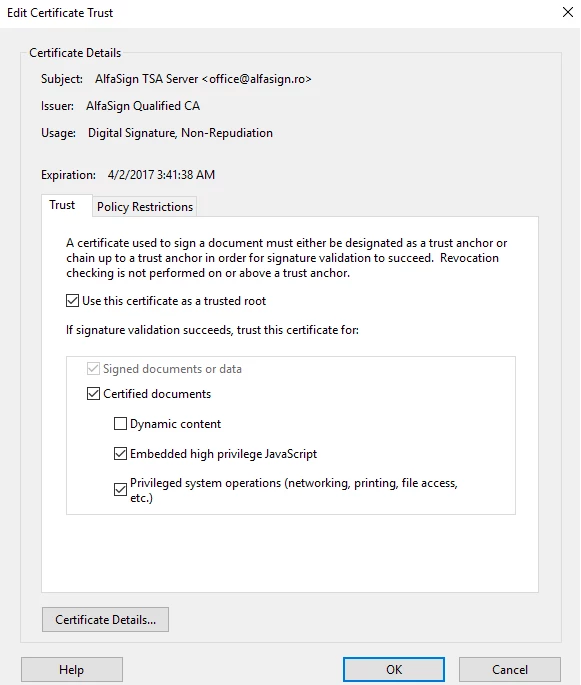
4- Select the following check boxes under Edit Certificate Trust and click OK.

     - Use this certificate as a trusted root

     (ii)- Signed documents or data (if its not already)

     (iii)- Certified documents

     (iv)- Embedded high privilege JavaScript

      (v)- Privileged system operations (networking, printing, file access, etc.)
Let me know if it worked.

Thank You,

Shivam

7 replies

Participant
July 14, 2022

Why signature field is not available? Trust is also grade out and am unable to verify the document

Participant
July 7, 2022

Dear I'm trying to apply to ur explain process but til not valid


Participant
April 6, 2025

https://www.youtube.com/watch?v=LR5dTuWwprM

I just followed the steps shown in the video. And it worked for me. 

Participant
April 30, 2022

Works perfectly. Thanks a lot


Participant
January 15, 2022

how to do


Participant
December 23, 2020

Thanks Heaps !! worked for me 🙂

Participant
August 14, 2020

This works like a charm. Thakyou

Adorobat
AdorobatCorrect answer
Participating Frequently
October 9, 2016

Hi sarahr9691477

You might try the following steps for Acrobat DC/XI:

1- Launch Acrobat>navigate to Edit menu> select Preferences

2- Under Preferences>select Signatures in the left hand pane.

3- Select Trusted Certificates in the left hand pane, select the certificate for which you want to change settings>select Edit Trust

4- Select the following check boxes under Edit Certificate Trust and click OK.

     - Use this certificate as a trusted root

     (ii)- Signed documents or data (if its not already)

     (iii)- Certified documents

     (iv)- Embedded high privilege JavaScript

      (v)- Privileged system operations (networking, printing, file access, etc.)

Let me know if it worked.

Thank You,

Shivam

Participant
July 30, 2025

Thanks a ton mate;) It worked for my e-PAN! Tried and tired of different methods for hours but, nothing worked for me except this solution. All we have to do is find the signers certificate details correctly and modify them in "Digital ID and Trusted Certificate Settings" Boom You've got a Green Sign(Tick) Mark for your digitally signed document, Cheers;)