
Participating Frequently
September 12, 2023
Answered

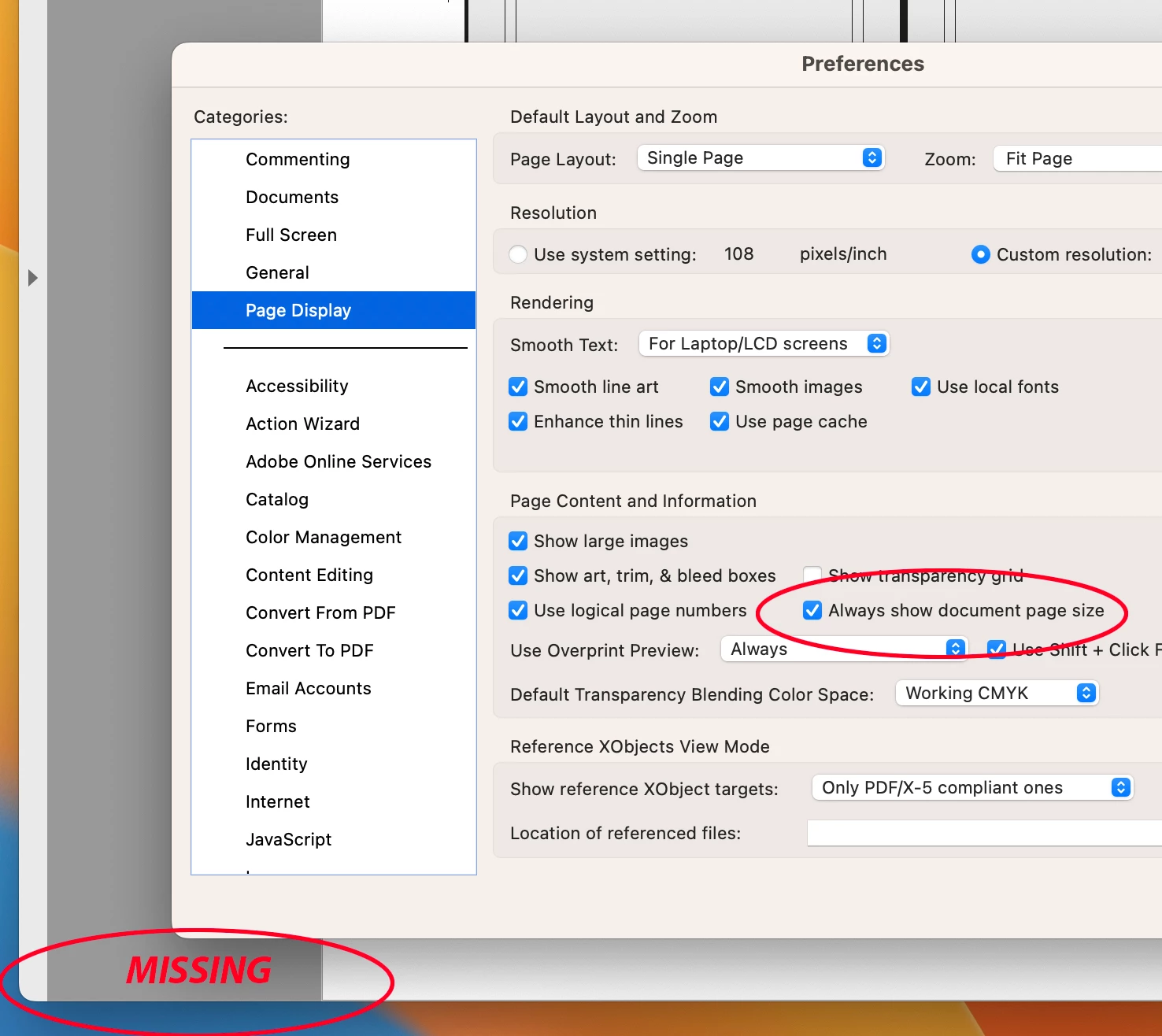
"Always Show Document Pages Size" in "Page Display" preference is suddenly not working !!!

  • September 12, 2023
  • 54 replies
  • 60715 views

I always rely on the Document Page size in the lower left frame bar of any and all PDF windows.  For some reason, today it is gone.  I have restarted Acrobat, rebooted my machine.  I have even deleted the Acrobat preferences and let it create a new preference file.  No matter what, this check box clicked or not clicked, does not yield me what I have relied on for many years.


Thoughts please.


Acrobat DC for Mav. v 2023.006.20320


Correct answer AJaycup

The solution is to go to the menu tab, down to view, then select "Disable New Acrobat". This reverts to Adobe UI before it was made to be garbage and will display the page size all the time. As far as I can tell, all the features are still there as well.

54 replies

AJaycupCorrect answer
Participant
October 14, 2025

The solution is to go to the menu tab, down to view, then select "Disable New Acrobat". This reverts to Adobe UI before it was made to be garbage and will display the page size all the time. As far as I can tell, all the features are still there as well.

Participant
October 15, 2025
Super, thank for help.
Amal.
Community Manager
Community Manager
February 28, 2024

Hi All


The issue has been addressed with the new version of Acrobat (23.08.20555) and now we have a preference to enable the scroll bar in Mac.
Please find details for the fix here:- https://helpx.adobe.com/acrobat/using/scroll-framework-upgrade-macos.html


~Amal

rickselfok
Participating Frequently
February 28, 2024

WAIT A MINUTE! You finally gave us back the page display and now in lieu of scroll bars, you put page display back to HOVR?  WTF! Are you guys even listening??? Can you only comprehend one thing at a time?

surf119
Participating Frequently
December 12, 2023

If the latest update didn't resolve this, I resolved it by reverting to the old version (view/disable new Acrobat) and then unchecking the Always show document page size option (counterintuitive, but it was the only way I could find to make it work). 

Participant
December 10, 2023

I understand the frustration with the 'Always Show Document Pages Size' issue. It's unusual that the usual troubleshooting steps haven't resolved it. Have you checked for any recent updates or changes in Acrobat? If the problem persists, passion fitness health you might want to reach out to Adobe Support for further assistance.

Participating Frequently
December 10, 2023

Thank you Amal for seeing thre the "Document SIze" debacle.  Adobe does listen which is great!  As the original poster on this issue, I still have to say the change that happened to the rulers cutting off the document is still a PITA.  One apparent place you notice it is if you do a "Find" (Command F).  When you want to close the FIND window, you have to turn OFF Rulers to be able to access the "x" out button. So parts of an Interface: gets in the way of other part of the Interface !  Not a well though out plan, and I know you have heard about this a thousand times since September.


Please address the scroll bar and ruler isssues.  The way it used to be was perfect.  Did anyone complain back then ?


Thank you,

Mike


Participating Frequently
December 11, 2023

To add on to that thought, I have problems with the tabs at the top not showing the full file name. That is yet another annoyance that was fine the way it was and now the "update" made it more difficult to do our work.

Participant
November 13, 2023

Thank you!

Participant
October 17, 2023

YEAH!! Its back and even more visible....THANK YOU ACROBAT for listening to the Printers and Prepress users.

kenup
Participating Frequently
October 17, 2023

Woohoo!

Amal.
Community Manager
Community Manager
October 17, 2023

Hello All,


The latest Adobe Acrobat version, numbered 23.06.20360, has been released to resolve this issue. To ensure you have the most up-to-date software, please follow these steps:


  1. Open Adobe Acrobat.
  2. Go to the "Help" menu.
  3. Select "Check for Updates."


After updating, be sure to reboot your computer to complete the installation. For more detailed information about this new release, you can visit the following link: Adobe Acrobat Release Notes.


If you have any questions or encounter any issues during the update process, feel free to ask for assistance.


~Amal

GG_Dynamix
Inspiring
October 17, 2023

The document size bug is fixed for me - many thanks.

Performance with larger hi-res documents is still the same - zooming and scrolling is unusable.

Amal.
Community Manager
Community Manager
October 18, 2023

Hi there


Thank you for bringing this issue to our attention. We appreciate your patience as we work to resolve the degradation in Zoom and Scroll Performance in High-Resolution Documents. Our engineering team is actively addressing this matter, and you can expect a fix to be included in an upcoming future update of our software.


Also, we would like to inform you that Pitstop has released a hotfix to address the immediate problem . For detailed instructions on how to install the hotfix, please refer to the following article: PitStop Pro Issues on macOS after Upgrading to Adobe Acrobat.


We apologize for any inconvenience this may have caused and appreciate your understanding as we work to provide a permanent solution.


~Amal

GG_Dynamix
Inspiring
October 17, 2023

Yes, same problem here - this update is a mess "Turn off the always show. . .to always show" - yep, makes lots of sense.

Performance when zooming and scrolling in large hi-res documents is super slow too - is it this "modern scroll framework" that absethi causing it - its ridiculously slow and needs fixing.

Participating Frequently
October 17, 2023

I second that! Not as easy to use for preflight/prepress AT ALL.

Participant
October 16, 2023

Switching off the <Always show document page size> shows the page size. NOT logical, nor userfriedly. Kind request to make the button work as it is stated 'Always'

Participating Frequently
December 12, 2023

Celebrating getting basic functions back as if it's a sign Adobe are listening or understands why their core user base is so angry.... While still swallowing the broken scroll bars and appalling kiddy new GUI. Some people have serious Stockholm Syndrome