
Participating Frequently
February 19, 2013
Answered

"An error exists on this page. Acrobat may not display the page correctly. Please contact the person

  • February 19, 2013
  • 1 reply
  • 102591 views

Hello, I'm using Adobe Acrobat X Version 10.1.4 and upon creating pdf documents of different sizes I get the error message: "An error exists on this page. Acrobat may not display the page correctly. Please contact the person hwo created the PDF document to correct the problem."

I am the person creating the pdf document but do not know what to do, I have tried saving with different options, but no use the error message keeps popping up even though the document displays correctly.

Thank you for your assistance.
This topic has been closed for replies.
Correct answer ApoorvM

The download link for the documents:

http://s3.toldacuccot.hu/letoltes?sid=13b72dcc60189a4ec3c6201992135a0d&file=recreatingeditingexportingpdfsreanerrorexi.zip

You can download by clicking the "Letöltés" link.


Thanks for sending the files. I have verified the issue and have logged internal bugs for the same .

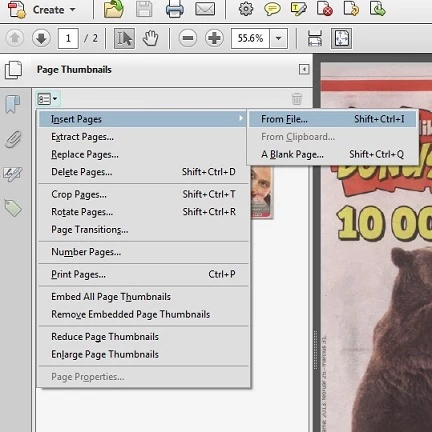
Meanwhile, I found a workaround for this issue . You can create a combined file as follows :

- Open one of the files .

- Open thumbnail pane of the file via Left hand tools pane .

- Go to options and Insert the second(or subsequent) files to the opened file using "Insert Pages" menu option.

- Save the file.

Also, refer the screenshot.

This file does not show the error on page.

1 reply

Inspiring
February 19, 2013

You might try running one of the PreFlight scripts to look for errors.

Participating Frequently
February 20, 2013

Thank you. How do I run PreFlight scripts? I use a Hungarian language version, logged out and logged back in with English but could not find PreFlight in the menus.

Participating Frequently
February 20, 2013

Perhaps I wasn't concise earlier. The problems comes up when I combine a pdf document containing A4 size pages with another pdf containing A0 or non standard size page.