
Participant
November 13, 2018
Answered

"At least one signature has a problems"

  • November 13, 2018
  • 7 replies
  • 140289 views

I Opened a document .pdf  already signed by a colleague of mines with Adobe

Showing the subjected warning about the signature present on it. The user certificate signature has been generated in our internal CA.
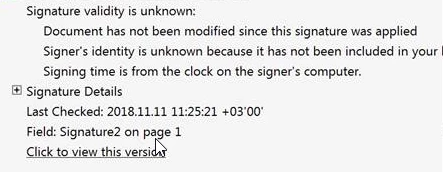
I have added the certificate that was used to apply the digital signature into Adobe’s list of Trusted Identities by following these steps:

  • Click on “Signature Panel” button on the left hand side of Adobe Reader / Acrobat
  • Right click on the listed signature
  • Click on “Show Signature Properties”
  • Click “Show Certificate button” (under the summary tab)
  • Click “Trust” tab
  • Click “Add to Trusted Identities”
  • Adobe Security window opens, click “OK”

  1. But i need to know why it is required.?
  2. Is there any other option available to trust the certificate Provide to the Trusted Identities inside adobe application.?
  3. How to resolve this on the enterprise wide to arrest this issue completely. ?
Correct answer Adorobat

Hi Janakaravi,

Sorry for the delay in response.  

As per the issue description mentioned above, you are facing issue when trying to sign a pdf using certificate signatures, is that correct?

Acrobat products do not ship with trusted identity data. Enterprise IT will typically want to install a pre-configured addressbook.acrodata file that captures Lightweight Directory Access Protocol (LDAP) information for contacts and certificates. The certificates can be delivered as already installed trusted identities with specific levels of trust set for any or all certificates used in digital signature and certificate security workflows.

You can do this by creating a custom installer using Acrobat's Customization wizard.

Please refer to the following links for more info:

Pre-deployment Configuration — Digital Signatures Guide for IT

Need to add a list of trusted certificates

Let us know if you have a further query.

Shivam

7 replies

Legend
July 23, 2019

I was using the list you posted, with your link.

Legend
July 23, 2019

You cannot "add your certificate to the AATL servers." Certificates are not added, authorities are. I see Thawte are not listed. Thawte (or their owner Symantec) would need to apply to Adobe, who would do due diligence and update the AATL list. No idea why this hasn't been done by them years ago. Maybe it was done, but Thawte were removed, as they were from FireFox, after the great Symantec certificate disaster. Read about it here: https://blog.mozilla.org/security/2018/03/12/distrust-symantec-tls-certificates/ "(FireFox) removal of trust for Symantec certificates issued prior to June 1st, 2016... affects all Symantec brands including GeoTrust, RapidSSL, Thawte, and VeriSign. " I have no inside knowledge, but one of my SSL certificates became untrusted as part of this disaster.

July 23, 2019

Thanks for the info! You are obviously correct about "Certificates are not added, authorities are", my bad.

"I see Thawte are not listed" - May I ask where can I see this list? I was unable to find it.

So basically if I understood correctly we (or our customers) should buy a certificate from one of the  AATL-enabled certificates listed here (such as DigiCert):

Adobe Approved Trust List Members, Acrobat

Is that correct?

(BTW, I did't understand yet if it must be a hardware based USB key)

Legend
July 23, 2019

Please post full details of the problem described, "at least one signarture has a problem" can cover many issues. See the original post for the details that the OP experienced: they listed three different issues.

July 23, 2019

I have the exact same issues posted by the OP.

Legend
July 23, 2019

By the way, zigzig70, please post full details of the mesages you get, it may be a different (but similar) problem.

Legend
July 23, 2019

What exact software and version do you use to sign with?

Do you get the message if you immediately reopen on the SAME computer having saved to LOCAL hard drive?

July 23, 2019

I use .NET C# iTextSharp to generate a new signed PDF.

https://stackoverflow.com/questions/57161825/at-least-one-signature-has-problems-message-when-signed-pdf-is-opened

Yes, I get the message on the local machine,

unless I manually add the certificate to the trusted list as described here:

How to resolve “At least one signature has problems.” error in Adobe Reader?

But that's not really a solution.

I get the same warning message in Reader as posted by the OP: "At least one signature has a problems".

It seems the Adobe has "Adobe Approved Trust List" (AATL) program:

Adobe Approved Trust List

So I'm currently trying to figure out how to add our certificate to  to the AATL servers.

marufalam
Participant
January 3, 2019

Hi Shivam,

Thanks for your info. We have the same problem. We are using Acrobat Pro XI to sign digitally for all our engineering report.

When we sign our report with a certificate from acrobat, It looks good. As soon as we send it to the client and they open it from the adobe reader it says "At least one signature has problems". However,  we found the solution from the following link but its quite annoying to ask every client to follow these instructions to validate our signature, it doesn't sound a professional request.

https://codesteps.com/2014/01/13/how-to-resolve-at-least-one-signature-has-problems-error-in-adobe-reader/

Please let us know if you have a solution so that clients don't have to see that message or need to validate signatures from their reader. We will appreciate your prompt response.

Thanks,

Maruf

Meenakshi Negi
Community Manager
Community Manager
January 4, 2019

Hi Maruf,

Would it be possible for you to share any sample document with us? We would like to replicate the issue on our end.

Also, please let us know the Adobe Acrobat Reader version they are using to open the document.

When you sign the document with a certificate, is it a self-created certificate in Acrobat?

We cannot assure you anything on this. However, we will check the issue on our end and will get back to you with information on this.

It would be helpful if you can share the sample file on which the issue occurs.

If you cannot share the file due to confidentiality, please create a two page PDF and add the signature in a similar manner.

You can share the file using the steps mentioned here How to share a file using Adobe Document Cloud

Let us know if you have any questions.

Regards,

Meenakshi

Participant
February 22, 2019

I am having this same problem.  I am a court reporter creating PDF digitally signed transcripts for my clients.  When I sign the transcript in Adobe Acrobat Reader DC Version 2019.010.20098.  When I digitally sign the transcript PDF it says the signature says "at least one signature has problems"  Then I click the validate all signatures, it does it's thing and then says all signatures are valid but when I tried to send it to myself to see what my client is seeing it says "at least one signature has problems".  Why does it say they are valid on my computer and then says something different on his.  Here is the link to my transcript:  Shared Files - Acrobat.com

tThank you for any help, Kristy

PS I noticed someone mentioned I would have to get a commercial account...

Adorobat
Community Manager
AdorobatCommunity ManagerCorrect answer
Community Manager
November 22, 2018

Hi Janakaravi,

Sorry for the delay in response.  

As per the issue description mentioned above, you are facing issue when trying to sign a pdf using certificate signatures, is that correct?

Acrobat products do not ship with trusted identity data. Enterprise IT will typically want to install a pre-configured addressbook.acrodata file that captures Lightweight Directory Access Protocol (LDAP) information for contacts and certificates. The certificates can be delivered as already installed trusted identities with specific levels of trust set for any or all certificates used in digital signature and certificate security workflows.

You can do this by creating a custom installer using Acrobat's Customization wizard.

Please refer to the following links for more info:

Pre-deployment Configuration — Digital Signatures Guide for IT

Need to add a list of trusted certificates

Let us know if you have a further query.

Shivam

Inspiring
September 27, 2019
This is exactly what I need to do, but the links don't work for me when I click on them. Could you provide them for me please?