
Participant
January 15, 2021
Answered

"Export all Images" not exporting small images

  • January 15, 2021
  • 2 replies
  • 990 views

I have a large catalog I am extracting images from and most items have both a main and smaller detail image. All the larger image sizes export fine, but non of the smaller images are exporting. They are .png images. Any idea if there is a setting somewhere to adjust minimun image export size, or any other tricks for this? I am trying really hard to keep from having to manually extract hundreds of these. Any help appreciated.

Thank you.
This topic has been closed for replies.
Correct answer JR Boulay

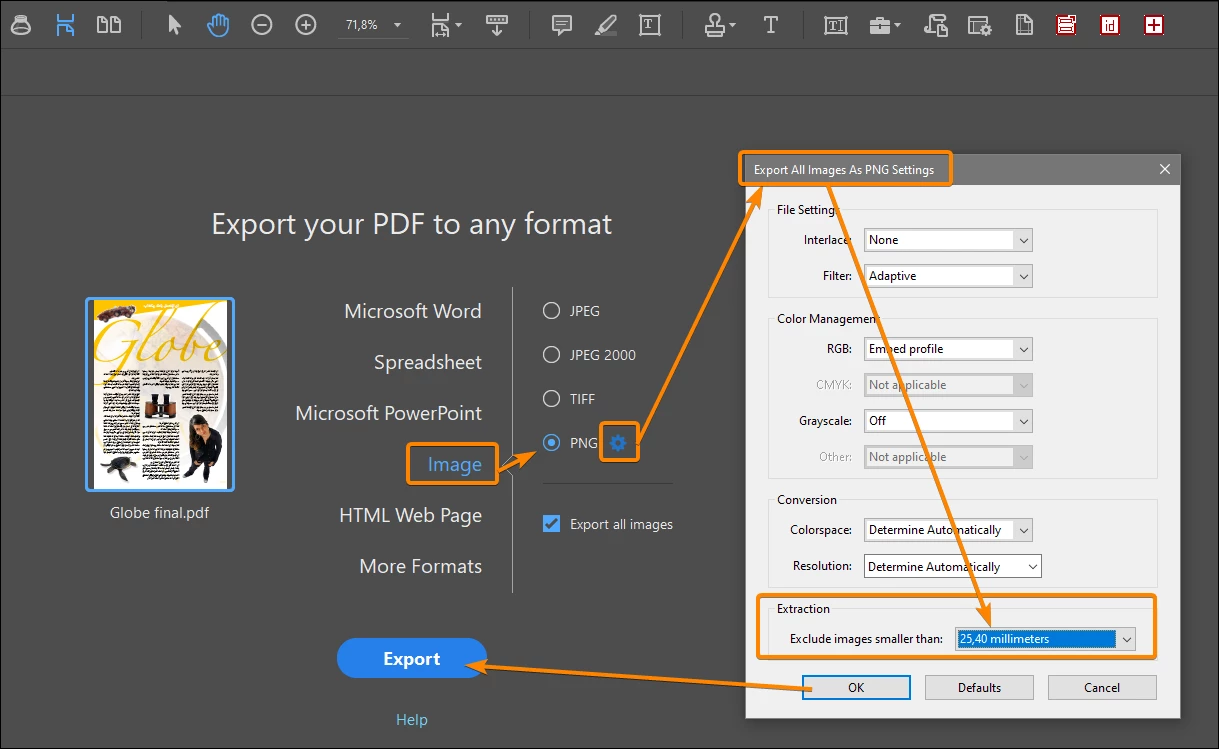
This setting is hidden behind the blue gear that appears next to the selected image format. You should set it to "No limit".

A picture is better than a long speech:


2 replies

JR Boulay
Community Expert
JR BoulayCommunity ExpertCorrect answer
Community Expert
January 16, 2021

This setting is hidden behind the blue gear that appears next to the selected image format. You should set it to "No limit".

A picture is better than a long speech:


Acrobate du PDF, InDesigner et Photoshopographe
try67
Community Expert
Community Expert
January 16, 2021

No, I don't believe there is such a setting. Could you share a sample file with us?

Also, what version of Acrobat are you using, exactly?