
Participating Frequently
December 4, 2021
Answered

"Request Signatures" locks up on "Uploading to Adobe Sign" screen. This has been a problem for weeks

  • December 4, 2021
  • 13 replies
  • 32522 views

I click "Request Signatures" and input recipient's email address. The screen locks up on "Uploading to Adobe Sign". This has been a problem for weeks. I have tried every solution on these forums. It's clear a lot of people are having this same problem and nothing fixes it. Come on, Adobe. You are charging for this product, yet this is a very basic and important function that doesn't work. I know you will probably come back with the same scripted response telling me to do the same things I have already done, so please skip that. What I want to know is this: if there is really no solution available because this is a bug that Adobe refuses to fix, can someone please recommend another product I can use to send a document for signature? Thank you very much!
Correct answer LCAadmin

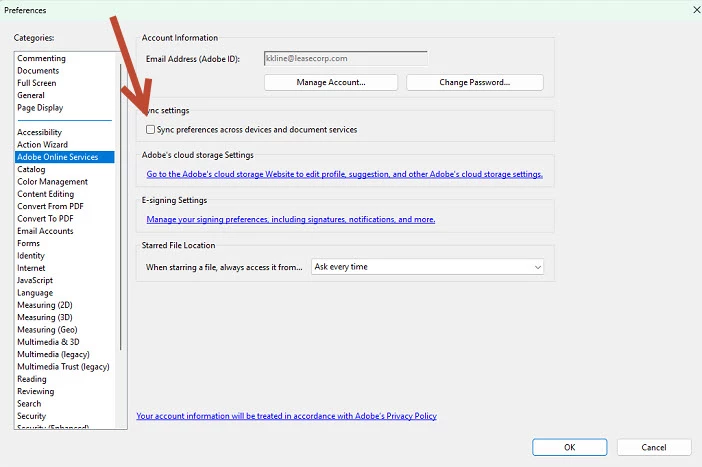
We figured out that if you go into preferences and turn off the Sync preferences across devices document services in the preferences, Adobe Online Services. Give it a try....it worked for us. Boom, turned it off, tried to send, and it went through. Good luck folks!


13 replies

Participating Frequently
December 6, 2021

Hi James,


The core problem is the AcroCEF.exe process. Several of Acrobat’s program functions (Save As, Send-to-Mail, Redactions, Requesting E-Signatures, etc.) seem to rely on this component, and when it hangs, the function’s window will only display a white box.


The problem started with Adobe’s September (21.007.20091) Acrobat update, and my users have also been running into this issue since then. We’ve tried all of Adobe’s suggested “fixes” on similar threads across this discussion board, but they’re only temporary. The best workaround we’ve found so far is to open the Windows Task Manager when the problem is happening, and force close all instances of the AcroCEF.exe process (there are usually several stacked together). Sometimes it works while Acrobat is still open and the blank box loads the proper contents immediately afterward, sometimes all Acrobat windows need to be closed first, any remaining hung AcroCEFs can then be ended, and then the document can be re-opened.

This usually restores functionality, but it’s only temporary until the problem happens again.

Participant
January 25, 2022

Hi

I am having the same problem. Tried uninstalling, reinstalling. Force closing the AcroCEF.exe process doesnt work either

The version of Adobe is the latest. Have Adobe indentified a fix for this yet? 

Participating Frequently
September 26, 2022

Hi James,


Sorry about the delay in response.

Would you mind sharing the screenshot of the options you get for E-Sign on the Acrobat Online account?

Please also share the email address in a private message that you use to sign in. You may initiate a private message using the envelope icon at the top right of the community page.


Thanks,

Meenakshi


Hello Meenakshi, are you there? I provided What you requested above. Thanks.

Inspiring
December 6, 2021

You do understand that the upload needs internet connectivity, and a Firewall that does not block the upload request.

Participating Frequently
December 6, 2021

Serious question: how stupid do you think the people using this forum are? Yes, Maargueritek, I am aware the upload needs internet connectivitya and it is not blocked by a firewall. Unreal.

Participant
September 15, 2023

Lmao preach.

Amal.
Community Manager
Community Manager
December 6, 2021

Hi James


Hope you are doing well and sorry to hear that. As described, Request Signatures" locks up on "Uploading to Adobe Sign" screen


Would you mind sharing the version of the Adobe Acrobat DC you are using? TO check the version go to Help > About Acrobat and make sure you have the recent version 21.07.20099 installed. Go to Help > Check for updates and reboot the computer once.


Also try to repair the installation form the help menu (Win Only) and see if that helps.


You may also try to create a new test user profile with full admin rights in Windows  or enable the root account in MAC and try using the application there and check.


Also try to send the documents for signature via Document Cloud https://acrobat.adobe.com/link/home/


Regards

Amal