
Participant
August 25, 2022
Frage

"Updating Tags" causes word to crash

  • August 25, 2022
  • 1 Antwort
  • 3945 Ansichten

When I ask to create a PDF in Word,  it quite often makes Word crash.    

It appears to stall on an Adobe 'pop up window'  ... where there is a progress bar and its says 'updating tags'

When I get back into Word, I get the following message. 
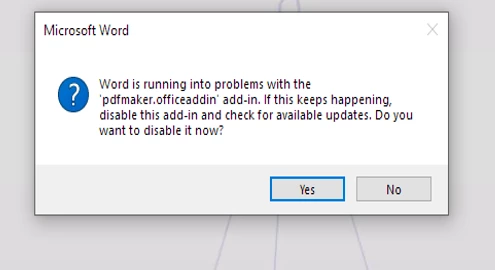
I looked at the discussions and tried to install a patch, but it did not work.  Can someone suggest a fix to this issue with details regarding how to accomplish the fix?  Thank you! 


Dieses Thema wurde für Antworten geschlossen.

1 Antwort

Bevi Chagnon - PubCom.com
Legend
August 25, 2022

Most likely the version of PDF Maker you have is out of date with your version of MS Word.

PDF Maker is a plug-in made by Adobe that is automatically installed into Word when you install Adobe Acrobat itself.


  1. Make sure your version of MS Word is up to date. Go to: / File Account / Office Updates.
  2. Make sure your version of Acrobat is up to date. Go to Help / Check for Updates.
  3. Restart your computer and try making the PDF again.


In some situations, users must uninstall Acrobat, then update Word, and then reinstall Acrobat.


|    Bevi Chagnon   |  Designer, Trainer, & Technologist for Accessible Documents ||    PubCom |    Classes & Books for Accessible InDesign, PDFs & MS Office |