
Participating Frequently
September 19, 2024
Question

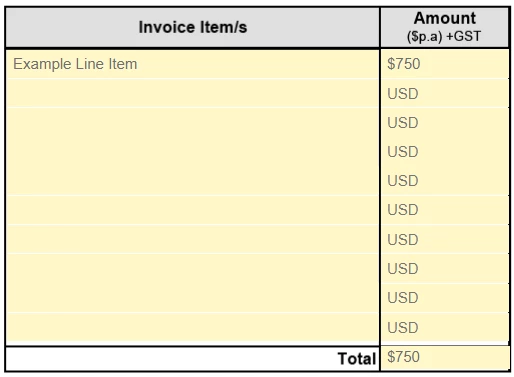
"USD" Watermark Appearing in Unfilled Currency Fields

  • September 19, 2024
  • 6 replies
  • 1599 views

Hi there,


We use an internal form in our Company that has a group of fields that are formatted as currency. The sum of these fields is totalled at the bottom.

Not all of the fields in this group are needed on every form but we've found that if the currency field is left empty, the letters "USD" are automatically inserted as shown below in the attached example.


How do I stop this behaviour? The USD is not visible until the form is in front of a recipient for signing so it's not obvious to the form preparer.


Any assistance with this would be appreciated.

Brendon
 

This topic has been closed for replies.

6 replies

Bernd Alheit
Community Expert
Community Expert
September 20, 2024

> The USD is not visible until the form is in front of a recipient for signing so it's not obvious to the form preparer.


Adobe Sign adds this in the web viewer.

Participating Frequently
September 19, 2024

As requested, here is a copy of the form if it helps.

PDF Automation Station
Community Expert
Community Expert
September 19, 2024

It looks good to me.  What program was it open with when you took the initial screenshot?


Participating Frequently
September 19, 2024

Acrobat Pro again. I had myself as the initial signer. Subsequent signers also see the USD watermarks.

PDF Automation Station
Community Expert
Community Expert
September 19, 2024

Try setting the format properties in one of the fields from Number to None, closing the properites, reopening the properties, and resetting the format as you have shown.  Did you copy and paste the fields from somewhere else?  It is possible to have a custom format script that you can't see in the properties because a combination number format and number keystroke will display the UI for number format in this tab.  If you select "Browse internal PDF structure" in the Options dropdown of the Preflight window and drill down to the field you will be able to see the scripts.  Otherwise, try what I said in my first sentence.


Participating Frequently
September 19, 2024

Hi, I've tried this, the behaviour reoccurs even after completely deleting the field and setting it back up.

There are no custom scripts embedded anywhere in this form as I don't have the skillset for it.


The calculation is done in the Current Total field as shown:


try67
Community Expert
Community Expert
September 19, 2024

I'm not seeing it anywhere. In what viewer was the first screenshot taken?

Participating Frequently
September 19, 2024

Thanks for your responses, I am the creator of the form and I can say with 100% certainty that there is no scripting on the form. It uses the default Acrobat field settings under the format tab.

try67
Community Expert
Community Expert
September 19, 2024

What about a calculation script?

Also, can the "USD" text appear under the field, as static text?

Again, without seeing the actual file it's very difficult to help you with this issue.

try67
Community Expert
Community Expert
September 19, 2024

As mentioned, this is probably done using a script, but you'll need to share the file in question with us for a definite answer.


Thom Parker
Community Expert
Community Expert
September 19, 2024

This doesn't have anything to do with Acrobat. Whoever created the form put in a script (probably a custom format script) to show this text.  Talk to them. 


Thom Parker - Software Developer at PDFScriptingUse the Acrobat JavaScript Reference early and often