
Participant
September 7, 2023
Answered

Reader Blocked by Adobe Ad

  • September 7, 2023
  • 1 reply
  • 1032 views

Hi, For the last few days when I've tried to use Adobe Reader but an Adobe ad keeps appearing in the top left of the screen which prevents the Reader from functioning, see image. The only way out of Reader is to force quit (Apple OS). I've tried reloading Reader but the problem persists.

Any help would be appreciated.
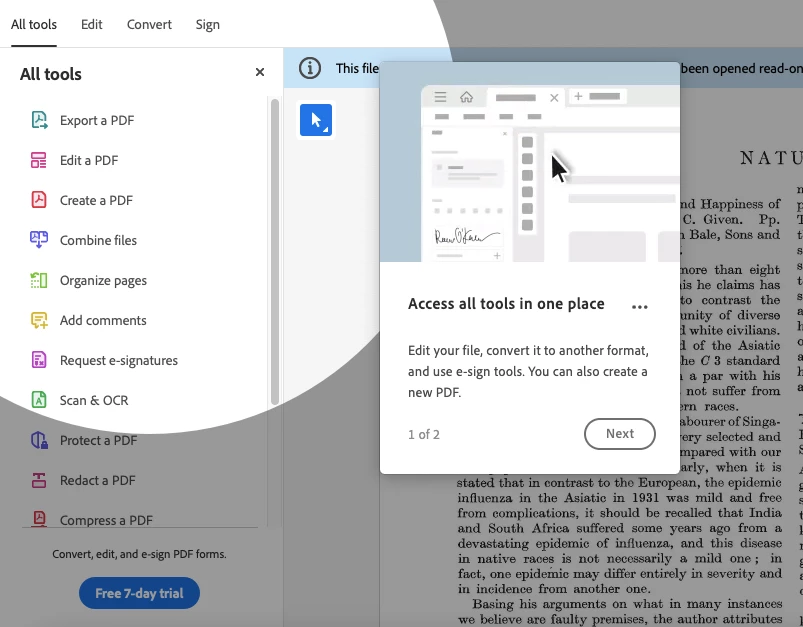
 

This topic has been closed for replies.
Correct answer Amal.

Hi @Stewart32137771xlwq 


Hope you are doing well and thanks for reaching out.


As described

quote

Hi, For the last few days when I've tried to use Adobe Reader but an Adobe ad keeps appearing in the top left of the screen which prevents the Reader from functioning.


Please go to Edit (Win), Adobe Acrobat (Mac) > Preferences > General > Under Messages from Adobe, Uncheck 'Show me messages when I launch Acrobat' > Click OK and reboot the application and see if that works.


Let us know how it goes.


~Amal

1 reply

Amal.
Community Manager
Amal.Community ManagerCorrect answer
Community Manager
September 8, 2023

Hi @Stewart32137771xlwq 


Hope you are doing well and thanks for reaching out.


As described

quote

Hi, For the last few days when I've tried to use Adobe Reader but an Adobe ad keeps appearing in the top left of the screen which prevents the Reader from functioning.


Please go to Edit (Win), Adobe Acrobat (Mac) > Preferences > General > Under Messages from Adobe, Uncheck 'Show me messages when I launch Acrobat' > Click OK and reboot the application and see if that works.


Let us know how it goes.


~Amal

Participant
September 8, 2023
Amal,

Thank you for your reply. Please excuse my lack of knowledge but I’m not sure where to find Edit (Win) that you mention as the start point. Please advise where I may find the start point for (hopefully) solving the problem.

Kind Regards,

Stewart C
Amal.
Community Manager
Community Manager
September 15, 2023

Hi @Stewart32137771xlwq 


Please follow the steps as below:

  1. Open the Adobe Acrobat application.
  2. Click on the hamburger menu on the top left corner
  3. Go to Preferences > Preferences > General > Under Messages from Adobe, Uncheck 'Show me messages when I launch Acrobat' > Click OK and reboot the application as shown in the screenshot below:


Let us know if you experience any trouble and need more help.


~Amal