Participant
July 30, 2025
Question

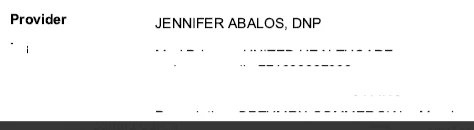
Redaction Leaving partial text visible
  • July 30, 2025
  • 4 replies
  • 507 views

As you can see, the black lines are after redacting and accepting changes.  We tried doing it again on the original file, but we encounter the same issue.

    4 replies

    Community Manager
    July 31, 2025

    Hi @vanessa_5036,


    Thanks for sharing the screenshot and the additional details.


    From what it looks like, the original document may be a scanned image-based PDF. In such files, redaction tools often place a black overlay on top of the image rather than fully removing the visible content underneath — which is why you’re still seeing the black lines even after applying and accepting redactions.


    If that’s the case, reapplying redactions won’t have any effect unless the content is first made text-searchable. To fully redact a scanned document, we recommend running OCR (Optical Character Recognition) first using the “Scan & OCR” tool in Acrobat, which will convert the image into editable text. Once that’s done, redactions can be properly applied and permanently removed.


    Let us know how it works.


    Best regards,
    Tariq | Adobe Community Team

    Participant
    July 31, 2025

    Thank you, yes, that seems to be the issue with some of the PDF files.  We will try making them OCR and then redacting. 

    Pariah Burke
    Community Expert
    Community Expert
    July 30, 2025

    Hi, Vanessa.

    1. What version of Acrobat? https://helpx.adobe.com/acrobat/kb/identify-product-version.html
    2. What operating system and version?
    3. Does this happen with other PDFs you’ve tried redacting?
    4. Where did this PDF come from? If you press CTRL+D/CMD+D and look at the bottom of the Description tab, what is listed as the Application, PDF Producer, and PDF Version?
    5. If you create a brand new PDF from a Word document using these instructions https://helpx.adobe.com/search.html?q=word%2520to%2520pdf&context=https%253A%252F%252Fhelpx.adobe.com%252Facrobat%252Fkb%252Fidentify-product-version.html&filters={"products"%3A["Adobe+Acrobat"]} and then try redacting that, does the same thing happen?


    Participant
    July 31, 2025

    Users have either Windows 10 Pro or 11 Pro.
    The PDFs come from various sources - we don't control how they are made, some might be scanned while others are (converted) into PDF from the original.   It happens with some PDFs, so I belive the issue is with scanned documents vs documents that are created in software and then converted.   Thank you - your questions did help us understand the differences with the items we receive.


    kglad
    Community Expert
    Community Expert
    July 30, 2025

    in the future, to find the best place to post your message, use the list here, https://community.adobe.com/

    p.s. i don't think the adobe website, and forums in particular, are easy to navigate, so don't spend a lot of time searching that forum list. do your best and we'll move the post (like this one has already been moved) if it helps you get responses.


    <"moved from cc services">
    John T Smith
    Community Expert
    Community Expert
    July 30, 2025

    When you post a question you always need to tell the Adobe program you are using
    There are MANY programs in a full subscription, plus other non-subscription programs
    Please post the exact name of the Adobe program you use so a Moderator may move this message to that forum

    Participant
    July 30, 2025

    Hello - Thank you for that.  This is for Adobe Pro, full service subscription. 


    kglad
    Community Expert
    Community Expert
    July 30, 2025

    ... assuming a acrobat